HappyHorse 2
  • Create
  • AI Image
    • Open Image WorkspaceCreate or edit images with all supported models
    • GPT Image 2NewOpenAI image generation and reference-guided editing
    • Nano Banana 2NewFast Google image generation with multi-reference editing
    • Nano Banana ProHigh-fidelity Google image generation and editing
    • Nano Banana FlashFast, efficient image generation and editing
    • Seedream 5.0NewHigh-detail creative image generation
    • Flux 2Flexible generation and reference-based editing
    • Qwen Image 2Versatile image generation with strong text rendering
    • Z-ImageFast open-weight image generation
    • Qwen Image 3NewStructured prompts, multilingual text, and rich visual detail
  • AI Video
    • Open Video WorkspaceCreate videos with all currently connected models
    • MiniMax H3NewExplore MiniMax H3 workflows, prompts, and video creation techniques
  • Tools
  • Pricing
English
  • English
  • 中文
  • 日本語
  • 한국어
  • Español
  • العربية
  • 繁體中文
HappyHorse 2

Flux 2 Pro Image Generator

Perfect for visual-driven creative projects that demand pre-export polish and precise reference alignment, Flux 2 Pro is the refined, elevated update of FLUX 2 available on this platform. It shines when you need outputs ready for early stakeholder feedback, and want to lock in consistent color palettes, material specifics, or composition across a single request using multiple reference images.

Describe the image you want to generate

Generate 1 images · 10 credits total

Getting Started with Flux 2 Pro

Unlock the full potential of Flux 2 Pro on this platform for polished image generation and precise reference-guided edits

Begin with a detailed visual brief, upload reference images to lock in your target color palette or core product identity, then adjust framing until your output feels presentation-ready before exporting.

01

Structure your request as a creative direction brief

Outline your core subject, materials, lighting, camera lens type, and the exact presentation tone you want the model to generate.

02

Leverage reference images to preserve product, palette, or styling consistency

Upload up to eight reference images whenever you need distinct visuals to establish consistent color palettes, materials, silhouettes, or styling for your finished output.

03

Tweak for a refined finish before final export

First tweak prompt tied to composition and material quality, then upgrade to a higher-resolution pass once your framing and core creative vision are locked in.

Key Advantages of Flux 2 Pro

Core Advantages of Flux 2 Pro When a Polished Finish Is Your Primary Goal

Flux 2 Pro is the high-fidelity FLUX variant available on this platform. It stands out when your final image needs to feel closer to a polished, finalized creative direction, rather than a rough, flexible middle-ground draft.

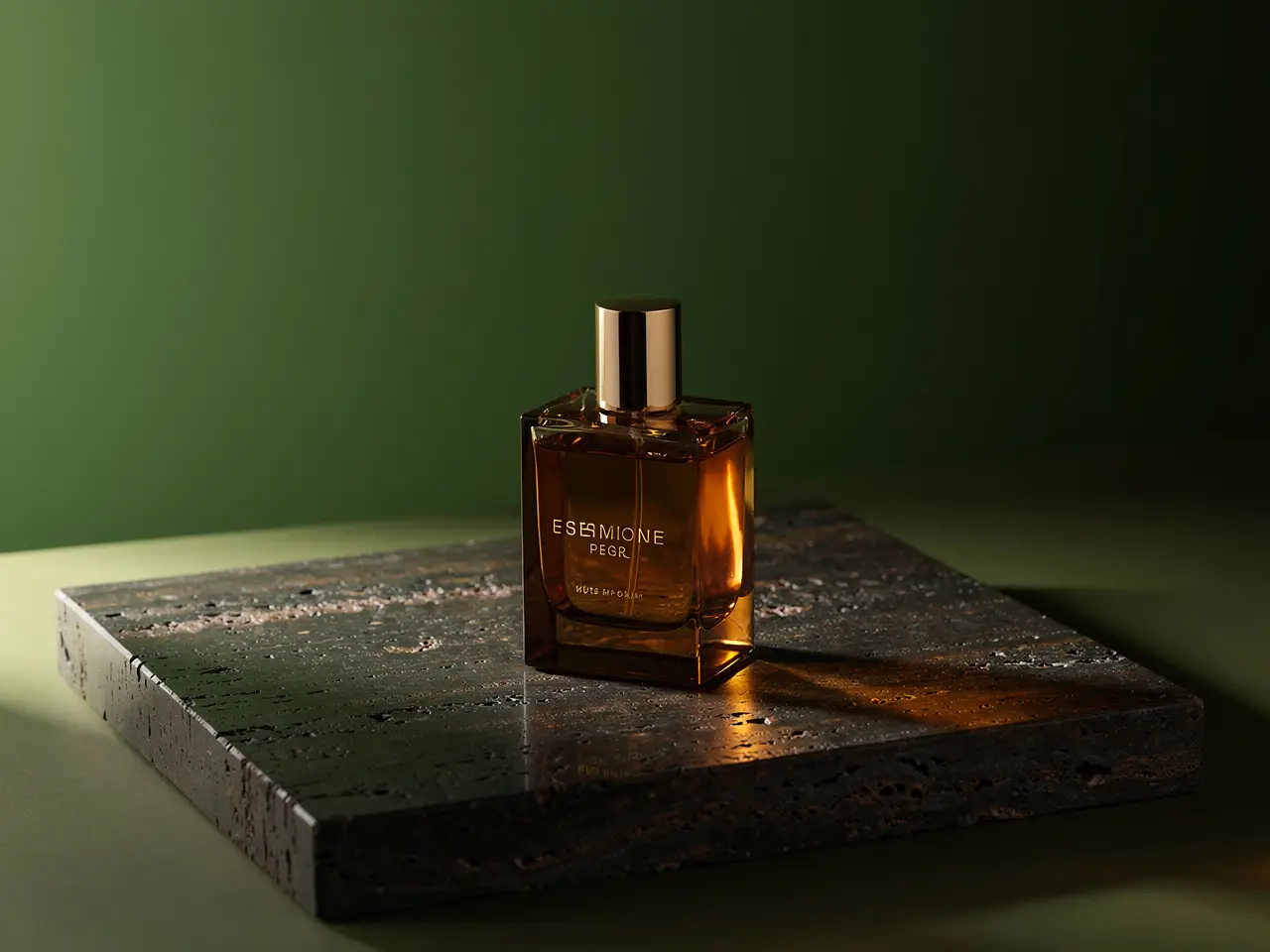
Polished Finish for Luxury Product & Still-Life Work

Flux 2 Pro is a perfect pick when your final frame needs to feel clean, high-end, and nearly presentation-ready as a product visual.

It delivers standout results for fragrance, high-end packaging, and luxury tabletop setups.
Its output thrives when surface quality and refined finish take priority over fast generation speeds.
Choose this variant when your image needs to feel close to a finalized, review-ready creative direction.
Begin Creating with Flux 2 Pro
Model reference image

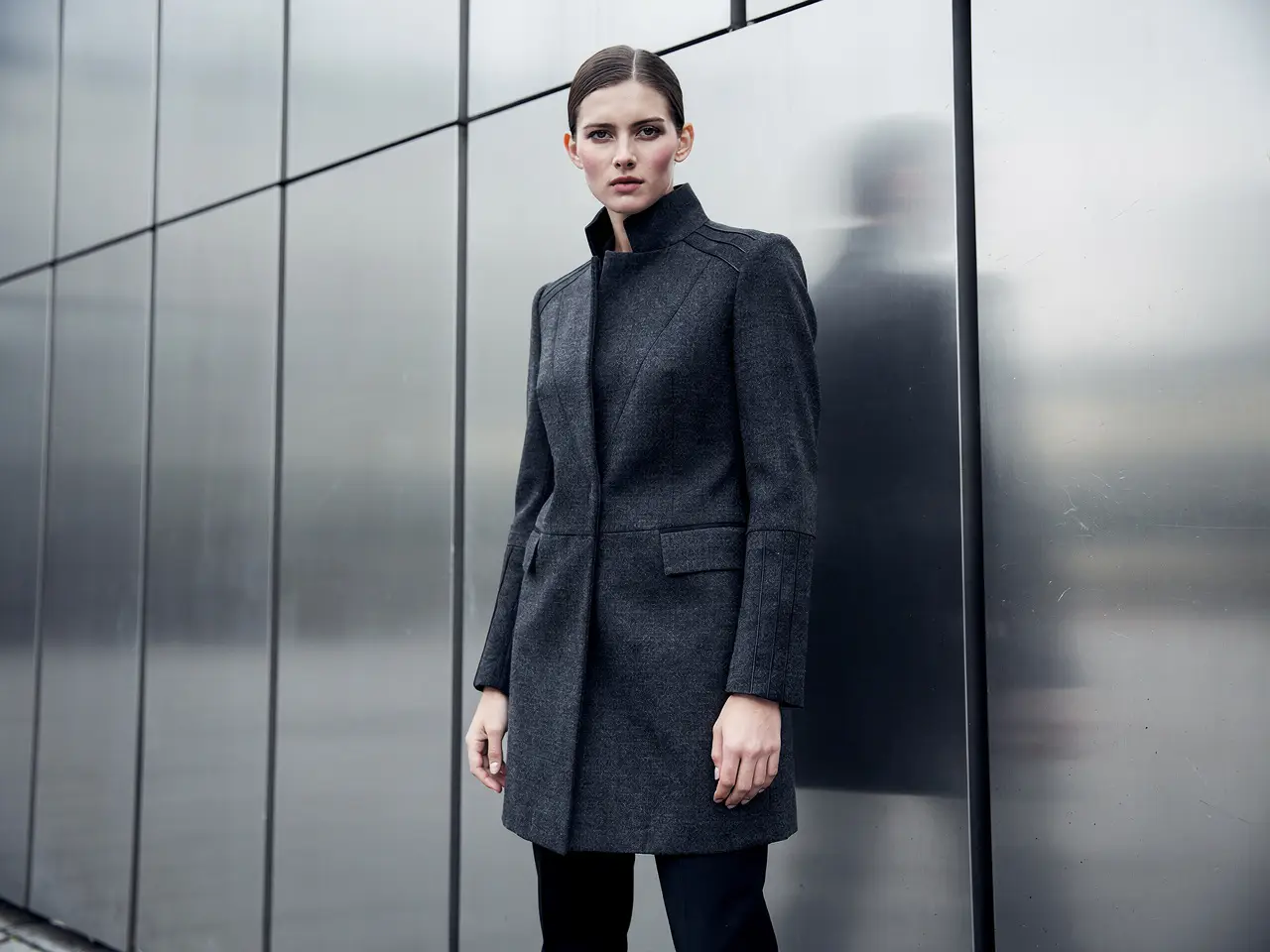
Polished Finish for Editorial & Campaign Fashion

Flux 2 Pro delivers strong results when wardrobe, location, and commercial tone need to feel more polished than a balanced, middle-ground model option.

This makes it perfect for fashion campaigns and tight, polished editorial concepts.
It maintains a higher finish quality across the same hosted generation workflow.
Choose this variant when intentional polish takes precedence over fast iteration output.
Begin Creating with Flux 2 Pro

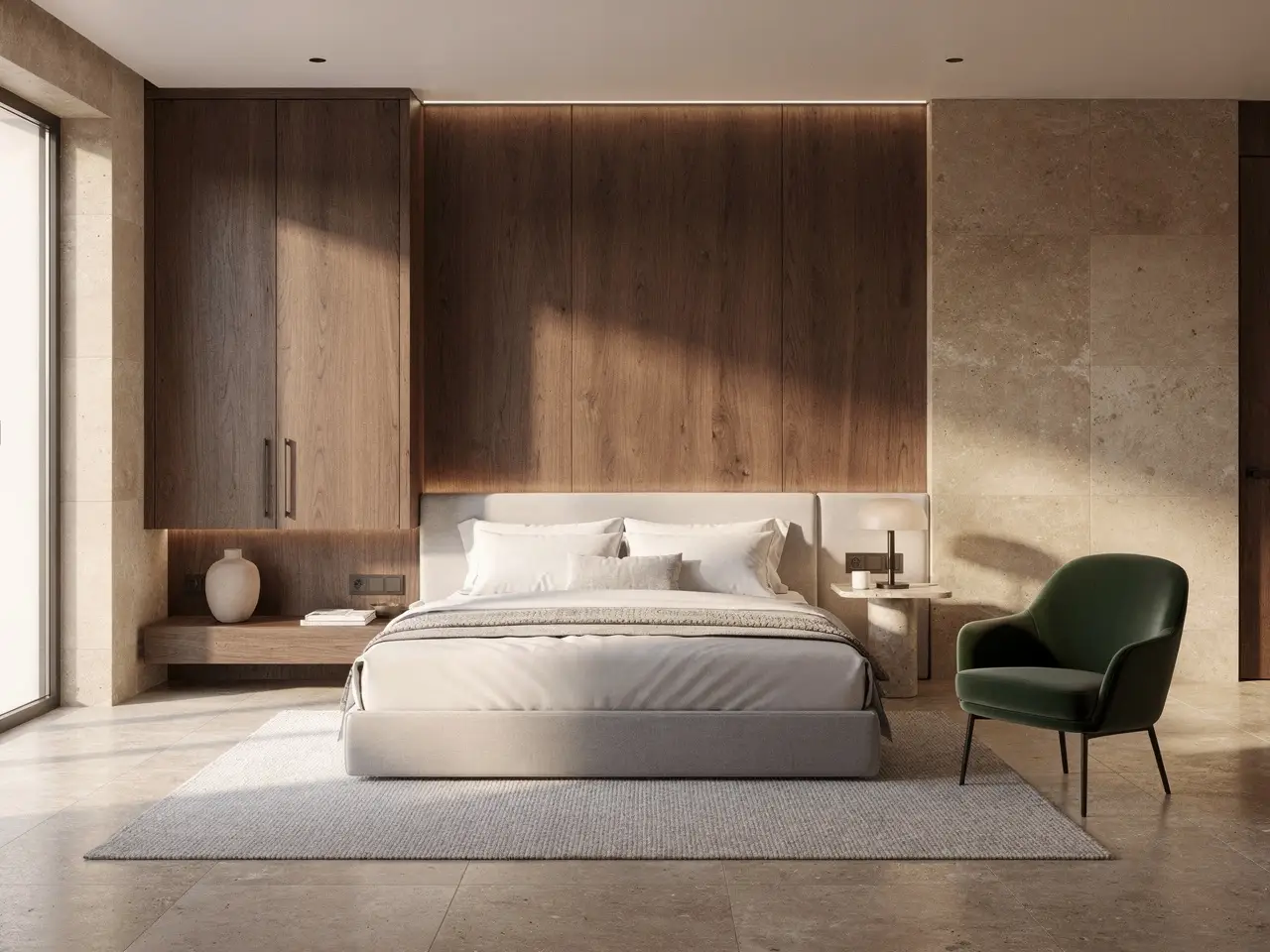
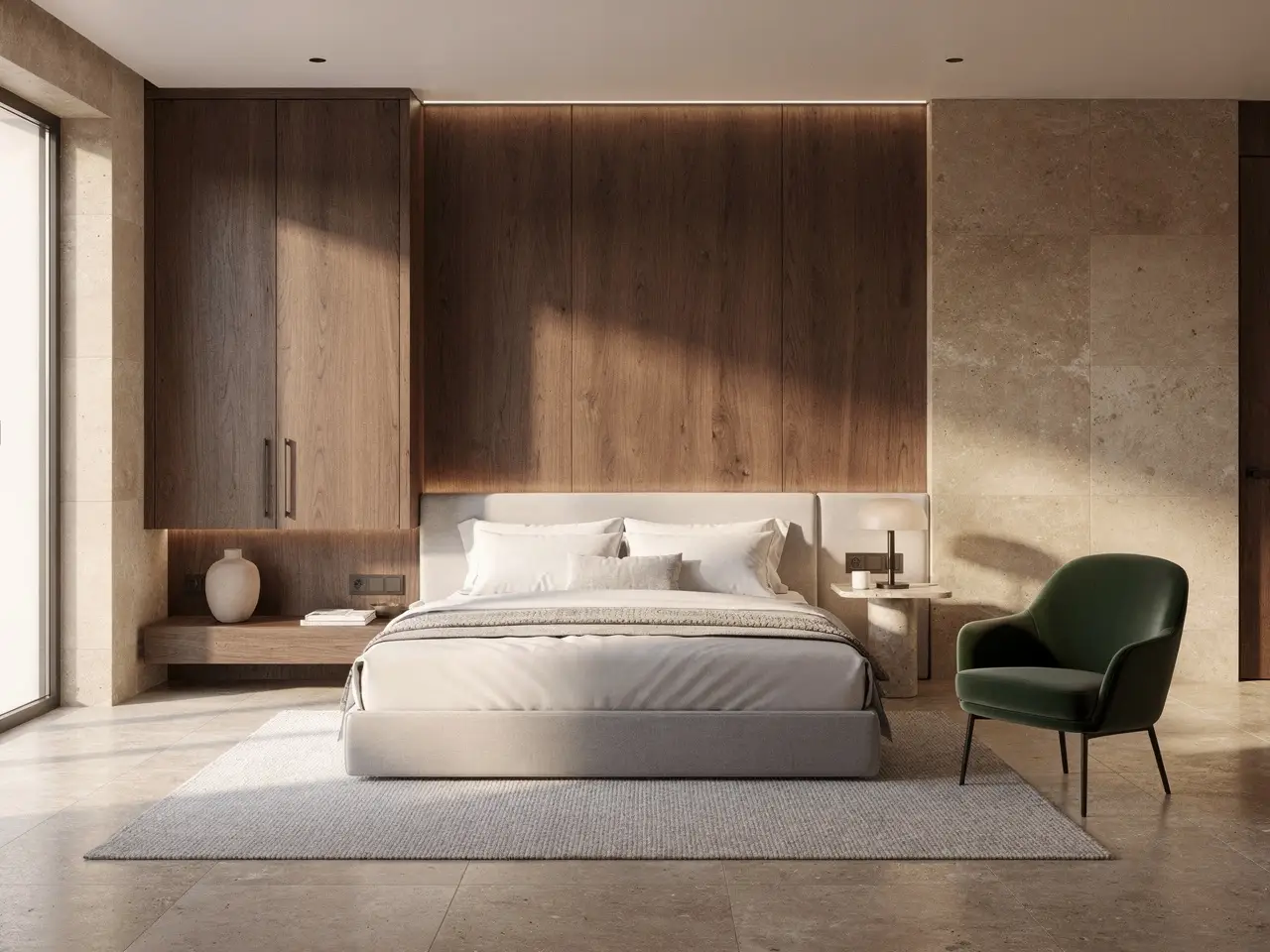
Premium Finish for Interiors & Hospitality

It also thrives for boutique interiors, hotel guest rooms, and design-focused spaces that need to read as polished premium presentation assets.

It’s ideal for hospitality concepts and high-finish environmental design direction.
Focusing on material storytelling and polished lighting are top reasons to pick the Pro variant.
This makes it the perfect choice when the space itself is a core part of your premium brand pitch.
Begin Creating with Flux 2 Pro
Model reference image

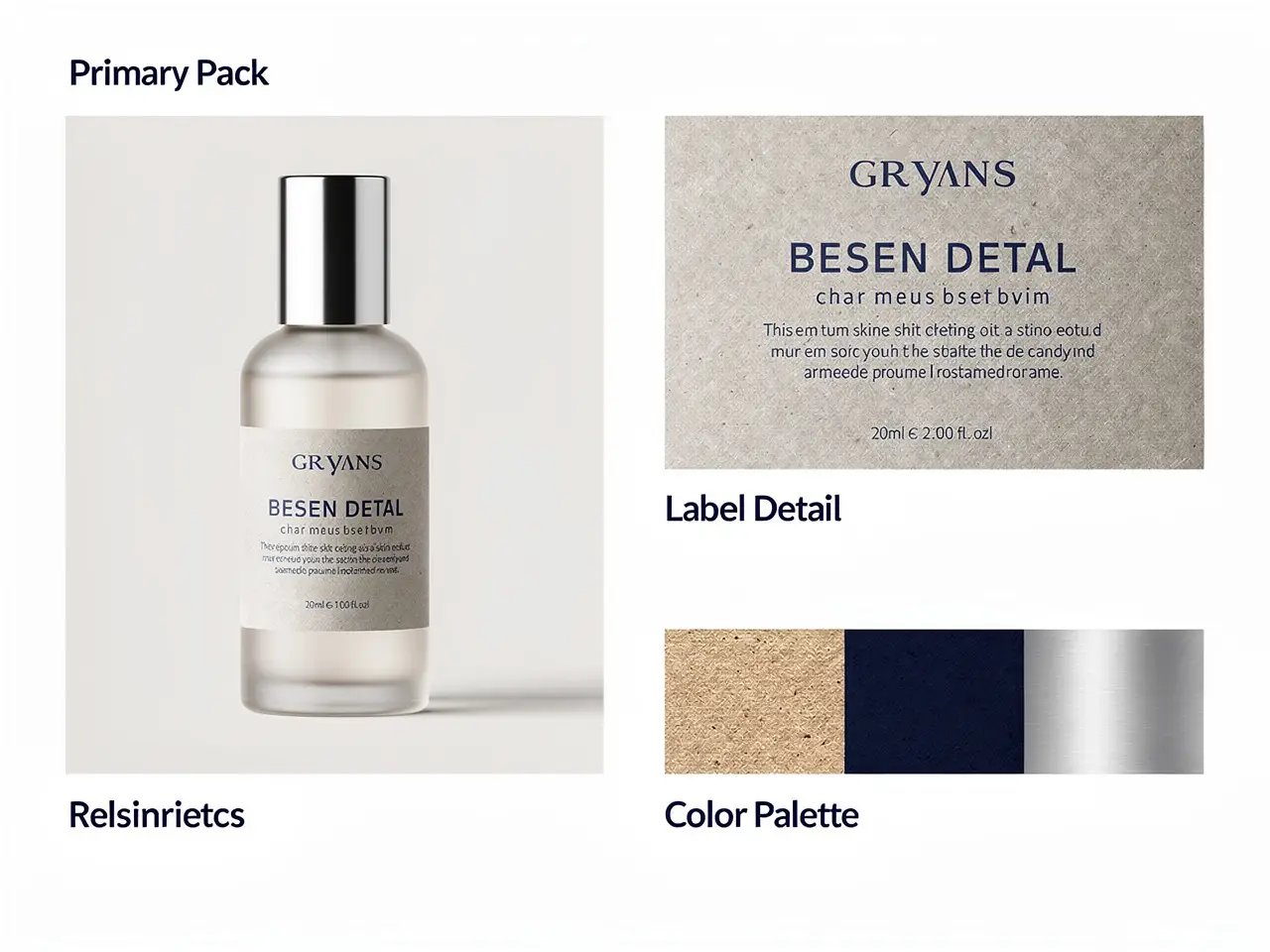
Perfect for Polished Direction Boards & Packaging Reviews

Flux 2 Pro is a great pick for packaging and creative direction boards when your final image needs to feel cleaner than a rough exploratory concept sheet.

This supports premium packaging, product launch boards, and polished brand stakeholder reviews.
Your final image will stay polished while remaining editable across prompt iterative updates.
Choose this variant when your creative board needs to feel instantly presentation-ready.
Begin Creating with Flux 2 Pro
Ideal Use Cases

Key Uses for Flux 2 Pro

Flux 2 Pro thrives when your finished output needs to feel polished, thoughtfully curated, and campaign-ready before leaving the platform.

High-End Product Still Lifes

Ideal for luxury fragrance, skincare, packaging, and tabletop visuals where surface finish, precise palette control, and intentional composition are non-negotiable.

Fashion & Campaign Key Art

Great for editorial-style campaign shots, mood board style iteration assets, and concept art that demands a refined, polished finish.

Reference-Driven Brand Visuals

Upload multiple reference images whenever you need core product identity, material direction, or brand-aligned palettes to stay consistent during generation or editing.

High-Resolution Creative Review Assets

Choose Flux 2 Pro when your core creative concept is locked in, and you want a straightforward path to high-resolution review images or campaign draft assets.

Proven Prompt Formulas & Examples

Write More Effective Flux 2 Pro prompts: Tested Formulas & Real-World Examples

These examples showcase the polished visual work Flux 2 Pro thrives at: high-end product still lifes, editorial fashion shots, luxury interiors, and reference-guided packaging direction.

High-End Product Visual

Meets or exceeds leading prompt Alignment Benchmark Standards

Perfect for polished still lifes where materials, reflections, and palette control all need to convey luxury.
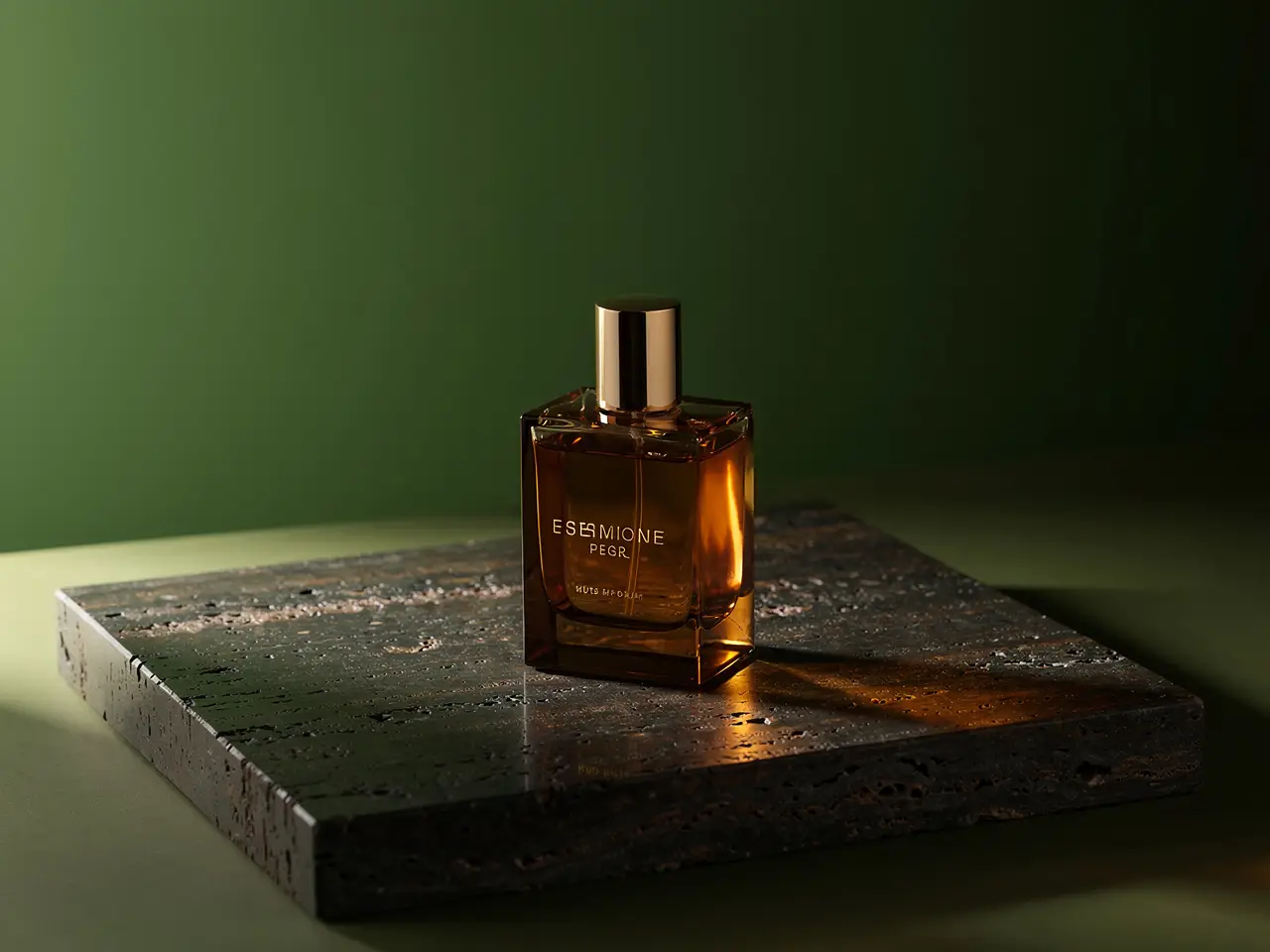
A luxury fragrance still life with precise reflections, premium materials, and a calm editorial palette.

Luxury Fragrance Still Life

Proven industry-standard Prompt best-practice workflow for optimized generation

[product] + [surface and materials] + [light direction] + [color palette] + [campaign mood]

Explore Full prompt Documentation and Official Technical SpecificationsShow Full Comprehensive Breakdown

In-depth prompt Breakdown and Complete Overview

Create a luxury fragrance campaign still life. Place a single amber glass bottle atop dark travertine, with soft side lighting, controlled reflections, deep moss and bronze accent tones, and a restrained editorial luxury vibe. Ensure the final image feels ready for a beauty campaign mood board, with clean negative space and no extra props beyond subtle warm reflective highlights.

Core Functional Elements That Allow This Prompt To Produce Standout, High-quality Final Outputs

Flux 2 Pro delivers better results when your prompt clearly outlines surfaces, light direction, and palette, rather than leaning on vague, generic luxury buzzwords.

Targeted Final Generated Project Outcome

A polished product still life for campaign concepting, launch decks, or brand direction.

Curated Pro Tips for Creative Industry Professionals

  • Lead with surfaces and lighting details before adding atmospheric tone notes.
  • Keep your prop list brief when your core product needs to stay the focal point.
Fashion Concept

Meets or exceeds leading prompt Alignment Benchmark Standards

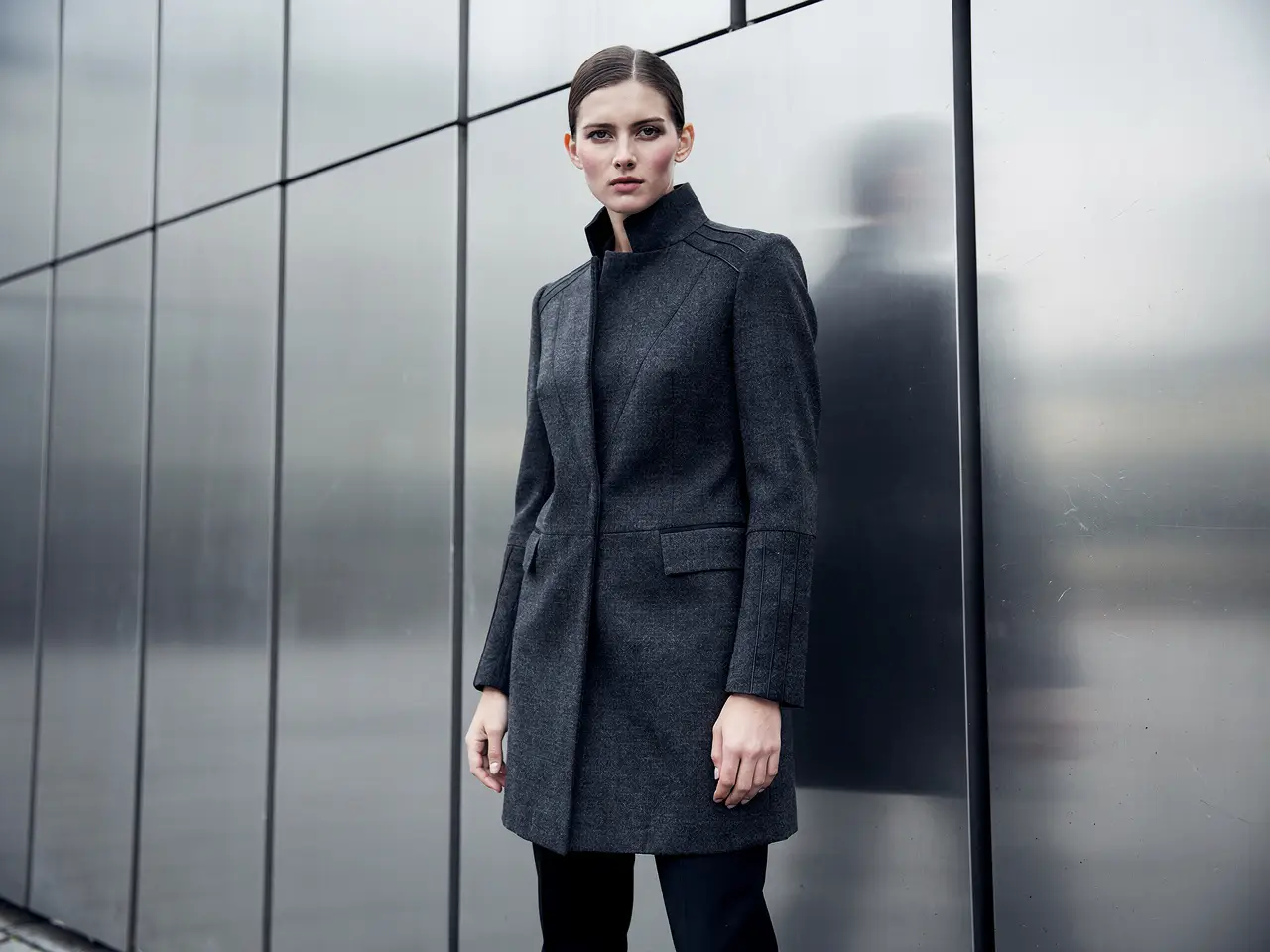
Perfect for fashion shots that need precise styling control, fixed camera distance, and a polished campaign-ready tone.

An editorial fashion campaign frame with controlled styling, refined color, and premium lighting.

Editorial Fashion Campaign Frame

Proven industry-standard Prompt best-practice workflow for optimized generation

[subject] + [wardrobe] + [camera framing] + [location] + [editorial mood]

Explore Full prompt Documentation and Official Technical SpecificationsShow Full Comprehensive Breakdown

In-depth prompt Breakdown and Complete Overview

Create an editorial fashion campaign frame with a model in structured charcoal outerwear standing beside brushed metal architecture. Use a medium-full camera distance, overcast daylight, soft shadow transitions, and a premium magazine-style tone. Keep styling understated, posture calm, and the image polished enough to read as a brand campaign direction rather than a casual street photo.

Core Functional Elements That Allow This Prompt To Produce Standout, High-quality Final Outputs

This detailed prompt balances core subject, wardrobe, camera framing, and environment, which helps Flux 2 Pro maintain consistent composition while delivering a polished final output.

Targeted Final Generated Project Outcome

A finished-looking fashion concept image for campaign development or look direction.

Curated Pro Tips for Creative Industry Professionals

  • Specify framing directly instead of assuming the camera crop will align as planned.
  • Stick to one clear tone reference, rather than mixing multiple conflicting fashion genres.
Interior Concept

Meets or exceeds leading prompt Alignment Benchmark Standards

Ideal for polished interior frames where materials, palette, and overall atmosphere should read clearly and on purpose.

A boutique hotel room concept with warm materials, measured lighting, and a polished hospitality mood.

Boutique Hotel Room Concept

Proven industry-standard Prompt best-practice workflow for optimized generation

[room type] + [material palette] + [lighting] + [camera angle] + [hospitality style]

Explore Full prompt Documentation and Official Technical SpecificationsShow Full Comprehensive Breakdown

In-depth prompt Breakdown and Complete Overview

Create a boutique hotel room concept with walnut millwork, warm limestone surfaces, off-white bedding, and a deep olive accent chair. Use a wide but controlled camera angle from the foot of the bed, soft late-afternoon lighting, and a calm, premium hospitality tone. The room should feel polished and realistic, like an interior concept crafted for a design presentation.

Core Functional Elements That Allow This Prompt To Produce Standout, High-quality Final Outputs

Flux 2 Pro delivers better results when your prompt clearly outlines materials, palette, and camera angle in a calm, precise prompt.

Targeted Final Generated Project Outcome

A polished interior concept for hospitality reviews, brand decks, or architectural mood boards.

Curated Pro Tips for Creative Industry Professionals

  • Highlight key hero materials to prevent your space from feeling like a generic luxury interior.
  • Keep your camera angle notes clear and explicitly precise.
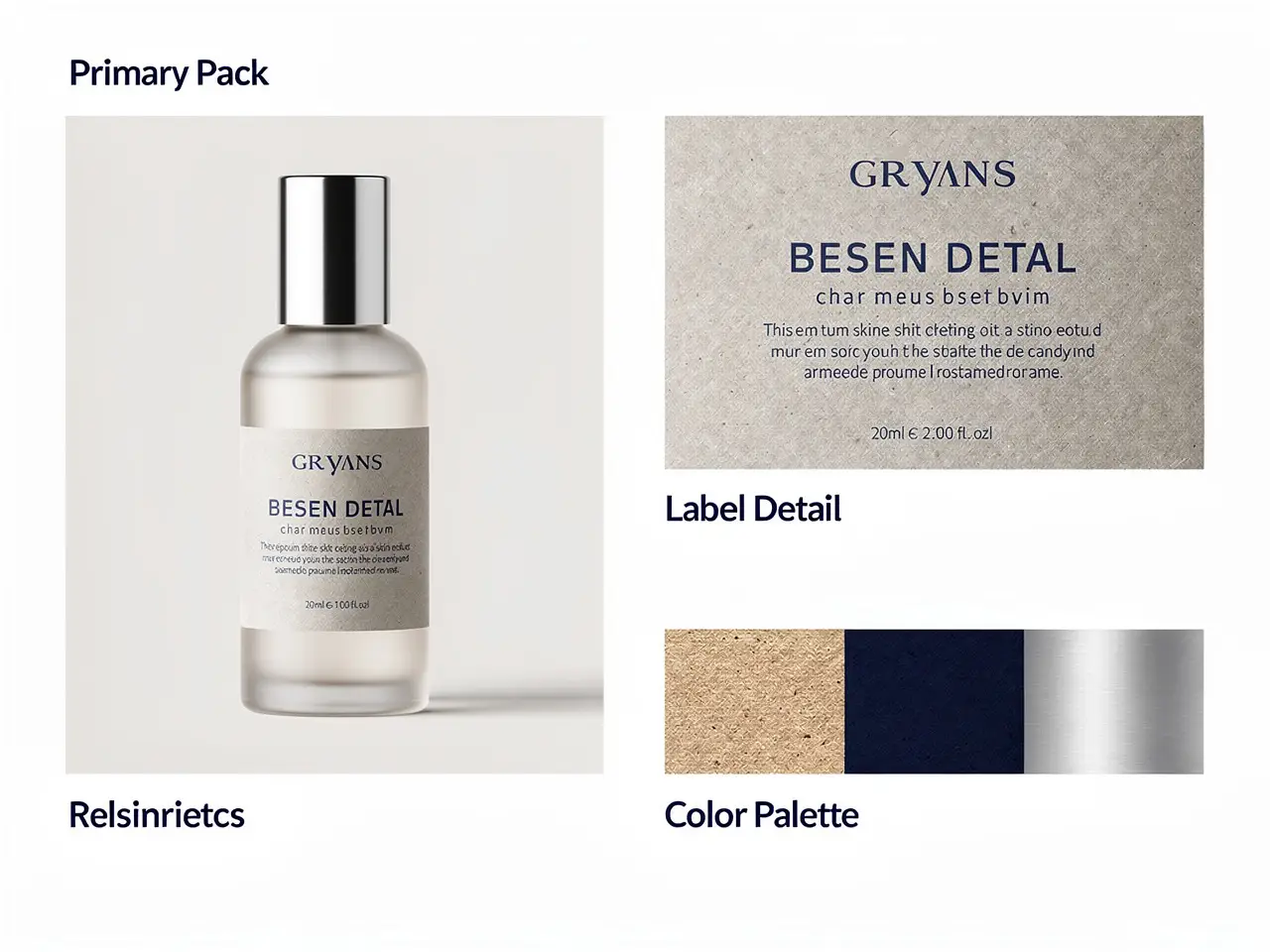
Reference-Based Edit

Meets or exceeds leading prompt Alignment Benchmark Standards

Perfect for packaging refreshes where core product identity stays consistent while you revise the label system.

A packaging update board showing a stable product silhouette with a cleaner label direction and controlled palette.

Reference-Driven Packaging Update

Proven industry-standard Prompt best-practice workflow for optimized generation

[what stays] + [what changes] + [label direction] + [palette] + [presentation board]

Explore Full prompt Documentation and Official Technical SpecificationsShow Full Comprehensive Breakdown

In-depth prompt Breakdown and Complete Overview

Retain the bottle silhouette and cap proportions from your uploaded reference image. Update the label system to use matte stone finishes, deep navy typography, and a cleaner, centered visual hierarchy. Present the final result as a premium packaging review board with one hero bottle, one close-up label detail, and a small palette strip highlighting stone, navy, and brushed silver. The image should read as an internal brand review asset.

Core Functional Elements That Allow This Prompt To Produce Standout, High-quality Final Outputs

This detailed prompt clearly conveys to Flux 2 Pro exactly which elements should stay fixed and which need to be adjusted, which helps the final edit stay fully brand-aligned.

Targeted Final Generated Project Outcome

A cleaner packaging direction board for design review and launch planning.

Curated Pro Tips for Creative Industry Professionals

  • Explicitly specify which elements must stay fixed before laying out your new design direction.
  • Give each reference image a clear purpose, rather than uploading them without defined roles.
When to Choose Flux 2 Pro

Choose Flux 2 Pro When a Polished Finish Takes Priority Over Fast Generation Speed

Flux 2 Pro is the leading choice when your final image needs to feel polished before export, especially for product, fashion, and brand visuals where intentional composition and material quality are top priorities.

Choose Flux 2 Pro When Your Final Image Needs to Feel Presentation-Ready

Pick this variant when your creative brief is visual-first, and your output needs better polish, sharper material rendering, and more confidence in the overall frame before exporting from the generator.

Test Alternative Models for Different Tradeoffs

Experiment with alternative models for different tradeoffs: Try Flux 2 for a balanced family variant, Flux 2 Klein for fast iteration, Seedream 4.5 for an alternative high-resolution visual bias, and Z-Image when open-source deployment is your top priority.

Creator Community Perspectives

Creator Walkthroughs & Unbiased Independent Reviews of Flux 2 Pro

These videos share independent creator insights on Flux 2 Pro, including how users compare it to other high-fidelity image generation models. They provide useful supporting context once you’ve reviewed the examples above.

Curated Gallery of AI Video Generation Showcase Pieces

Open-Source Ecosystem

Related Open-Source Tools & Projects Compatible with Flux 2 Pro

Flux 2 Pro is part of the wider public FLUX.2 family ecosystem, so the most trusted open-source reference is the family-level repository and official release materials, rather than a dedicated Pro-exclusive ecosystem page.

GitHub Publicly Hosted Source Code Repository for the Official Open-Source Project 01

black-forest-labs / flux2

Official family repository

The official FLUX.2 repository from Black Forest Labs. This is the top family-level reference for understanding how Flux 2 Pro integrates into the wider FLUX.2 release and tooling ecosystem.

1,105 Total count of GitHub stars accumulated across the official project repository
Apache-2.0
Explore the Official Hub for This Open-Source Project
FAQs

FAQ

Helpful information about HappyHorse 2

What is Flux 2 Pro?

Flux 2 Pro is the premium, refined evolution of FLUX 2 available on this platform. Tailored specifically for text-to-image and reference-guided edits, it stands out when your final output needs to feel fully polished before exiting the generation tool.

What is Flux 2 Pro best for?

Flux 2 Pro thrives for high-end product photography, campaign key art, editorial fashion layouts, still-life concepts, and any visual project where a polished finish and intentional composition take priority over fast generation speeds.

Does Flux 2 Pro support image input here?

Without a doubt. On this platform, Flux 2 Pro lets you upload up to eight reference images per single request. This makes it perfect for product line refreshes, mood board style iterations, and edits where your final output needs to align tightly with a pre-set color palette, materials, or styling direction.

Which resolutions and aspect ratios does Flux 2 Pro support here?

Flux 2 Pro supports 1K and 2K on this platform. Compatible aspect ratios span 1:1, 4:3, 3:4, 16:9, 9:16, 3:2, 2:3, alongside an automatic detection toggle to simplify setup.

How do I write better Flux 2 Pro prompts?

For stronger, more effective prompt prompts for Flux 2 Pro, frame your request as a detailed visual brief. Begin by outlining your core subject, materials, camera distance, and color palette, then explicitly define how each reference image should shape the final output. Flux 2 Pro delivers top-tier results when your prompt is precise and concrete, rather than cluttered with vague, overused style buzzwords.

When should I use Flux 2 Pro instead of Flux 2 or Flux 2 Klein?

Choose Flux 2 Pro when your final image needs to feel polished and ready for stakeholder review before exporting. Pick Flux 2 for a balanced, middle-ground option within the same model family, and use Flux 2 Klein when fast, lightweight iteration takes precedence over ideal final finish quality.

Is Flux 2 Pro good for premium product and fashion visuals?

Without a doubt. Flux 2 Pro is an exceptional pick for high-end product and fashion visuals, especially when you need sharper material rendering, more intentional composition, and a polished, campaign-ready tone for your product or fashion work.

Can I use Flux 2 Pro images commercially?

For commercial production projects, assess Flux 2 Pro-generated output using the same standards you’d apply to results from any other hosted AI model. Commercial usability hinges on your unique use case, internal brand review workflows, and the platform’s applicable terms of service.

Still have questions? Our support team is ready to help.

Related Models

Compare Flux 2 Pro to Other Image Models Offered on This Platform

If Flux 2 Pro isn’t the right match for your project, compare it to these related pages to find options for fast iteration, a lighter family variant, an alternative visual bias, or open deployment tradeoffs.

Flux 2 Core Image Generator

Give Flux 2 a shot for a more balanced option of the same model family, rather than prioritizing final polish.

Discover Our Curated Collection of Associated AI Models

Flux 2 Klein Core Image Generator

Compare Flux 2 Klein with Flux 2 Pro when speed and lightweight iteration take precedence over final polish.

Discover Our Curated Collection of Associated AI Models

Seedream 4.5 Premium Image Generator

Give Seedream 4.5 a shot for an alternative high-resolution visual workflow built for polished campaign and poster projects.

Discover Our Curated Collection of Associated AI Models

Seedance Pro Image Generator

Compare Seedance Pro with Flux 2 Pro when you want an additional high-fidelity hosted workflow with improved text-aware structure.

Discover Our Curated Collection of Associated AI Models

Start Creating with Flux 2 Pro on This Platform

Open the generator, start with a detailed visual brief, and use reference images when your output needs to align tightly with a pre-set product, palette, or styling direction.

Launch Flux 2 Pro Generator
Resources
  • Create
  • Pricing
  • Image to Prompt
  • Batch Image to Prompt
Company & Legal
  • About
  • Contact
  • Privacy Policy
  • Terms of Service
  • Refund Policy
AI Image
  • Nano Banana Pro
  • Nano Banana 2
  • GPT-4o
  • Seedream 4.5
  • Seedream 4.0
  • Flux 2 Pro
  • Flux 2
  • Qwen Image 2
  • Z-Image
  • NanoBanana Flash
  • Qwen Image 3
HappyHorse 2

HappyHorse 2 – AI Video Generator Free with New User Credits

[email protected]

This website is an independent third-party service built around HappyHorse 2 workflows. We are not the official website for HappyHorse 2, and all product names, model names, and trademarks belong to their respective owners.

© 2026 HappyHorse 2. All rights reserved.

Privacy Policy