HappyHorse 2
  • Create
  • AI Image
    • Open Image WorkspaceCreate or edit images with all supported models
    • GPT Image 2NewOpenAI image generation and reference-guided editing
    • Nano Banana 2NewFast Google image generation with multi-reference editing
    • Nano Banana ProHigh-fidelity Google image generation and editing
    • Nano Banana FlashFast, efficient image generation and editing
    • Seedream 5.0NewHigh-detail creative image generation
    • Flux 2Flexible generation and reference-based editing
    • Qwen Image 2Versatile image generation with strong text rendering
    • Z-ImageFast open-weight image generation
    • Qwen Image 3NewStructured prompts, multilingual text, and rich visual detail
  • AI Video
    • Open Video WorkspaceCreate videos with all currently connected models
    • MiniMax H3NewExplore MiniMax H3 workflows, prompts, and video creation techniques
  • Tools
  • Pricing
English
  • English
  • 中文
  • 日本語
  • 한국어
  • Español
  • العربية
  • 繁體中文
HappyHorse 2

Seedream 4.5 Image Generator

This top-tier high-resolution Seedream variant, Seedream 4.5, delivers professional-grade image creation and reference-guided editing. It shines for projects that demand sharper micro-details, tighter poster-focused compositions, or additional space for 2K and 4K review assets, all wrapped into one unified, efficient workflow.

Describe the image you want to generate

Generate 1 images · 8 credits total

Getting Started with Seedream 4.5

Elevate Your Creative Workflows with Seedream 4.5 for Sharper, Higher-Fidelity, High-Resolution Final Deliverables

Start with a clearly defined prompt, use reference images any time product or design identity needs to remain consistent, and only run the higher-resolution pass once your core composition is locked in.

01

Map Out Your prompt with Structure and Target Finish Quality as Your Core Planning Priority

Map out your subject, target composition, materials, and which elements need sharp detail to establish a clear high-resolution goal from your very first prompt.

02

Use Reference Images to Maintain Product or Design Identity

Upload up to fourteen reference images any time product details, color palette, or design direction needs to align exactly with a real-world creative brief.

03

Wait to Run the Higher-Resolution Pass Until Your Base Composition Is Locked In

Lock in your core composition first, then use the higher-resolution workflow to create sharper review assets and presentation-ready final deliverables.

Core Strengths of Seedream 4.5

What Sets Seedream 4.5 Apart for Polished, High-Resolution Creative Work

Seedream 4.5 is the perfect pick when high-resolution polish is your top priority when choosing this model, with outputs that prioritize refined, presentation-ready final assets.

Polished Finishes for Posters & Launch Campaign Imagery

Seedream 4.5 shines for launch posters or core campaign imagery that should feel clean, sharp, and fully resolved from the get-go.

This makes it ideal for launch posters, campaign reference boards, and polished branded creative assets.
It’s the wiser choice when finish quality matters more than ultra-fast, streamlined production pipelines.
Choose this model when high-resolution polish is your primary deciding factor.
Open the Seedream 4.5 Generator
Model reference image

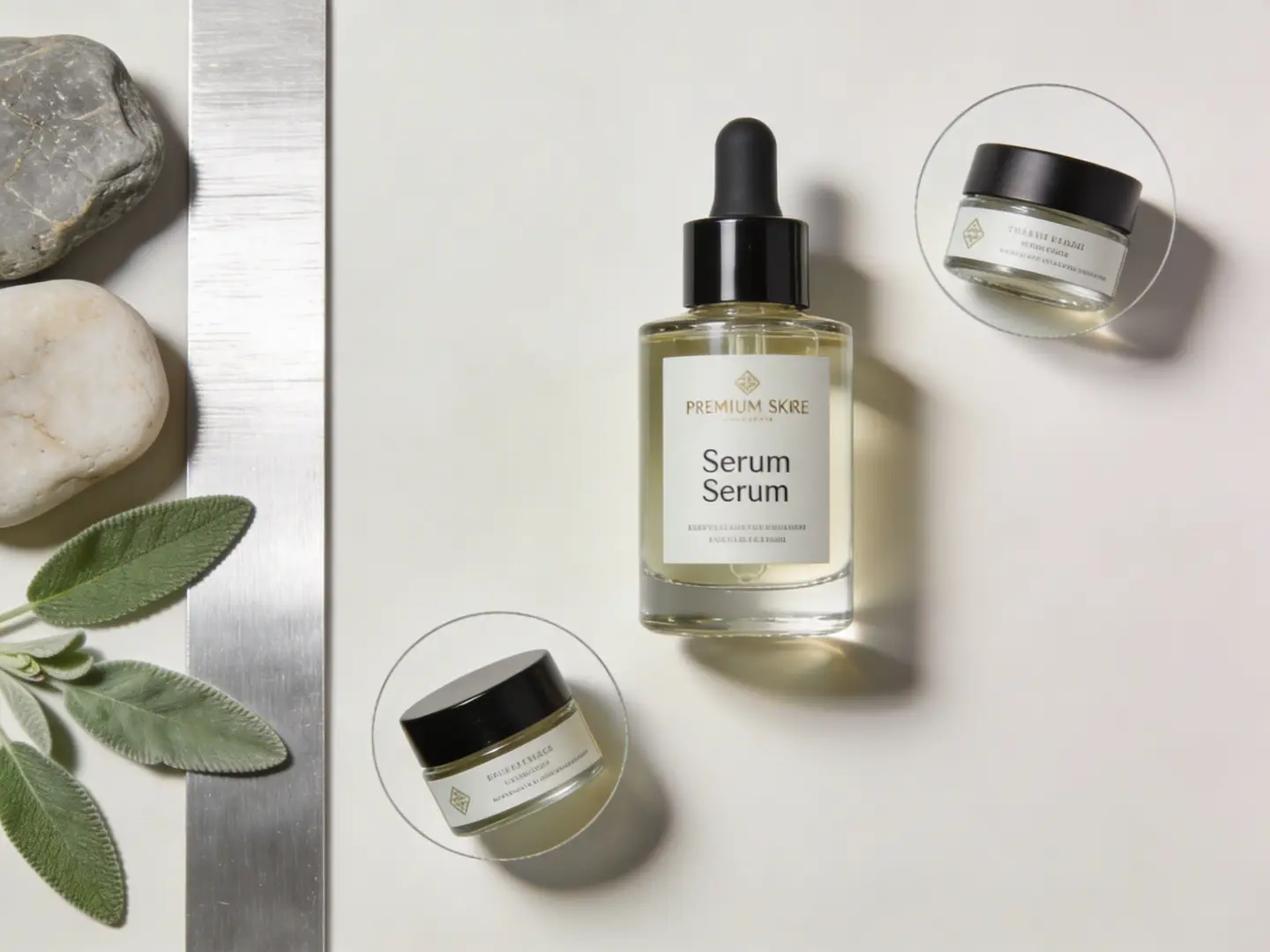
Perfect for Polished Review Boards & Premium Asset Sheets

Seedream 4.5 shines at skincare reference boards, packaging asset sheets, and any directional board that should feel presentation-ready right out the gate.

This is a game-changer when internal review materials demand a higher, more polished visual standard.
This model is designed for boards that need both clear structural composition and polished finish quality.
It pairs seamlessly with workflows where the review board itself should communicate a premium, professional tone.
Open the Seedream 4.5 Generator

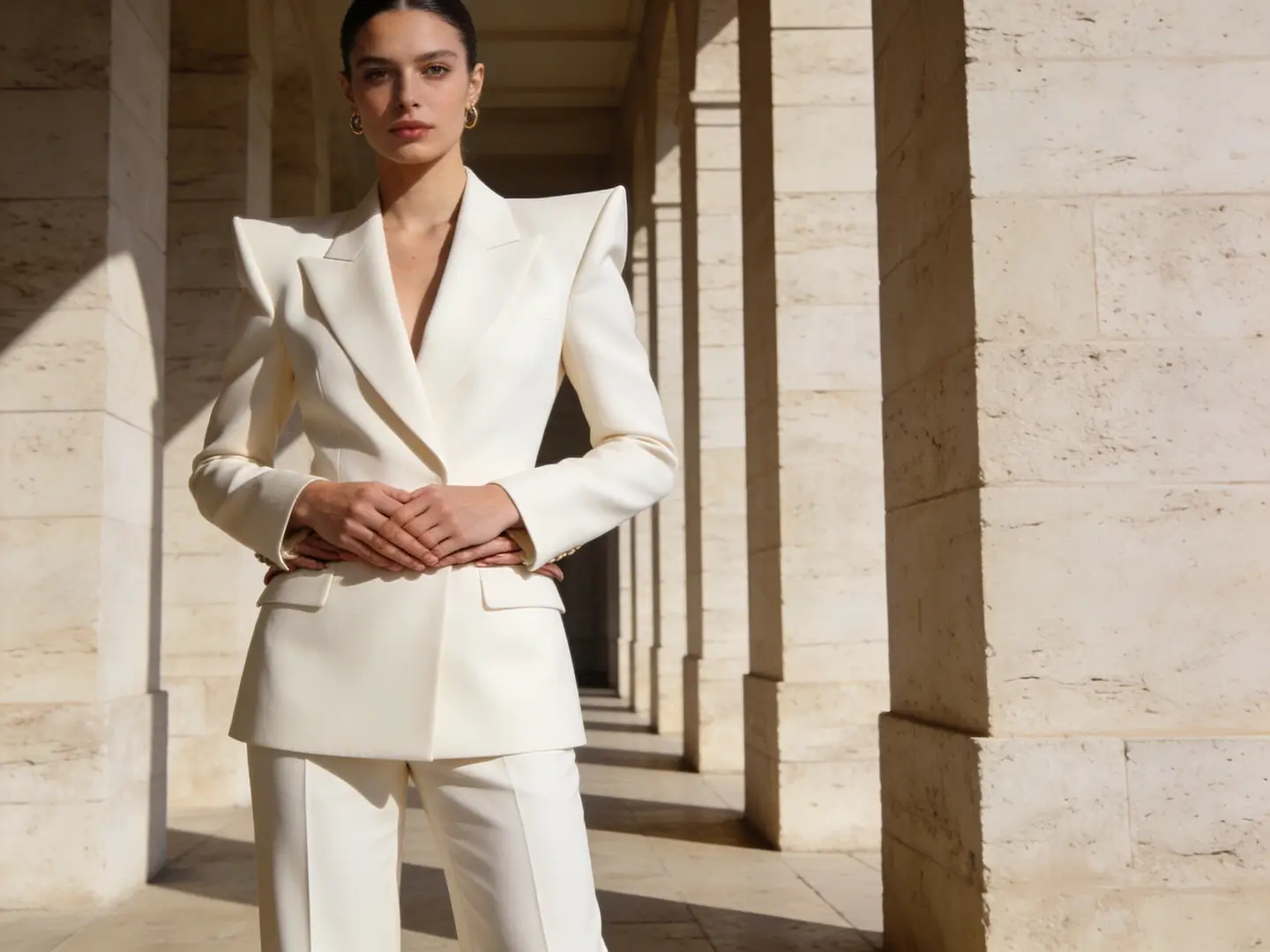
Perfect for High-Resolution Fashion & Editorial Creative Work

Seedream 4.5 shines for editorial or fashion imagery that needs elevated polish over standard mid-tier workflows, without having to switch to a different model family.

This makes it practical for sharper campaign visuals and targeted fashion look-development work.
Outputs work best when your prompt lays out a single, clear premium aesthetic tone.
Choose this model when fashion-forward polish is a core part of your work’s objectives.
Open the Seedream 4.5 Generator
Model reference image

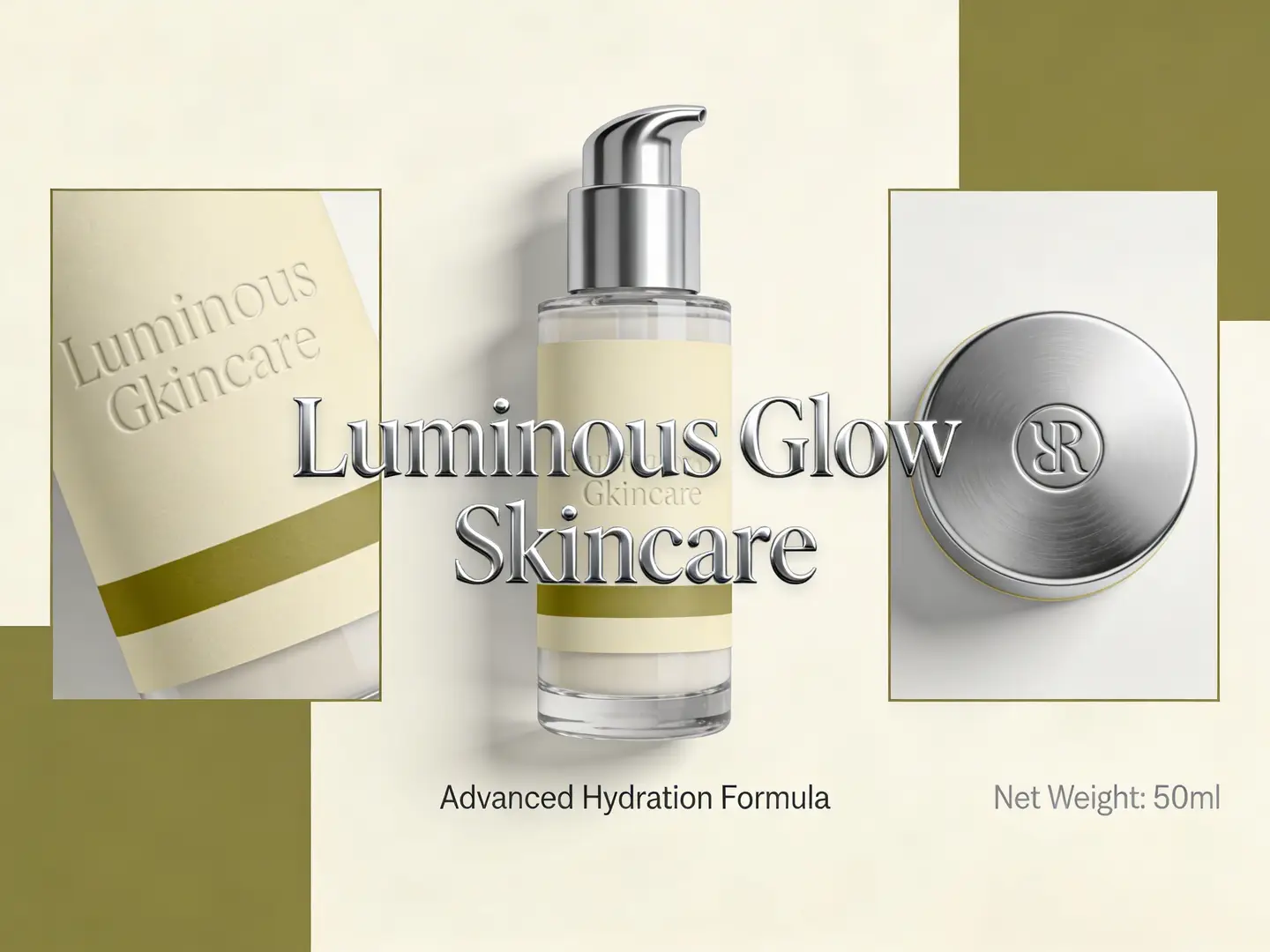
Polished Finishes for Packaging & Premium Product Direction

Seedream 4.5 is perfect for packaging reference boards and product directional work that should feel more refined and presentation-ready right out the gate.

This works beautifully for premium packaging refreshes and brand-direction reference boards.
It’s a practical workflow choice when outputs demand a higher finish than the base Seedream variant.
This model is the ideal choice when polish is your top priority tradeoff for your creative projects.
Open the Seedream 4.5 Generator
Top Real-World Use Cases

Top Real-World Applications for Seedream 4.5

Seedream 4.5 shines when outputs need to remain crisp, clean, and presentation-ready at 2K or 4K without switching between disjointed production workflows.

Polished Campaign & Poster Imagery

Put this model to use for campaign draft assets, poster-focused concepts, and hero imagery where the frame should feel polished even at standard review sizes.

Product Boards & Packaging Direction

A dependable practical choice for product reference boards, packaging updates, and design-review imagery where both fine detail and structural clarity are mandatory.

Reference-Heavy Imagery Alignment

Upload multiple reference images any time product identity, composition cues, or color palette guidelines need to remain visible and consistent across your generation or editing workflows.

High-Resolution Review Assets

Use Seedream 4.5 when your creative team requires 2K or 4K review-ready assets without having to switch to separate post-processing steps ahead of schedule.

Writing Effective Prompt Prompt: Best Practices & Real-World Examples

Writing High-Impact Seedream 4.5 prompts: Real-World Application Examples

These examples showcase the types of projects Seedream 4.5 shines at on this platform: polished posters, campaign imagery, product reference boards, and high-resolution review-ready assets.

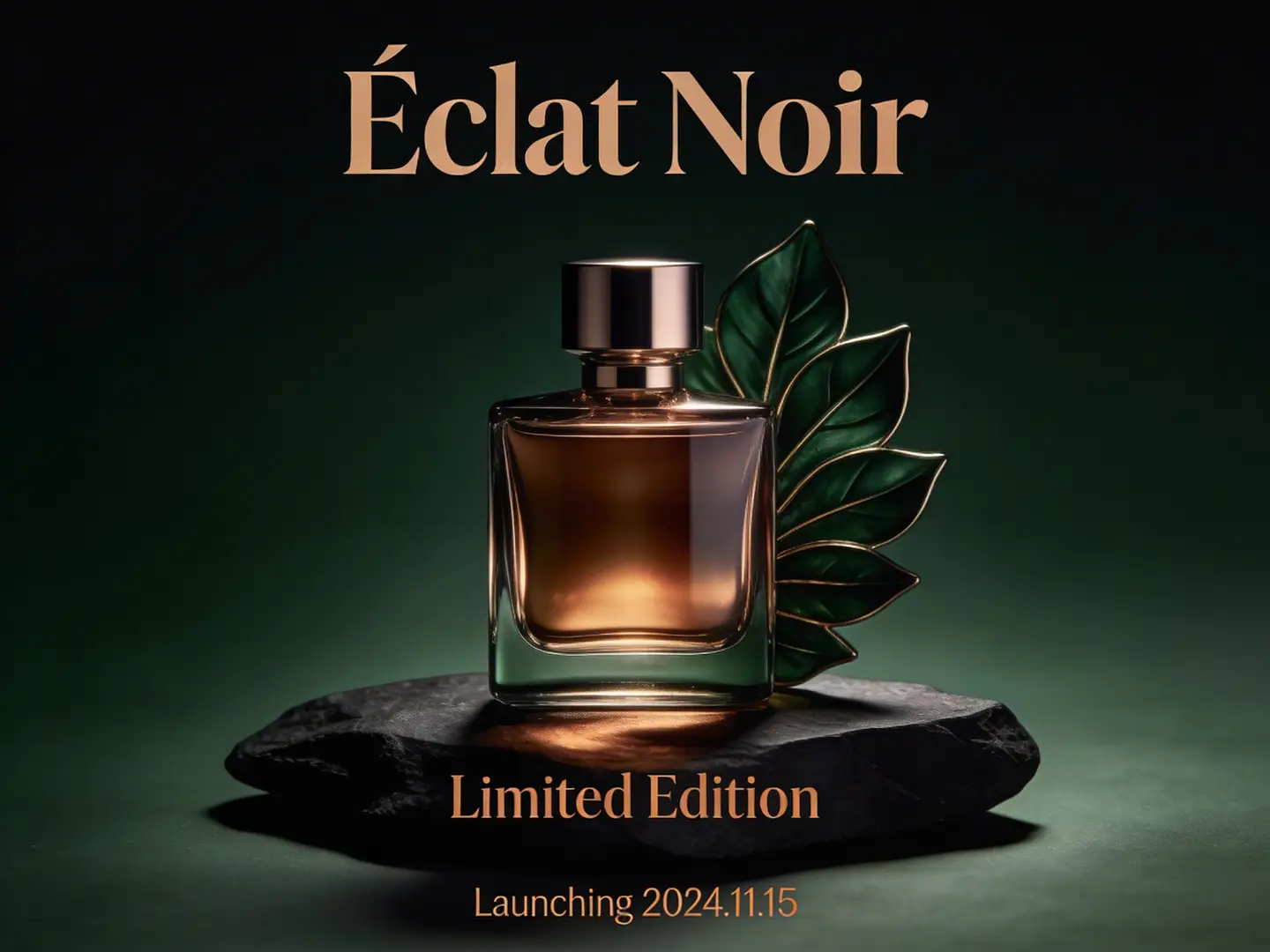
Poster concept

Meets or exceeds leading prompt Alignment Benchmark Standards

Ideal for polished poster-focused concepts where the frame should feel campaign-ready even at standard review sizes.
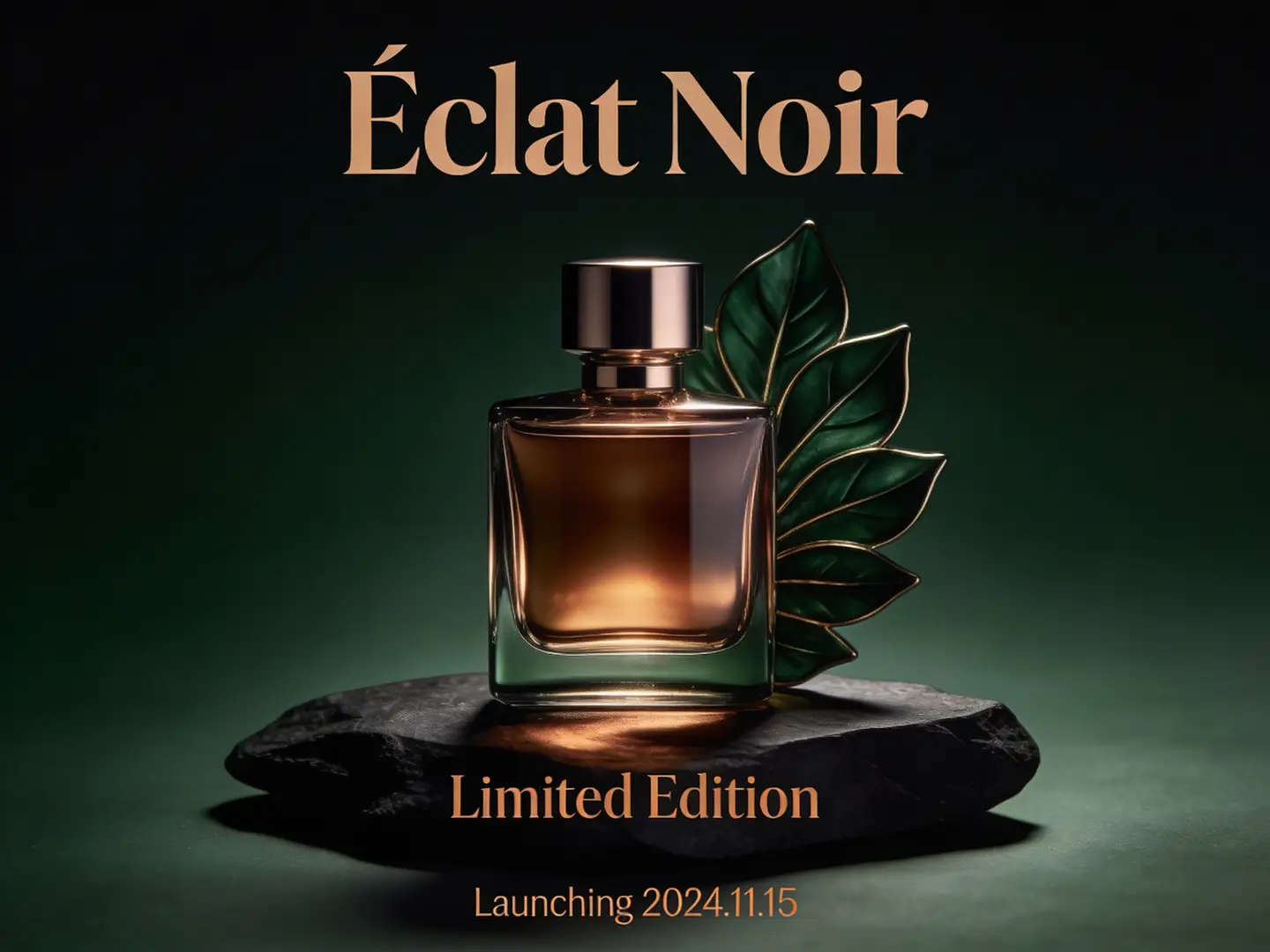
A polished luxury launch poster concept featuring clean composition, premium studio lighting, and a fully campaign-ready aesthetic.

Luxury Product Launch Poster Concept

Proven industry-standard Prompt best-practice workflow for optimized generation

[campaign subject] + [hero composition] + [poster mood] + [palette] + [finish level]

Explore Full prompt Documentation and Official Technical SpecificationsShow Full Comprehensive Breakdown

In-depth prompt Breakdown and Complete Overview

Craft a luxury launch poster concept for a premium fragrance. Center one hero bottle front and center on dark stone, accent it with warm bronze reflections and deep forest tones, and pair it with soft, premium side lighting. The final image should read as a high-end campaign poster draft—polished, sharp, and ready for a 2K review deck.

Core Functional Elements That Allow This Prompt To Produce Standout, High-quality Final Outputs

Seedream 4.5 produces its strongest results when your prompt requests a polished hero frame with a clear finish target, rather than a vague, open-ended aesthetic mood board.

Targeted Final Generated Project Outcome

A crisp, poster-style campaign concept perfect for review decks, launch planning, or core visual direction.

Curated Pro Tips for Creative Industry Professionals

  • Explicitly note your target finish quality if the asset should communicate a presentation-ready tone.
  • Streamline your poster subject and color palette to keep a clean, focused composition.
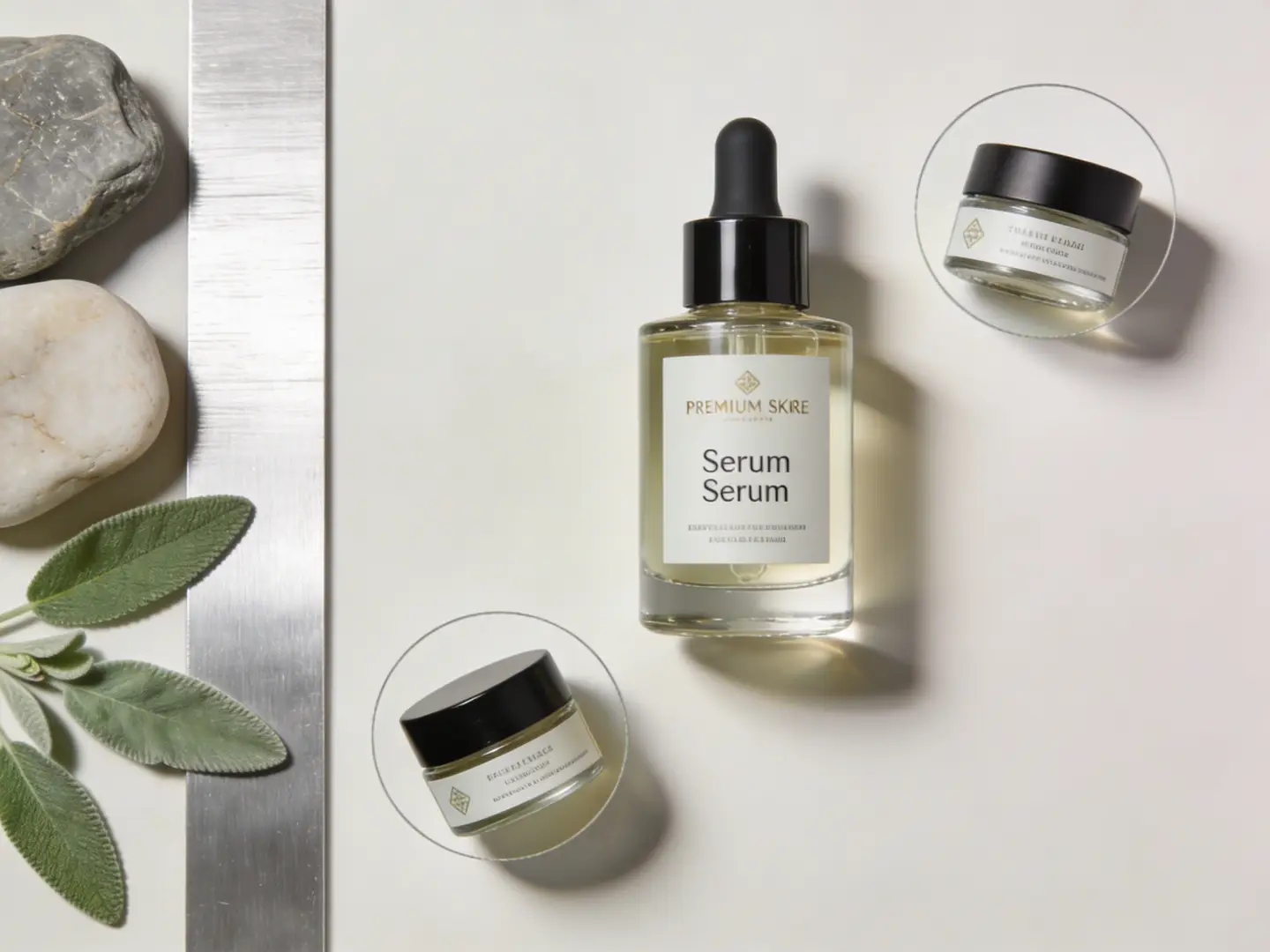
Product board

Meets or exceeds leading prompt Alignment Benchmark Standards

Perfect for product reference boards where outputs should appear sharp, organized, and easy to review at larger sizes.

A crisp skincare product review board with a hero bottle, detail crops, and clean, premium material cues.

Premium Skincare Product Review Board

Proven industry-standard Prompt best-practice workflow for optimized generation

[product] + [board structure] + [detail crops] + [material palette] + [review-board mood]

Explore Full prompt Documentation and Official Technical SpecificationsShow Full Comprehensive Breakdown

In-depth prompt Breakdown and Complete Overview

Craft a skincare product review board for a premium serum. Center one hero bottle front and center in the frame, add two detail crops for the label and cap, and include a minimal side strip highlighting stone, sage, and brushed silver material cues. Use clean studio lighting, soft premium reflections, and a composition that reads as a high-resolution design review asset.

Core Functional Elements That Allow This Prompt To Produce Standout, High-quality Final Outputs

This structured prompt frames the image as a formal review board, which helps Seedream 4.5 produce results that remain clean and legible even at larger sizes.

Targeted Final Generated Project Outcome

A crisp product board ideal for brand teams reviewing packaging and visual direction.

Curated Pro Tips for Creative Industry Professionals

  • Explicitly label each section of the board to keep an organized and easy-to-follow composition.
  • Keep material descriptions concise and visually specific to help produce stronger results.
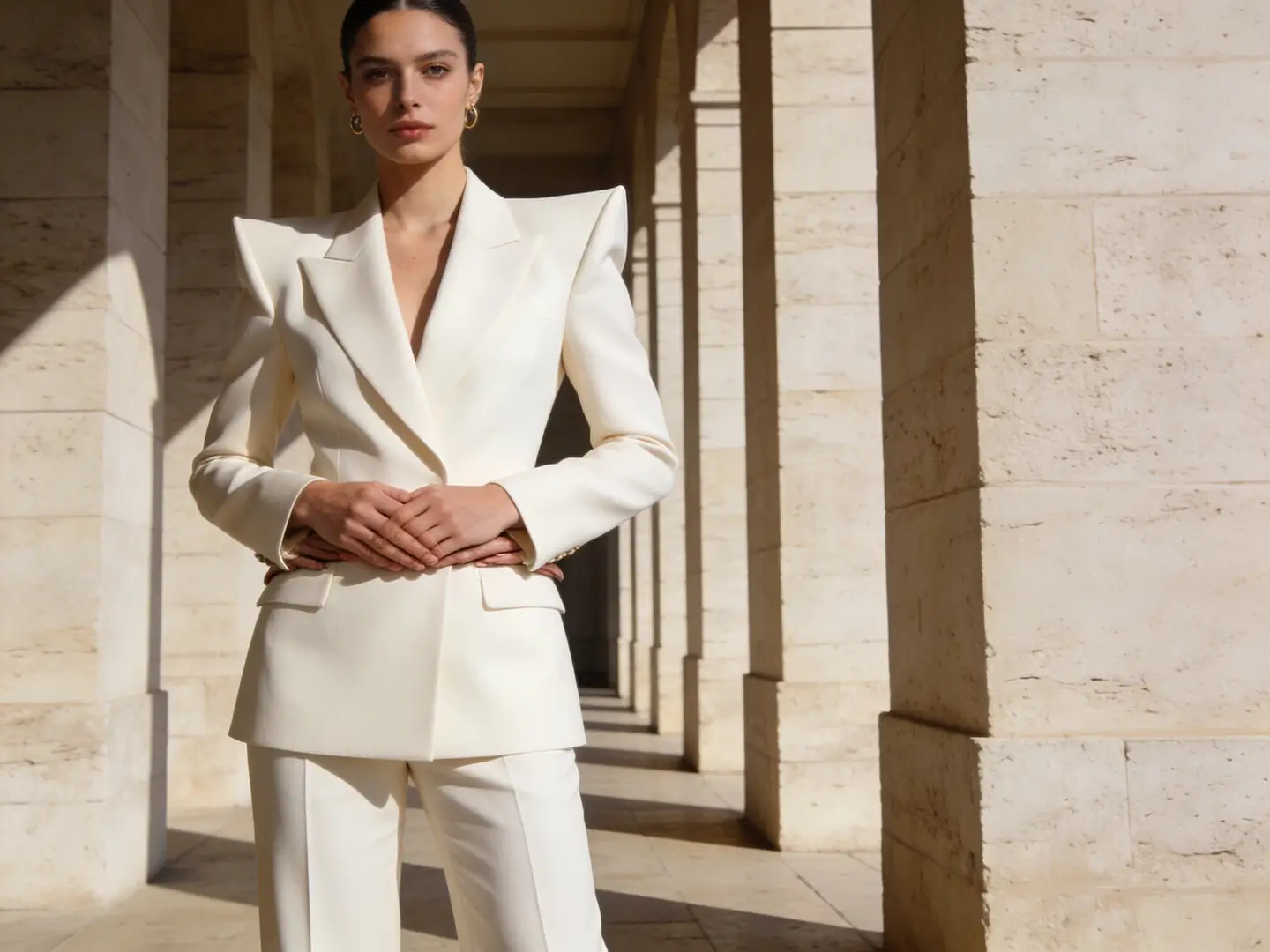
Fashion campaign

Meets or exceeds leading prompt Alignment Benchmark Standards

Ideal for fashion imagery that requires sharper detail and a more polished, review-ready final finish.

A crisp high-resolution fashion campaign frame with refined wardrobe details and a polished editorial finish.

High-Resolution Fashion Campaign Visual

Proven industry-standard Prompt best-practice workflow for optimized generation

[subject] + [wardrobe] + [location] + [light] + [campaign finish]

Explore Full prompt Documentation and Official Technical SpecificationsShow Full Comprehensive Breakdown

In-depth prompt Breakdown and Complete Overview

Craft a high-resolution fashion campaign visual featuring a model in structured ivory tailoring standing in a pale stone corridor. Use soft directional lighting, calm posture, restrained luxury styling, and a polished editorial finish that feels ready for a campaign review board.

Core Functional Elements That Allow This Prompt To Produce Standout, High-quality Final Outputs

Seedream 4.5 produces stronger results when your prompt explicitly lays out the wardrobe, setting, and target finish level in a single, focused prompt.

Targeted Final Generated Project Outcome

A polished fashion concept image perfect for campaign reviews, art direction, or editorial planning.

Curated Pro Tips for Creative Industry Professionals

  • Start with your wardrobe and target finish before adding broad mood descriptors.
  • Stick to one primary setting with a clear, consistent material story to get more cohesive results.
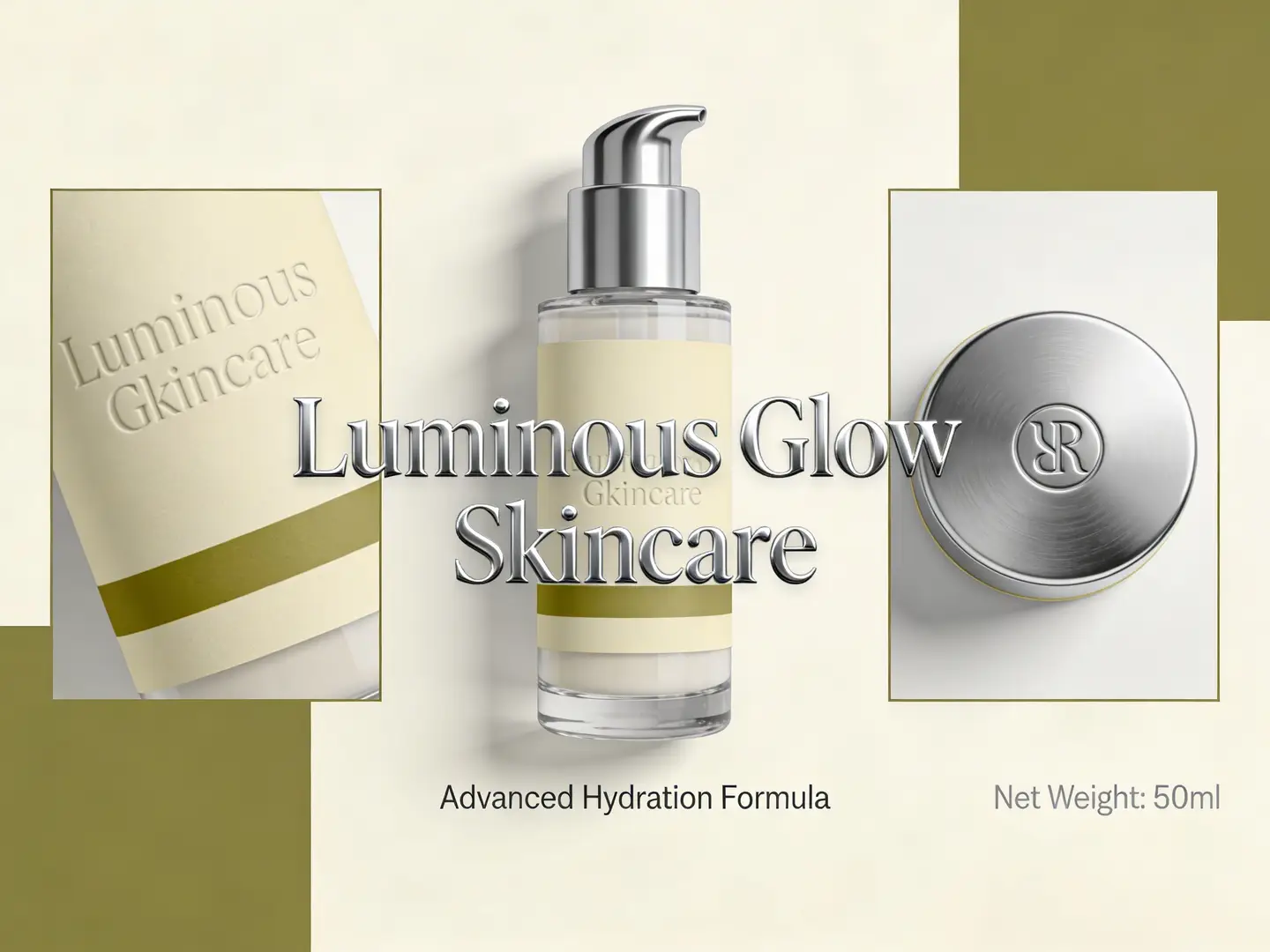
Packaging update

Meets or exceeds leading prompt Alignment Benchmark Standards

Perfect for packaging reference boards where the product silhouette remains consistent but the visual system needs a streamlined, polished update.

A crisp high-resolution packaging direction board with a consistent product silhouette and a polished updated label system.

High-Resolution Packaging Direction & Updates

Proven industry-standard Prompt best-practice workflow for optimized generation

[what stays] + [what changes] + [new palette] + [board layout] + [high-resolution review target]

Explore Full prompt Documentation and Official Technical SpecificationsShow Full Comprehensive Breakdown

In-depth prompt Breakdown and Complete Overview

Retain the bottle silhouette and pump shape from your reference image. Refine the packaging direction to warm ivory, muted olive, and brushed silver with a cleaner, centered visual hierarchy. Deliver the final result as a polished high-resolution packaging board with one hero bottle and two supporting detail crops for the label and cap.

Core Functional Elements That Allow This Prompt To Produce Standout, High-quality Final Outputs

This structured prompt explicitly lays out which elements need to remain fixed, while giving Seedream 4.5 a clear high-resolution review board target to work toward.

Targeted Final Generated Project Outcome

A crisp packaging update board ideal for design review, launch planning, and high-resolution side-by-side comparison.

Curated Pro Tips for Creative Industry Professionals

  • Explicitly differentiate the consistent product identity from the new design system to avoid confusion.
  • Explicitly note the asset’s intended purpose if it should act as a formal review asset.
Who Should Use Seedream 4.5

Choose Seedream 4.5 If High-Resolution Polish Is Your Top Priority in a Unified Workflow

Seedream 4.5 is the perfect choice when your frame should remain sharper, cleaner, and easier to review at 2K or 4K, while still supporting reference-heavy generation and editing all on one platform.

Choose Seedream 4.5 If Your Image Should Hold Up to Larger Review Sizes

Use this model for polished campaign drafts, poster concepts, product reference boards, and packaging reviews where sharper detail and cleaner structure are mandatory before the asset moves past this page.

Try Alternative Models for Different Family Versions or Tradeoffs

Choose Seedream 5.0 for the latest family iteration, Flux 2 Pro for an alternative polished visual workflow, and GPT-4o when readable text or diagram-like structural clarity is your top priority.

Creator & Community Insights

Creator Walkthroughs & Independent Third-Party Reviews of Seedream 4.5

These videos share independent creator viewpoints on Seedream 4.5 as a high-resolution, polish-first creative workflow, adding valuable third-party context to the details laid out on this page.

Curated Gallery of AI Video Generation Showcase Pieces

FAQs

FAQ

Helpful information about HappyHorse 2

What exactly is Seedream 4.5?

Seedream 4.5 is the upgraded high-resolution Seedream release hosted on this platform, built specifically for text-to-image creation and reference-guided image editing. It stands apart for projects that require sharper micro-details, more structured compositions, and additional space for polished, review-ready assets within one cohesive workflow.

What use cases is Seedream 4.5 best suited for?

Seedream 4.5 shines for polished campaign assets, poster concepts, product reference boards, packaging direction, and any project where 2K or 4K polished, finalized output is a mandatory requirement during internal review cycles.

Can Seedream 4.5 accept image inputs on this platform?

Absolutely. On this platform, Seedream 4.5 supports up to fourteen reference images per single generation cycle. This makes it a perfect pick for product boards, look-development workflows, and edits where multiple input references need to remain visible across your entire request.

What resolutions and aspect ratios are supported by Seedream 4.5 on this page?

Seedream 4.5 works with 2K and 4K on this page. The full range of supported aspect ratios covers 1:1, 4:3, 3:4, 16:9, 9:16, 2:3, and 3:2.

What’s the best way to craft stronger Seedream 4.5 prompts?

Start by being clear and specific about your subject, target composition, and desired finish quality. Seedream 4.5 produces better results when your prompt specifies which elements need sharp detail, which should stay crisp and uncluttered, and how reference images should maintain product or design integrity across your entire generation workflow.

When should I opt for Seedream 4.5 over Seedream 5.0 or Flux 2 Pro?

Opt for Seedream 4.5 if you need a high-resolution Seedream workflow tailored for sharp poster, product board, or campaign-ready outputs. Go with Seedream 5.0 for the latest family iteration, and select Flux 2 Pro if you’re after an alternative polished visual styling approach.

Does Seedream 4.5 work well for posters and branded campaign visuals?

Absolutely. Seedream 4.5 is an ideal pick for polished campaign assets, poster-focused concepts, product reference boards, and any creative asset where both structural clarity and sharp fine details must remain crisp.

Are outputs from Seedream 4.5 safe for commercial use?

If you’re developing commercial production projects, treat Seedream 4.5 outputs the same as any other hosted model-generated asset before publishing. Commercial usability will vary based on your unique use case, internal review policies, and the platform’s applicable terms of service.

Still have questions? Our support team is ready to help.

Related Models

Compare Seedream 4.5 to Other Image Models Hosted on This Platform

If Seedream 4.5 isn’t the right fit for your project, compare it to these related pages to find a newer family iteration, an alternative polished hosted workflow, or a different structural or deployment tradeoff.

Seedream 5.0 Image Generator

Try Seedream 5.0 if you want the latest Seedream family workflow available on this platform.

Discover Our Curated Collection of Associated AI Models

Seedream 4.0 Image Generator

Compare against Seedream 4.0 if you prefer the earlier Seedream family behavior rather than the 4.5 high-resolution variant.

Discover Our Curated Collection of Associated AI Models

Flux 2 Pro Image Generator

Test Flux 2 Pro if you want an alternative polished hosted workflow with a distinct visual styling approach.

Discover Our Curated Collection of Associated AI Models

Seedance Pro Image Generator

Compare against Seedance Pro if you need a more text-aware hosted workflow built for structured creative briefs.

Discover Our Curated Collection of Associated AI Models

Open Seedream 4.5 Today

Open the generator, map out your composition with structure and target finish quality as your top priority, then run the higher-resolution pass only after your composition is locked in.

Open the Seedream 4.5 Generator
Resources
  • Create
  • Pricing
  • Image to Prompt
  • Batch Image to Prompt
Company & Legal
  • About
  • Contact
  • Privacy Policy
  • Terms of Service
  • Refund Policy
AI Image
  • Nano Banana Pro
  • Nano Banana 2
  • GPT-4o
  • Seedream 4.5
  • Seedream 4.0
  • Flux 2 Pro
  • Flux 2
  • Qwen Image 2
  • Z-Image
  • NanoBanana Flash
  • Qwen Image 3
HappyHorse 2

HappyHorse 2 – AI Video Generator Free with New User Credits

[email protected]

This website is an independent third-party service built around HappyHorse 2 workflows. We are not the official website for HappyHorse 2, and all product names, model names, and trademarks belong to their respective owners.

© 2026 HappyHorse 2. All rights reserved.

Privacy Policy