HappyHorse 2
  • Create
  • AI Image
    • Open Image WorkspaceCreate or edit images with all supported models
    • GPT Image 2NewOpenAI image generation and reference-guided editing
    • Nano Banana 2NewFast Google image generation with multi-reference editing
    • Nano Banana ProHigh-fidelity Google image generation and editing
    • Nano Banana FlashFast, efficient image generation and editing
    • Seedream 5.0NewHigh-detail creative image generation
    • Flux 2Flexible generation and reference-based editing
    • Qwen Image 2Versatile image generation with strong text rendering
    • Z-ImageFast open-weight image generation
    • Qwen Image 3NewStructured prompts, multilingual text, and rich visual detail
  • AI Video
    • Open Video WorkspaceCreate videos with all currently connected models
    • MiniMax H3NewExplore MiniMax H3 workflows, prompts, and video creation techniques
  • Tools
  • Pricing
English
  • English
  • 中文
  • 日本語
  • 한국어
  • Español
  • العربية
  • 繁體中文
HappyHorse 2

GPT-4o Image Generator

Built for razor-sharp text rendering, strict structured layout adherence, and multi-reference input compatibility, this multimodal image creation and editing model caters to workflows needing clear legible copy, intentional visual flow, or perfectly aligned reference assets. Here, you can leverage it for text-to-image and reference-guided edits with up to five uploaded reference images.

Describe the image you want to generate

Generate 1 images · 6 credits total

Core Workflow for GPT-4o

Use GPT-4o on this page to build text-to-image and reference-aligned image edits

Start with a detailed prompt, upload up to five reference images to match your output to your target aesthetic, and tweak your final result with follow-up prompts right inside this editing workflow.

01

Draft a Structured Image Brief as a Clear Layout Guideline

Map out your central subject, desired composition, materials, lighting setup, and any exact copy that should appear in the finished image.

02

Upload Reference Images to Match Your Target Visual Style

Upload up to five reference images to steer GPT-4o toward matching a specific product design, color palette, scene, or intended visual direction.

03

Tweak Your Final Output With Subsequent Prompts

Tweak the prompt, ask for layout adjustments, or note elements to retain until your final image matches your exact vision.

Core Strengths of GPT-4o

What Sets GPT-4o Apart as a Top-Tier Hosted Image Tool

GPT-4o excels when your project demands strict adherence to a detailed brief, consistent readable text across generations, or integration of multiple reference images in one streamlined hosted workflow.

Crisp Text Rendering & Precise Layout Control

OpenAI centers text rendering as a core feature, making GPT-4o far more dependable for posters, menus, product labels, and annotated assets than most single-focus image models.

This is critical when both headline copy and supporting text must stay clear and legible after generation.
It’s ideal for event posters, café menus, packaging labels, technical diagrams, and ad assets with short, intentional copy blocks.
You can clearly map out layout hierarchy in your prompt instead of leaving text placement up to random chance.
Begin Generating With GPT-4o
Model reference image

Strong Granular Instruction Adherence

GPT-4o streamlines your workflow by letting you handle composition, styling, callouts, and precise copy requirements all in one prompt, no need to jump between separate tools.

It performs far better with creative-brief style prompts than standard keyword-focused image editors.
This works great for advertising drafts, how-to explainers, and product concept boards.
You can keep refining your concept without exiting the hosted editing workflow to guarantee consistent, cohesive results.
Begin Generating With GPT-4o

Multi-Reference Image Support

OpenAI offers end-to-end image generation and editing with visual inputs, and this page lets you use up to five references for GPT-4o.

This is incredibly valuable when multiple images shape your product, color palette, styling, or spatial layout.
It outperforms single-reference workflows when multiple input visuals craft your finished design.
Your finished output will stay closer to your intended brief when each reference has a clear, defined goal.
Begin Generating With GPT-4o
Model reference image

Ideal for Diagrams & How-To Visuals

GPT-4o isn’t only for photorealistic advertising. It excels at technical diagrams, numbered step-by-step workflows, and information graphics where structural clarity is just as important as visual style.

This broadens use cases beyond standard beauty shots or cinematic concept art.
It’s a strong pick when your image needs to clearly explain a process or compare multiple items.
This works wonderfully for onboarding guides, educational content, packaging instructions, and internal product updates.
Begin Generating With GPT-4o
Key Use Cases

High-Impact Project Scenarios for GPT-4o

GPT-4o excels for text-centric layouts, annotated visual assets, reference-aligned edits, and workflows that rely on a detailed prompt to maintain structure and consistency across every finished piece.

Campaign Posters & Branded Signage With Dynamic Copy

Use GPT-4o for product launch posters, café menus, storefront signage, and event announcement assets where copy plays a core role in the visual design.

Branded Product Concept Boards & Advertising Rough Drafts

Build structured product mood boards, labeled mockups, and marketing visuals that balance intentional composition, detailed product photography, and concise explanatory copy.

Multi-Reference Edits for Cohesive Branding

Upload multiple reference images if you’d like your finished output to closely align with a specific product identity, color palette, or pre-set design direction.

Instructional Diagrams & How-To Explainer Visuals

Create numbered step-by-step diagrams, quick how-tos, and annotated visuals where your image needs to both educate and appear polished.

Prompt Prompt Best Practices & Examples

Writing More Effective GPT-4o prompts: Practical Real-World Examples

Each example card breaks down a GPT-4o prompt framework, shares a sample generated output, and calls out the details that help the model turn your vision into reality exactly as you want. We center on structural clarity, precise wording, and the unique role each reference image plays in steering the model’s finished output.

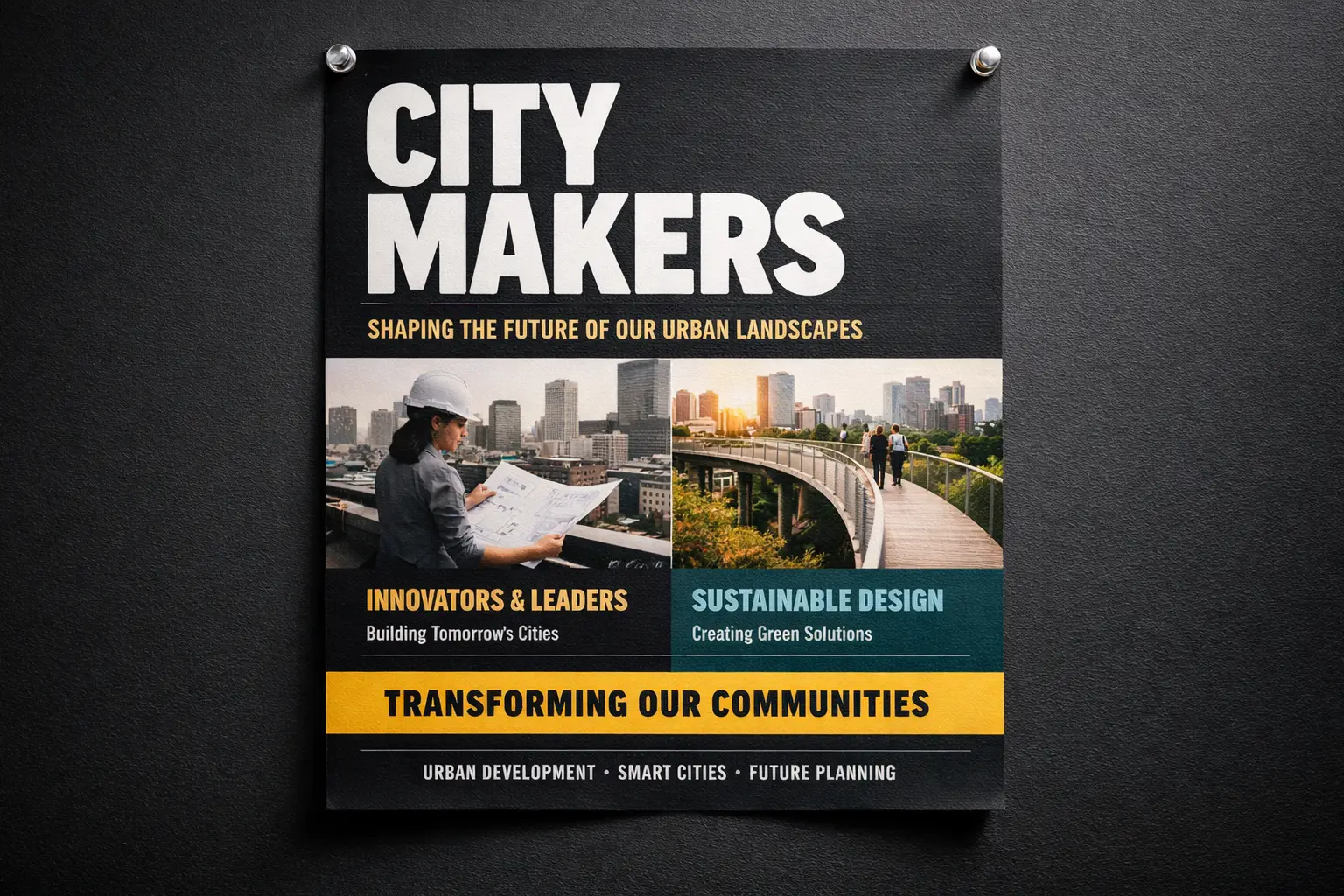
Poster with copy

Meets or exceeds leading prompt Alignment Benchmark Standards

Ideal for poster layouts where the headline, subheading, and event details all need to remain clear and legible.
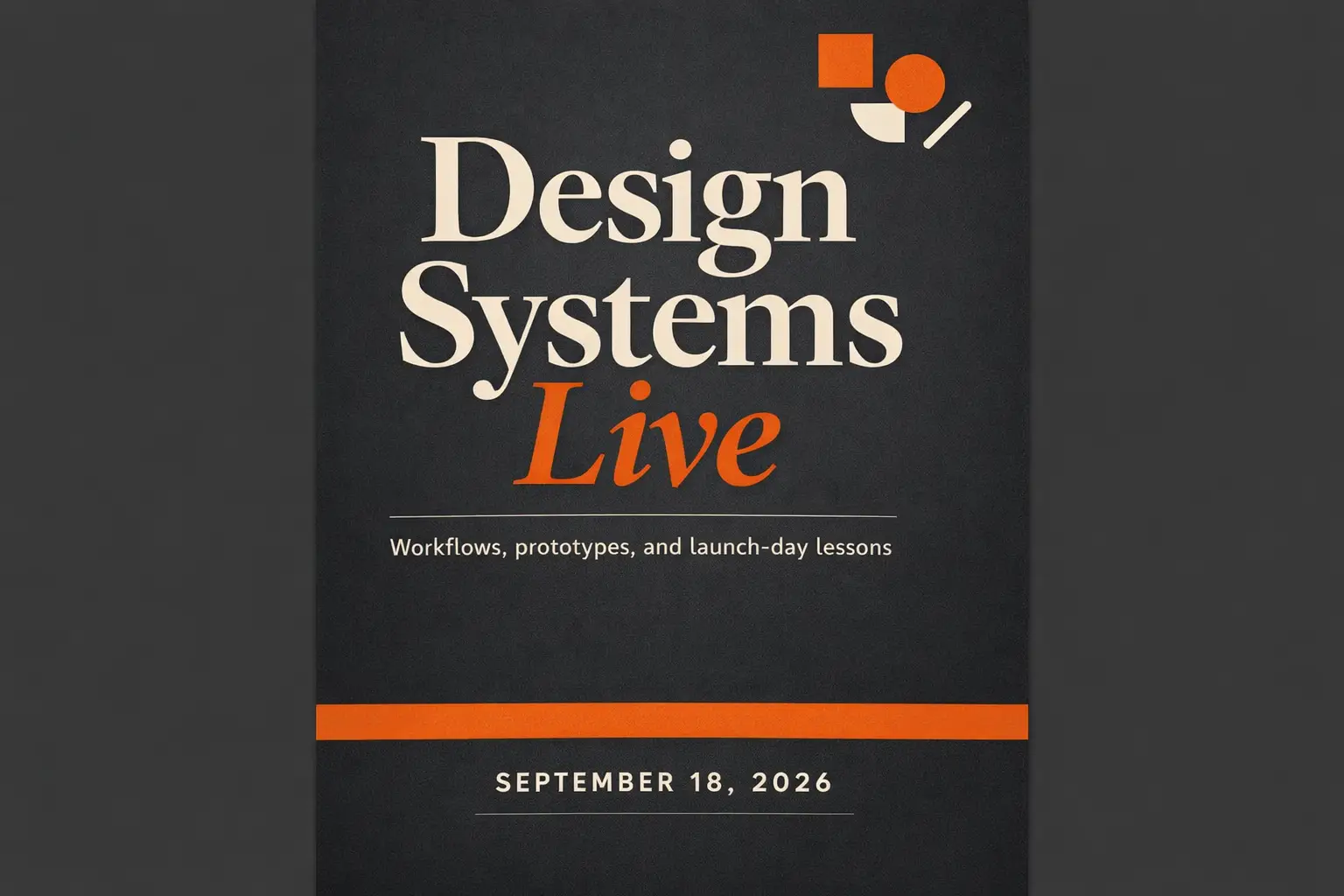
A conference launch poster with a bold headline and smaller supporting copy arranged in a clean visual hierarchy.

Campaign Poster With Clear, Readable Headline Copy

Proven industry-standard Prompt best-practice workflow for optimized generation

[poster subject] + [exact headline text] + [layout hierarchy] + [color direction] + [ad or event context]

Explore Full prompt Documentation and Official Technical SpecificationsShow Full Comprehensive Breakdown

In-depth prompt Breakdown and Complete Overview

Put together a sleek campaign poster for a creative industry conference. Highlight a large main headline: "Design Systems Live". Add a compact subheading: "Workflows, prototypes, and launch-day takeaways". Include a date line that reads "September 18, 2026". Use a deep charcoal backdrop, warm orange accent blocks, modern editorial typography, ample spacing, and a layout that feels like a premium event poster instead of a basic flyer.

Core Functional Elements That Allow This Prompt To Produce Standout, High-quality Final Outputs

GPT-4o outperforms most general-purpose image models for text and layout alignment, making it perfect for projects where copy is a critical piece of the visual layout.

Targeted Final Generated Project Outcome

A text-focused poster concept for event marketing, website landing pages, and social media announcement assets.

Curated Pro Tips for Creative Industry Professionals

  • Wrap exact copy in quotation marks when the precise wording is non-negotiable.
  • Split hierarchy instructions from style details so the model recognizes text as a structural element, not just decorative copy.
Product marketing

Meets or exceeds leading prompt Alignment Benchmark Standards

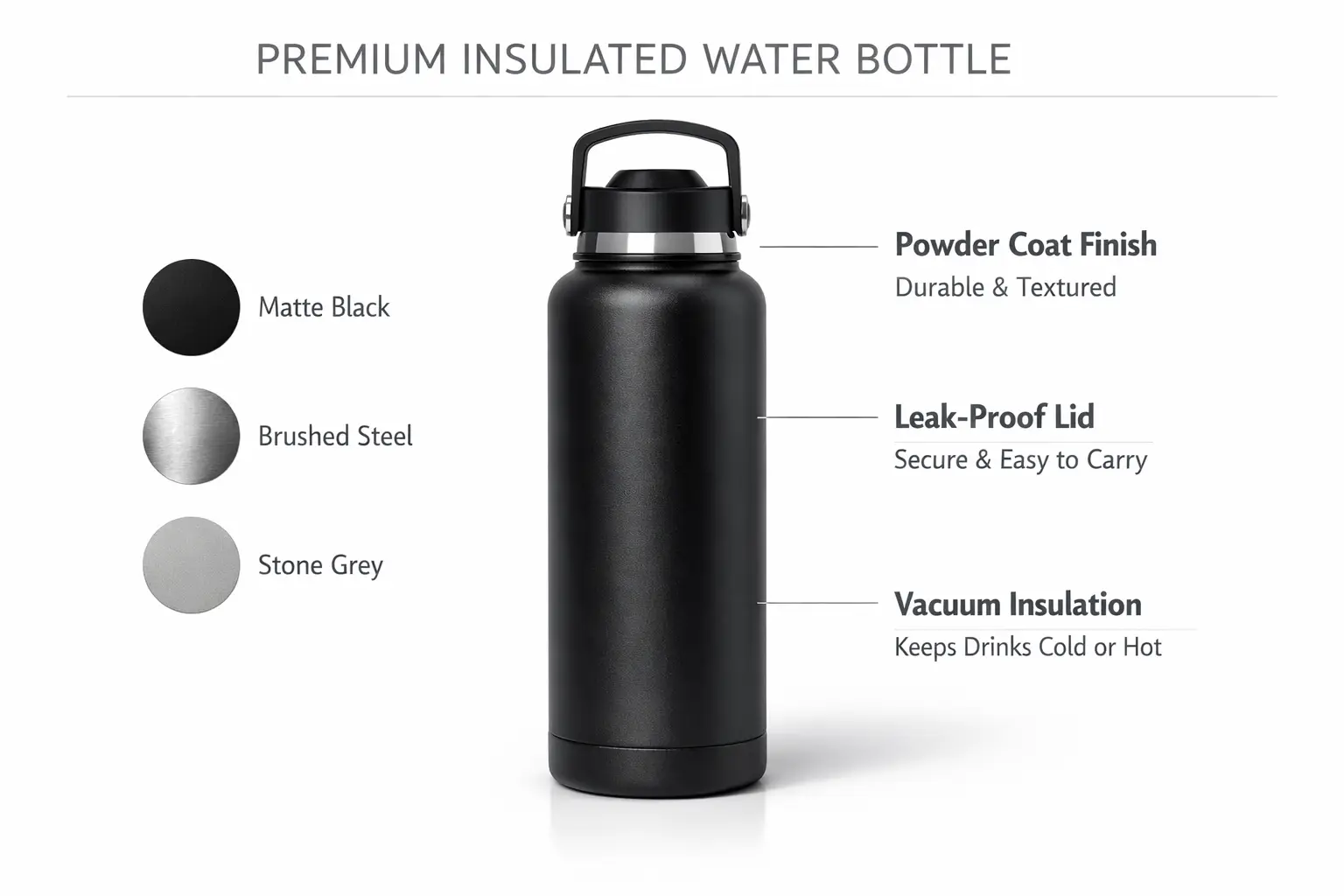
Perfect for branded product concepts that require labels, callouts, and structured composition.

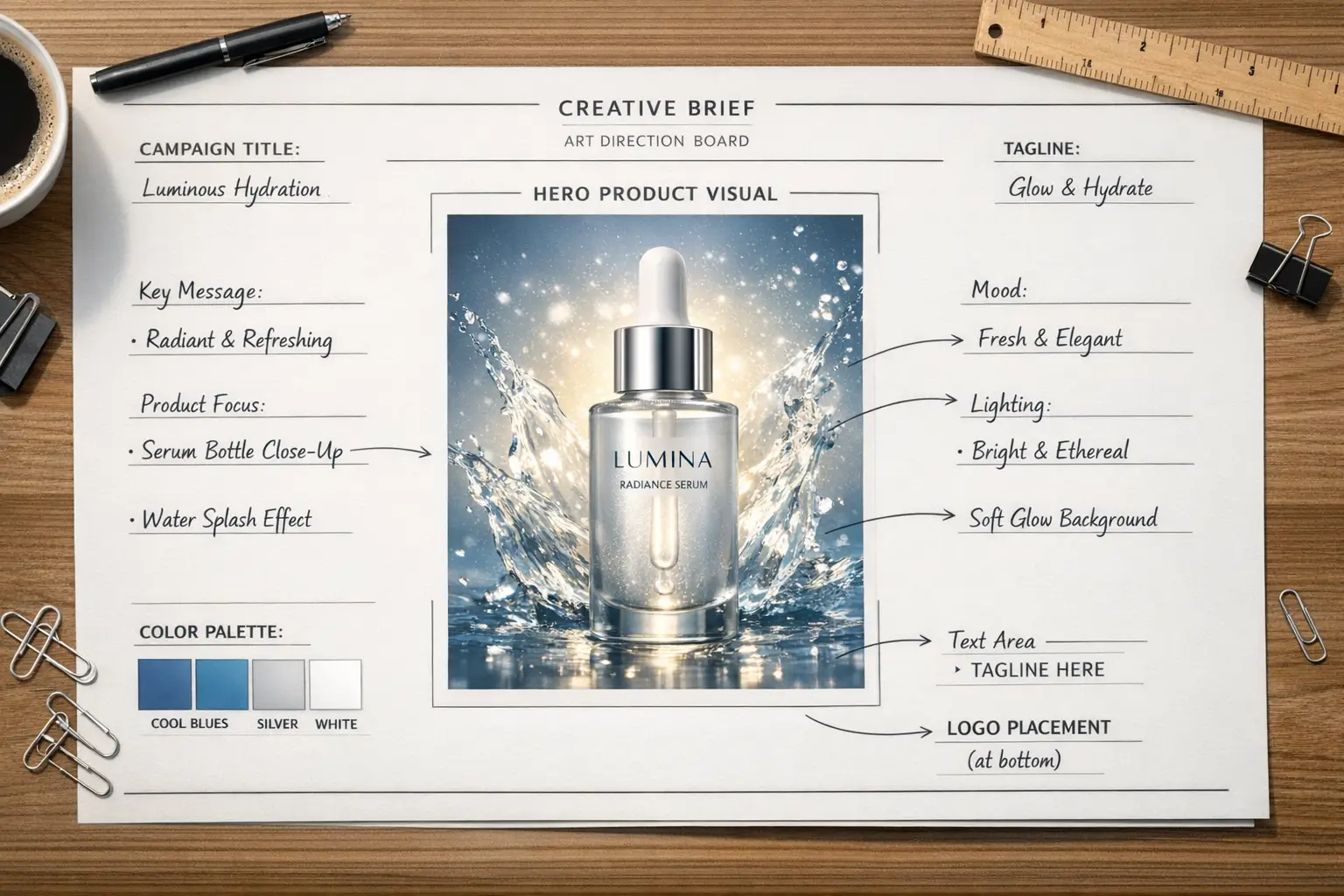
A product concept board with a central hero product shot, side material swatches, and short labeled annotations.

Annotated Product Concept Board

Proven industry-standard Prompt best-practice workflow for optimized generation

[product] + [board layout] + [callout labels] + [materials / colors] + [presentation style]

Explore Full prompt Documentation and Official Technical SpecificationsShow Full Comprehensive Breakdown

In-depth prompt Breakdown and Complete Overview

Put together a product concept board for a premium insulated water bottle. Position one large hero shot of the bottle in the center, add three smaller material swatches along the side, and add short callout labels for "powder coat finish", "leak-proof lid", and "vacuum insulation". Use a crisp white backdrop, understated black and stone-gray typography, soft studio lighting shadows, and a presentation style that aligns with a formal design review board.

Core Functional Elements That Allow This Prompt To Produce Standout, High-quality Final Outputs

This prompt requests both product rendering and labeled layout, which aligns perfectly with GPT-4o's core strengths in following detailed instructions and crisp text rendering.

Targeted Final Generated Project Outcome

A structured concept board for product reviews, brand strategy decks, or internal creative direction alignment.

Curated Pro Tips for Creative Industry Professionals

  • Label each callout clearly instead of using vague phrases like "add some labels".
  • Use terms like board, sheet, deck, or review layout when you aim to enforce a structured composition.
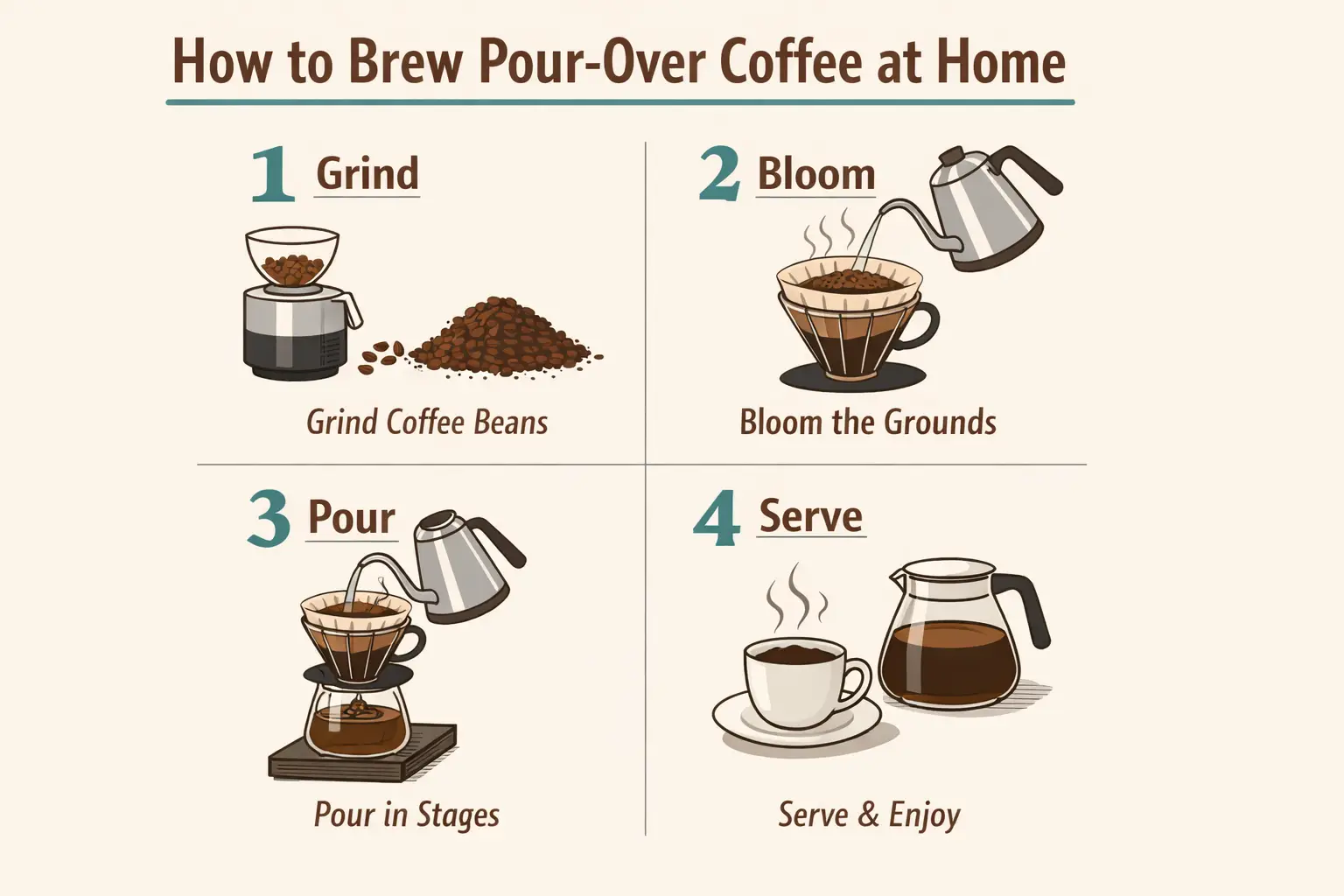
Diagram / How-To Explainer

Meets or exceeds leading prompt Alignment Benchmark Standards

Ideal for how-to explainers that blend illustrations, short copy, and numbered steps.

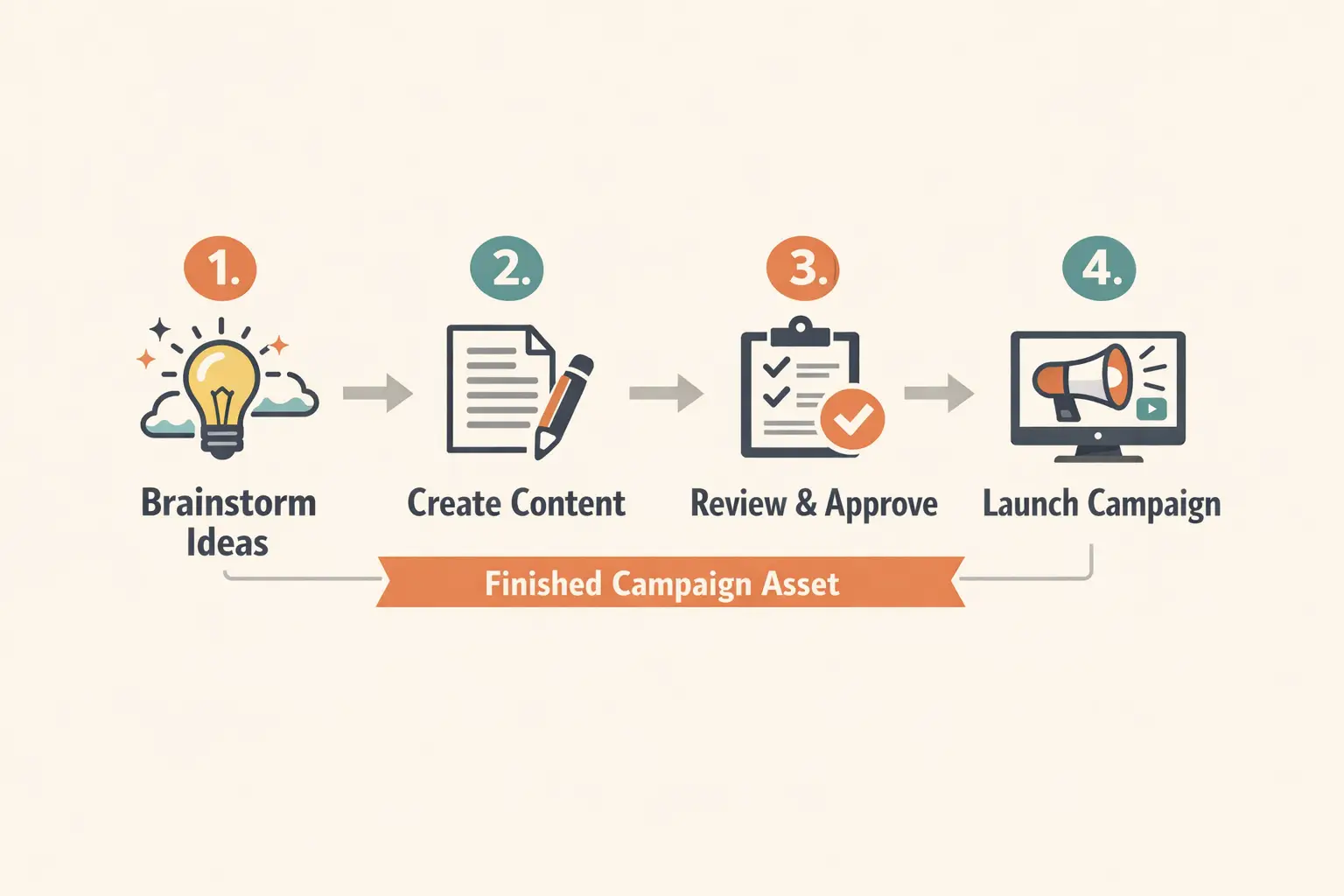
A step-by-step how-to explainer diagram with numbered panels and short, clear labels.

Step-by-Step How-To Explainer Graphic

Proven industry-standard Prompt best-practice workflow for optimized generation

[topic] + [number of steps] + [label text] + [diagram style] + [background and colors]

Explore Full prompt Documentation and Official Technical SpecificationsShow Full Comprehensive Breakdown

In-depth prompt Breakdown and Complete Overview

Put together a step-by-step explainer graphic for at-home pour-over coffee brewing. Add four numbered panels with short, clear labels: "1 Grind", "2 Bloom", "3 Pour", "4 Serve". Use simple editorial illustrations, clean icons, a warm cream backdrop, deep brown text, muted teal accents, and a layout that feels like a magazine explainer instead of a cartoon.

Core Functional Elements That Allow This Prompt To Produce Standout, High-quality Final Outputs

GPT-4o excels with diagram-style prompts where numbered steps and short labels need to stay clear and simple to follow.

Targeted Final Generated Project Outcome

A concise instructional graphic for blog posts, onboarding materials, or education-focused marketing.

Curated Pro Tips for Creative Industry Professionals

  • Keep labels brief to give the model the best shot to render them clearly and neatly.
  • Name the exact number of panels or steps when layout accuracy is a top priority.
Packaging concept

Meets or exceeds leading prompt Alignment Benchmark Standards

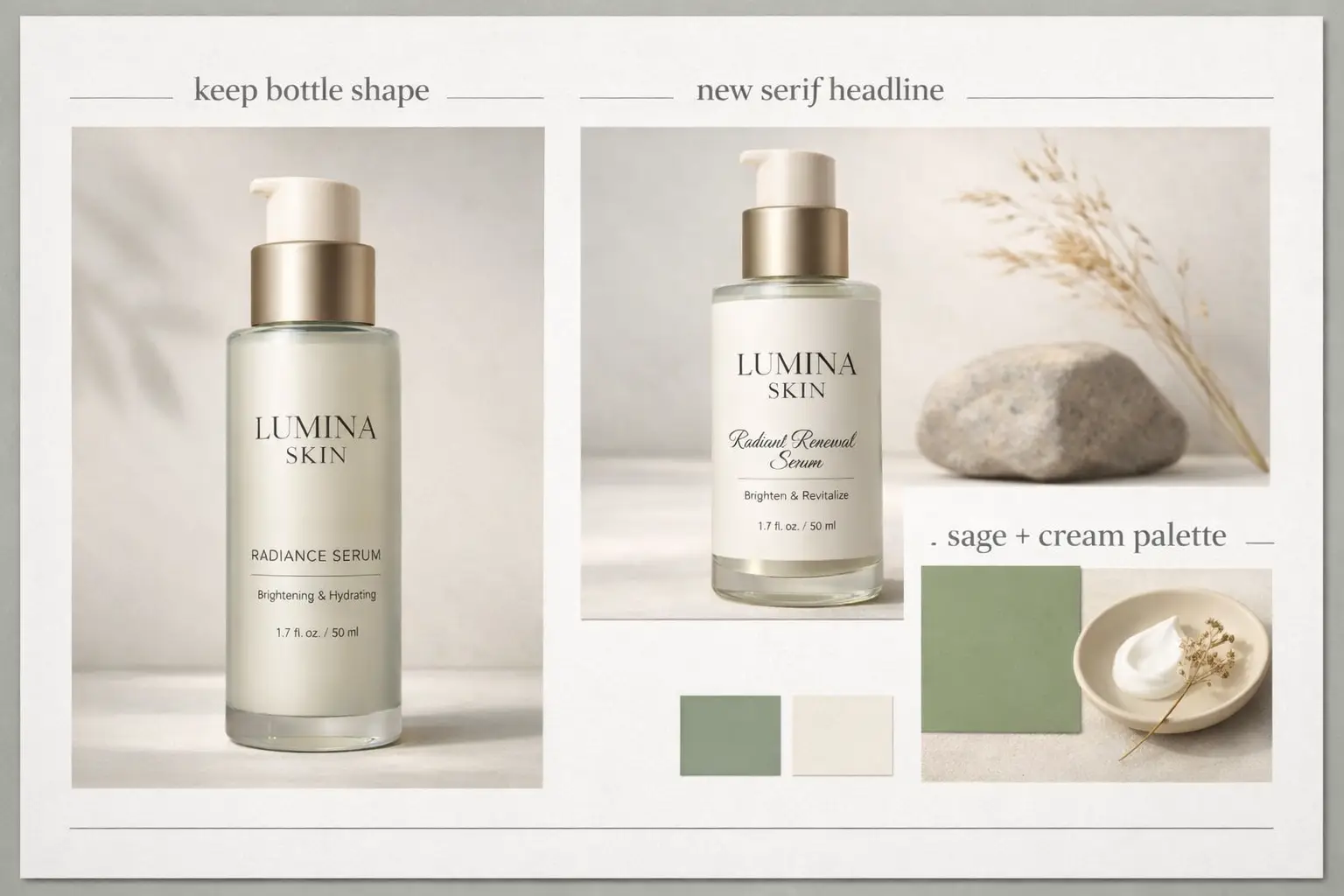
Perfect for packaging refresh boards that blend product details, label guidance, and short annotations.

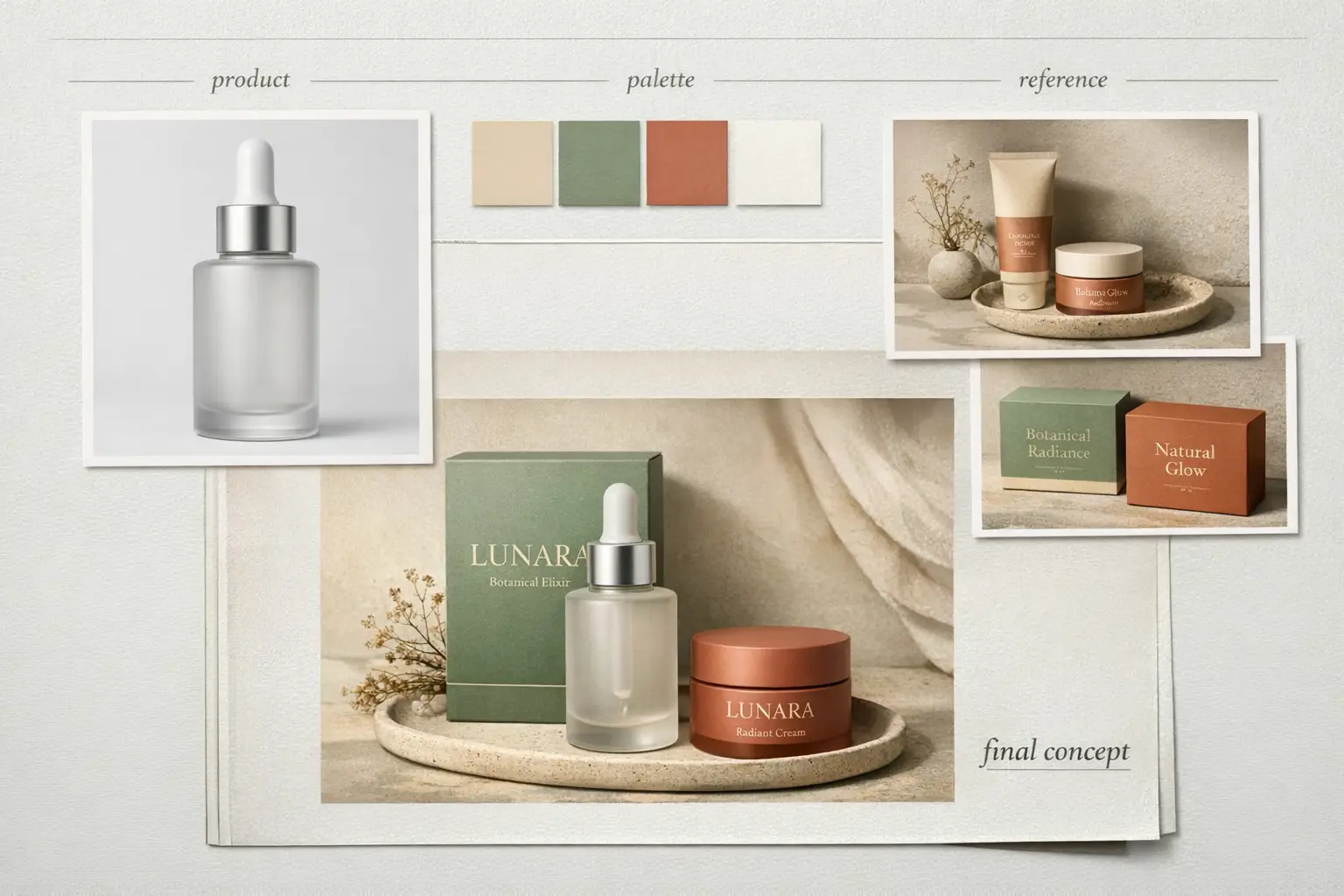
A refreshed packaging concept with a modern label system and streamlined product presentation.

Packaging Refresh Concept Board

Proven industry-standard Prompt best-practice workflow for optimized generation

[product] + [what should stay] + [new label direction] + [palette] + [board layout]

Explore Full prompt Documentation and Official Technical SpecificationsShow Full Comprehensive Breakdown

In-depth prompt Breakdown and Complete Overview

Put together a packaging refresh concept board for a premium skincare bottle. Highlight the bottle front-and-center, then add a secondary panel with a streamlined updated label design. Add short labels: "keep bottle shape", "new serif headline", and "sage + cream palette". Use soft studio lighting, an understated wellness-brand tone, and a polished art-direction board layout.

Core Functional Elements That Allow This Prompt To Produce Standout, High-quality Final Outputs

This prompt requests a structured board with readable labels and a clear before-and-after vision, which aligns perfectly with GPT-4o's knack for following detailed instructions.

Targeted Final Generated Project Outcome

A packaging concept board for product updates, label exploration, or internal creative reviews.

Curated Pro Tips for Creative Industry Professionals

  • Name exactly which elements should stay unchanged so the board won’t shift to a different product design.
  • Add short labels if you aim for the board to read like an official design review document.
When to Pick GPT-4o

Choose GPT-4o when readable text and multi-reference editing top your priority list over open model weights

GPT-4o is the ideal pick when your project requires readable copy, multi-reference support, or multiple rounds of editing within a streamlined hosted platform. It centers structured creative work with strict prompt adherence over local deployment options.

Choose GPT-4o When Your Brief Is Detailed and Layout Integrity Is Critical

Opt for GPT-4o when your prompt requires tangible structure: exact copy, clear annotations, multiple reference images, or a pre-set design hierarchy. It’s perfect when your image needs to communicate a specific message, not just look visually appealing.

Choose a Different Model When Open Weights or Custom Visual Styles Are Non-Negotiable

Go with Z-Image if open model weights and local deployment are non-negotiable for your workflow. Pick Seedream 4 or Flux 2 when you favor a distinct built-in visual style and don’t require the specialized text and multi-reference strengths of GPT-4o.

Community Perspectives

Video Walkthroughs & Independent Third-Party Reviews for GPT-4o Image Creation

These external videos provide independent third-party validation of GPT-4o’s text rendering, layout control, and multi-reference editing features. They’re included to complement the prompt patterns and guidance shared earlier, rather than replacing them.

Curated Gallery of AI Video Generation Showcase Pieces

FAQs

FAQ

Helpful information about HappyHorse 2

What core traits define GPT-4o image generation workflows?

GPT-4o image generation covers the native image creation tools built directly into GPT-4o. As a complete multimodal suite, OpenAI’s platform lets you build entirely new images or refine existing assets, follow detailed prompt prompts, generate crisp readable text, and use conversational context to maintain consistency across multiple rounds of edits.

What types of projects does GPT-4o excel at?

GPT-4o stands out for text-heavy posters, ad campaigns, annotated how-to guides, product mood boards, and edits that demand consistent layouts, crisp labels, and intentional visual hierarchy in the finished piece.

Does GPT-4o offer support for image-to-image on this page?

100% yes. Within this page’s workflow, GPT-4o provides full support for both text-to-image and reference-guided image edits. Upload up to five reference images to ensure your final output perfectly matches a specific product design, color palette, layout structure, or desired visual aesthetic.

What aspect ratio options are available for GPT-4o on this page?

GPT-4o includes 1:1, 2:3, and 3:2 in this page’s workflow. These options cover square social media assets, vertical portrait layouts, and standard horizontal campaign visuals to suit every marketing use case.

What’s the best way to craft stronger prompts for GPT-4o?

Prioritize clarity and specific detail above all else first. Start by naming your core subject, listing every element you want included in the frame, mapping out the visual hierarchy, using quotation marks for non-negotiable exact text, and separating mandatory requirements from optional stylistic picks. GPT-4o works best when your prompt reads like a formal creative brief, not a jumbled list of keywords.

When should you choose GPT-4o over Z-Image or Seedream 4?

Go with GPT-4o if readable text, multi-reference support, and streamlined hosted editing top your priority list. Pick Z-Image when open model weights and local deployment are non-negotiable for your creative workflow. Choose Seedream 4 if you favor a more stylized, cinematic default visual aesthetic and don’t have strict text rendering needs.

Is GPT-4o capable of generating readable text within images?

Without a doubt. OpenAI lists crisp, readable text generation as a core strength of GPT-4o image creation, making it ideal for posters, café menus, product labels, technical diagrams, and annotated marketing collateral.

Is it allowed to use GPT-4o generated images for commercial purposes?

For professional commercial use, treat GPT-4o’s outputs the same as all hosted AI-generated content: review every asset for brand alignment, legal compliance, and platform guidelines before you publish. Commercial usability shifts depending on your specific use case and the platform’s terms of service.

Still have questions? Our support team is ready to help.

Comparable Models

Compare GPT-4o Against Other Image Models on This Platform

If GPT-4o isn’t the right match for your workflow, use these linked model pages to weigh text rendering capabilities, editing styles, local deployment options, and default visual aesthetics.

Z-Image Image Generator

Compare GPT-4o against Z-Image to weigh the tradeoffs between hosted editing and open model weights plus local deployment options.

Discover Our Curated Collection of Associated AI Models

Seedream 4 Image Generator

Test Seedream 4 if you favor a more stylized, cinematic default visual style for your image projects.

Discover Our Curated Collection of Associated AI Models

Flux 2 Image Generator

Try Flux 2 to access a distinct prompt output style and an alternative route to high-quality, polished image results.

Discover Our Curated Collection of Associated AI Models

Qwen 2 Image Generator

Compare GPT-4o against Qwen 2 to explore another hosted image workflow centered on prompt-driven generation and reference-based editing.

Discover Our Curated Collection of Associated AI Models

Start Using GPT-4o Right Now

Open the generator, start with a thorough, detailed prompt, and upload up to five reference images if you’d like your finished output to align closely with your specific design brief.

Open GPT-4o Generator
Resources
  • Create
  • Pricing
  • Image to Prompt
  • Batch Image to Prompt
Company & Legal
  • About
  • Contact
  • Privacy Policy
  • Terms of Service
  • Refund Policy
AI Image
  • Nano Banana Pro
  • Nano Banana 2
  • GPT-4o
  • Seedream 4.5
  • Seedream 4.0
  • Flux 2 Pro
  • Flux 2
  • Qwen Image 2
  • Z-Image
  • NanoBanana Flash
  • Qwen Image 3
HappyHorse 2

HappyHorse 2 – AI Video Generator Free with New User Credits

[email protected]

This website is an independent third-party service built around HappyHorse 2 workflows. We are not the official website for HappyHorse 2, and all product names, model names, and trademarks belong to their respective owners.

© 2026 HappyHorse 2. All rights reserved.

Privacy Policy