HappyHorse 2
  • Create
  • AI Image
    • Open Image WorkspaceCreate or edit images with all supported models
    • GPT Image 2NewOpenAI image generation and reference-guided editing
    • Nano Banana 2NewFast Google image generation with multi-reference editing
    • Nano Banana ProHigh-fidelity Google image generation and editing
    • Nano Banana FlashFast, efficient image generation and editing
    • Seedream 5.0NewHigh-detail creative image generation
    • Flux 2Flexible generation and reference-based editing
    • Qwen Image 2Versatile image generation with strong text rendering
    • Z-ImageFast open-weight image generation
    • Qwen Image 3NewStructured prompts, multilingual text, and rich visual detail
  • AI Video
    • Open Video WorkspaceCreate videos with all currently connected models
    • MiniMax H3NewExplore MiniMax H3 workflows, prompts, and video creation techniques
  • Tools
  • Pricing
English
  • English
  • 中文
  • 日本語
  • 한국어
  • Español
  • العربية
  • 繁體中文
HappyHorse 2

Nano Banana Pro Image Generator

Built for intentional generative work and precise targeted edits, Nano Banana Pro is our platform’s top-tier hosted image model. It excels when your prompt demands hyper-detailed results, your final output needs crisp, easy-to-read text or structured labeled layouts, or you want to combine multiple reference images into a single generation task.

Describe the image you want to generate

Generate 1 images · 24 credits total

How to Start Using Nano Banana Pro

Get the Best Results With Nano Banana Pro for Hyper-Detailed Image Requests and Precise multi-reference Edits

Start with a structured prompt, upload only the reference images that directly inform your target subject or layout, then tweak your output until the text, visual hierarchy, and final finish match your creative vision.

01

Structure Your Request as a Formal Design Brief

Outline your core subject, desired composition, lighting setup, materials, and any exact text that must stay unchanged in the final generated image.

02

Upload Only High-Impact Reference Assets

Upload up to eight reference images to lock in product identity, color palette, composition, or packaging details that align with your existing design brief.

03

Tweak Until Your Structure Is Refined and Clear

Adjust your prompt, clarify the role of each reference image, and upgrade to a higher resolution once your base composition meets your initial goals.

Key Strengths of Nano Banana Pro

What Makes Nano Banana Pro Stand Out for Structured Creative Work

Nano Banana Pro excels when your request is structured, your image needs crisp readable text or intentional layout hierarchy, and multiple references should combine to create one refined hosted output.

Perfect for Precise Edits and Packaging Redesigns

Nano Banana Pro works best when your goal isn’t just "create an image" but "refine this product or board in a precise, controlled way."

This is ideal for packaging updates, product refreshes, and review-board style edits.
It produces excellent results when your brief clearly outlines which elements to keep and which to adjust.
Pick this model when structured, intentional edits matter more than chasing a specific visual trend.
Start Building With Nano Banana Pro
Model reference image

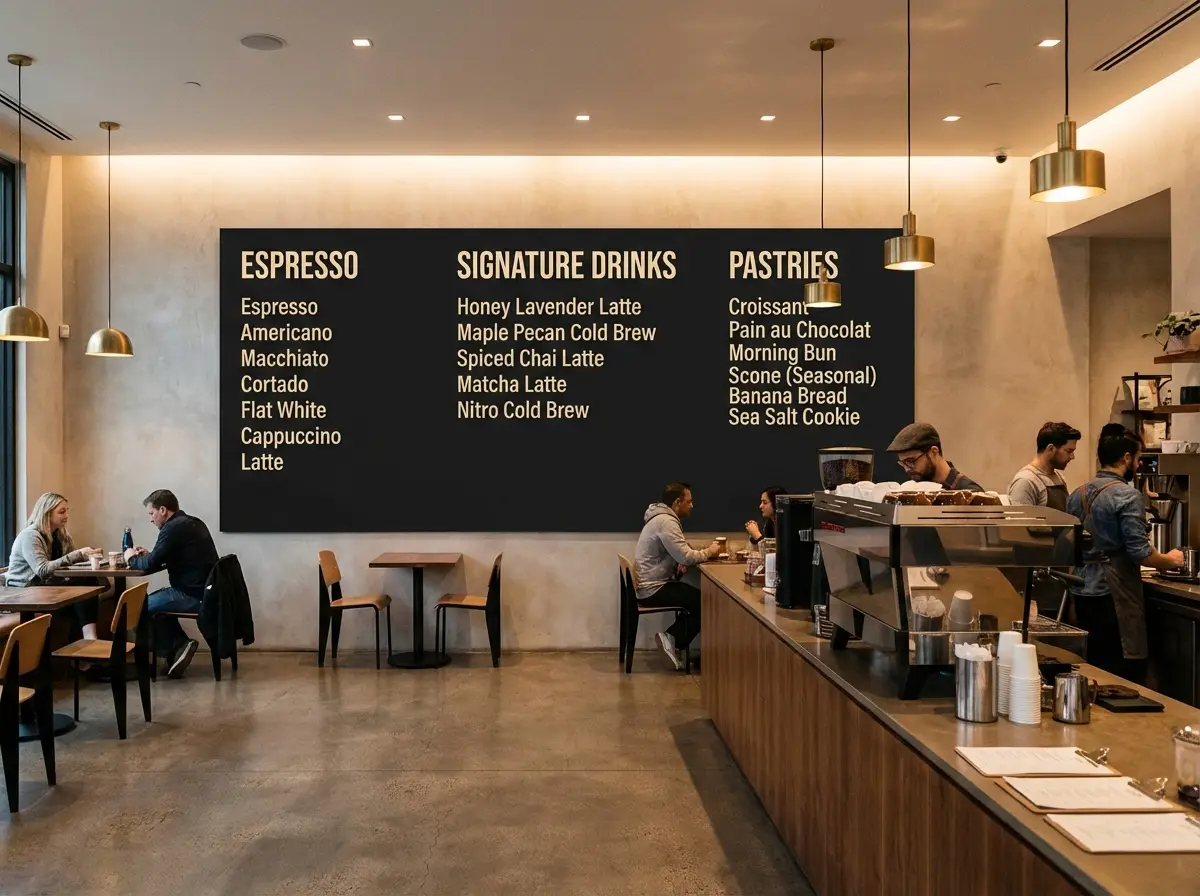
Great for Readable Layouts and Menu-Style Assets

Nano Banana Pro is a top pick when your image includes authentic text, labels, or layout hierarchy, and the text must stay clearly legible.

This makes it perfect for menus, posters, educational explainers, and information-focused marketing materials.
It’s a more dependable option when text is an integral part of the design, not just decorative flourishes.
Its structured prompt framework works extremely well for layout-focused image projects.
Start Building With Nano Banana Pro

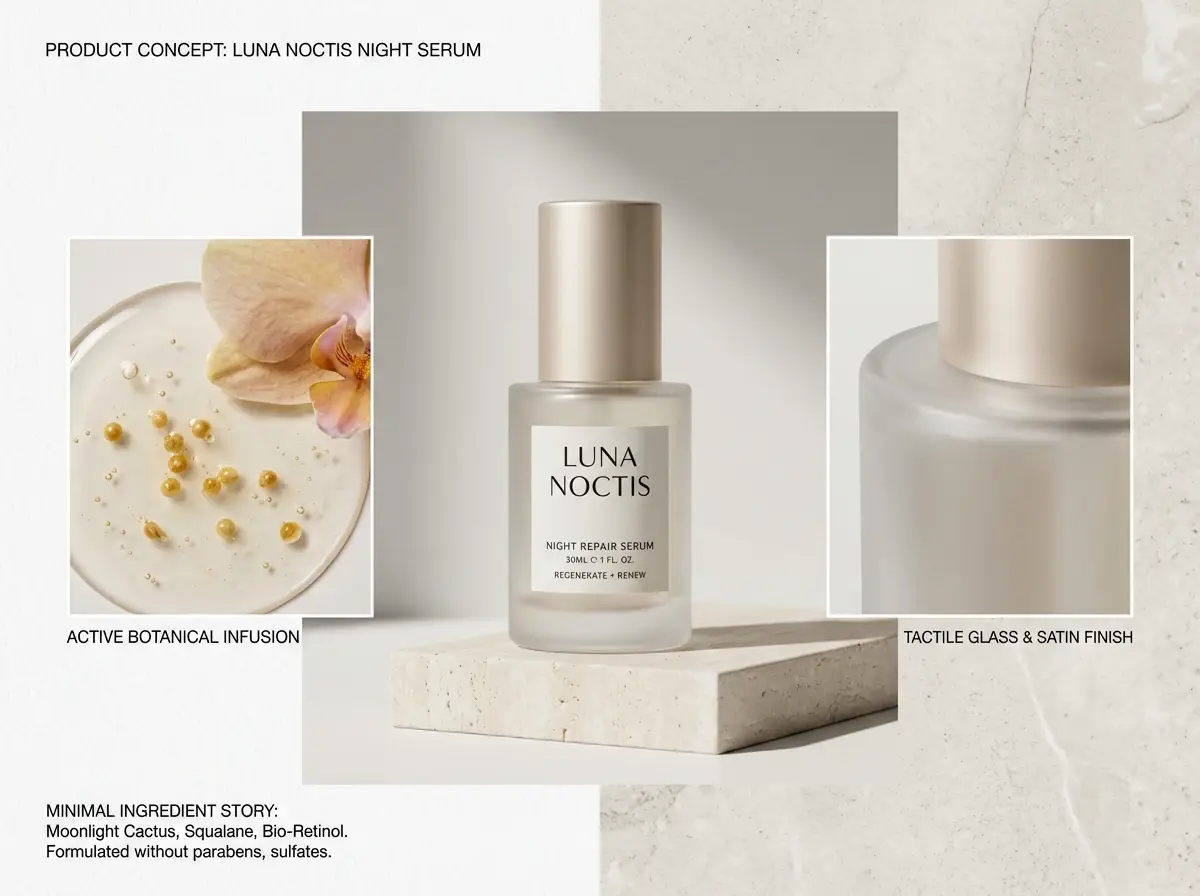
Perfect for Review Boards and Concept Sheets

Nano Banana Pro excels at product mood boards, concept sheets, and other structured visuals that pair hero images with clearly labeled guidance.

This is ideal for internal creative reviews and art direction boards.
It’s useful when a single image needs to communicate multiple visual options at once.
This model produces strong results when each section of your board is clearly labeled.
Start Building With Nano Banana Pro
Model reference image

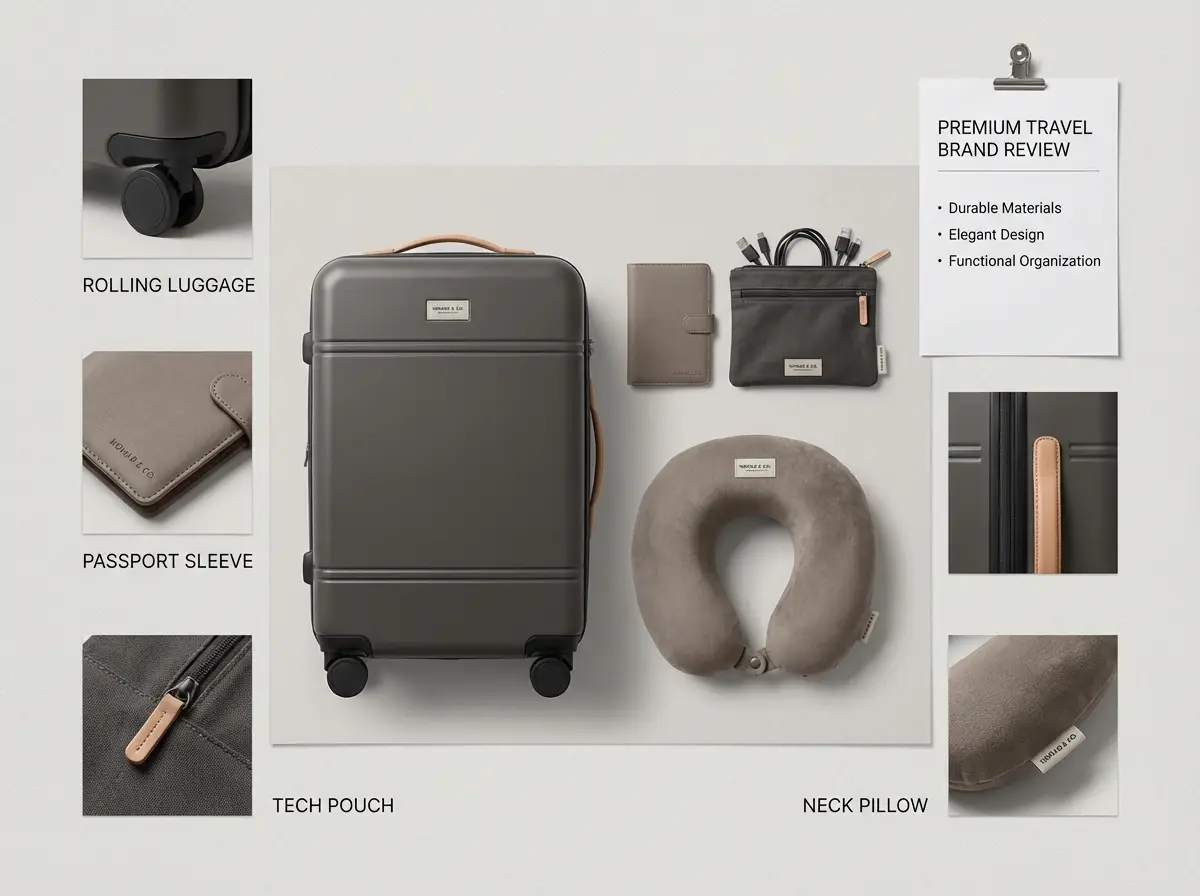
Ideal for Multi-Reference Unified Outputs

Nano Banana Pro also excels when multiple product, styling, or color palette references need to combine to create one unified hosted image output.

This is ideal for travel kits, retail display setups, and larger product line visuals.
It gives the model clearer direction when a single reference would be too restrictive.
Pick this model when each of your multiple reference images has a defined, clear purpose.
Start Building With Nano Banana Pro
Key Use Cases

Ideal Use Cases for Nano Banana Pro

Nano Banana Pro excels when your request combines detailed product specs, readable text, structured layouts, and multiple reference images into a single hosted generation workflow.

Packaging Redesigns and Product Mood Boards

Use this model for product mood boards, packaging updates, and premium brand concepts where product identity and layout consistency are mandatory.

Menus, Posters, and Text-First Visuals

It’s a more dependable option for layouts where headings, short descriptions, or labels must stay clearly legible in the final image, rather than blending into decorative background texture.

Multi-Reference Edits for Cohesive Final Outputs

Include multiple reference images when product shape, surrounding environment, styling, or color palette all need to come together to create one unified final image.

High-Resolution Marketing Collateral

Use Nano Banana Pro once you’ve finalized your visual vision for a straightforward path to high-resolution outputs for marketing campaigns.

Prompt Pro Tips & Practical Real-World Examples

Crafting More Effective Nano Banana Pro prompts: Practical Real-World Use Cases

Each example showcases the structured task types prompt Nano Banana Pro excels at. Focus on visual hierarchy, exact text requirements, and the specific role each reference image should fulfill.

Packaging design

Meets or exceeds leading prompt Alignment Benchmark Standards

Perfect for Luxury Packaging Updates That Need a Refined Board, Short Labels, and Clear Art Direction
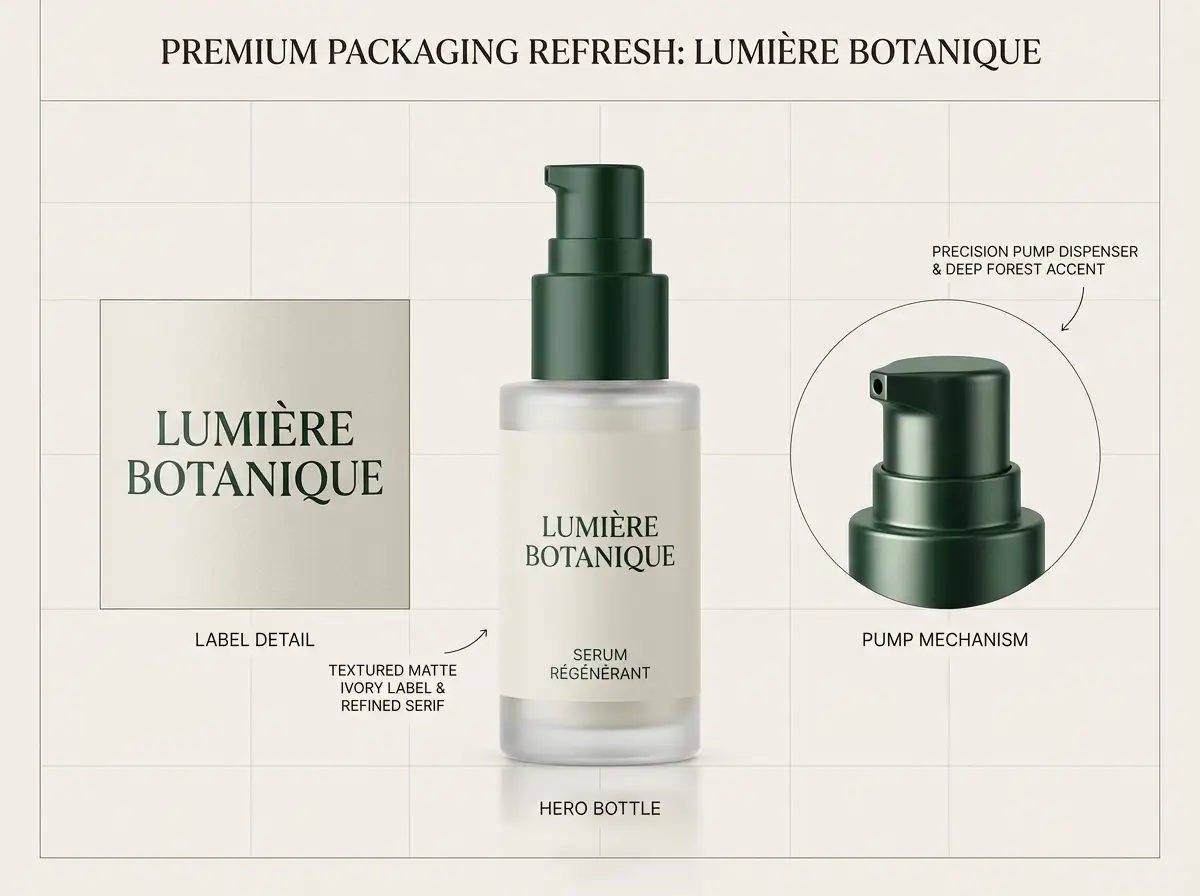
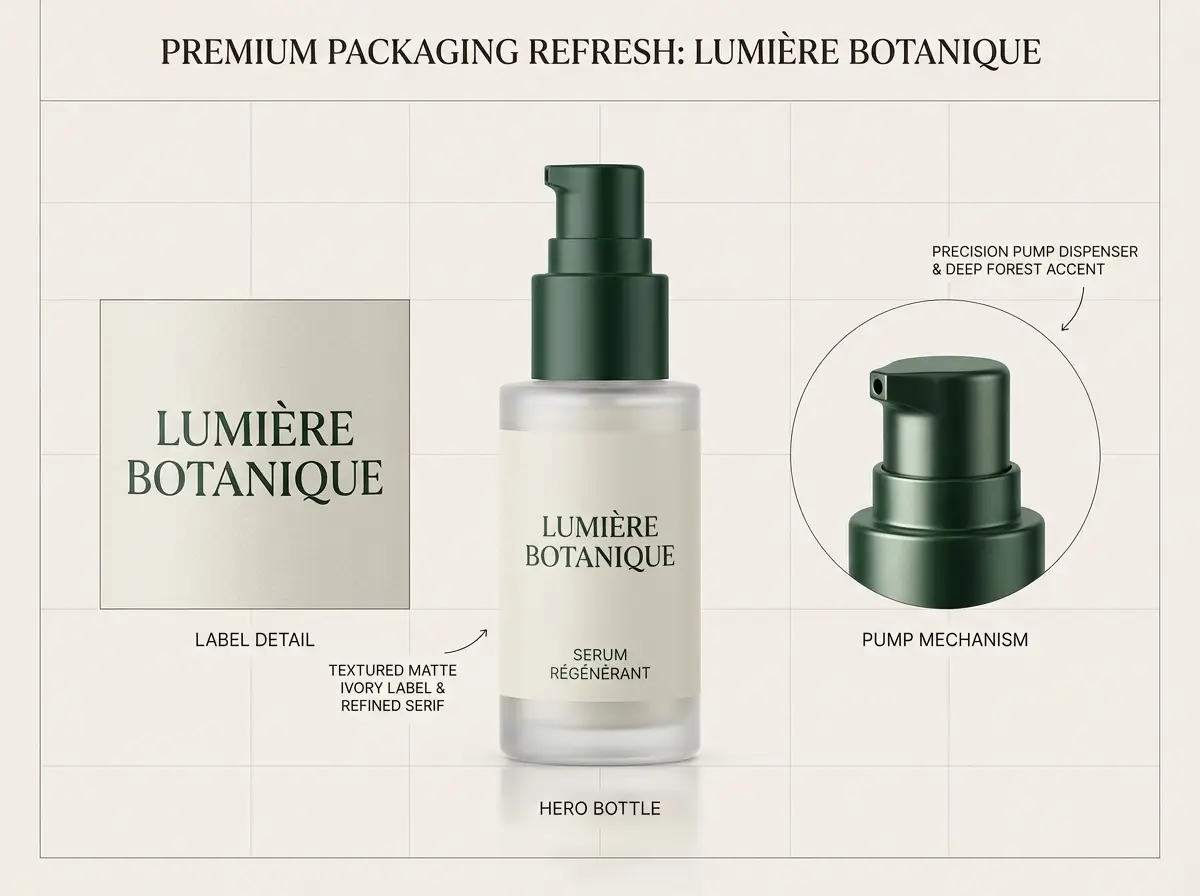
A luxury packaging update board for a glass skincare bottle with clean labels and a refined, intentional layout.

Luxury Packaging Update Board

Proven industry-standard Prompt best-practice workflow for optimized generation

[product] + [what should stay] + [new label direction] + [materials / palette] + [board presentation]

Explore Full prompt Documentation and Official Technical SpecificationsShow Full Comprehensive Breakdown

In-depth prompt Breakdown and Complete Overview

Create a luxury packaging update board for a glass skincare serum bottle. Keep the original bottle silhouette and pump mechanism exactly as they are. Revise the label design to use a matte ivory base with deep forest green accents and a polished serif brand headline. Include one central hero bottle, a close-up crop of the updated label, and short, clear callouts reading "preserve bottle shape", "updated serif label", and "premium wellness color palette". Use soft studio lighting, realistic glass reflections, and a clean design-review board layout.

Core Functional Elements That Allow This Prompt To Produce Standout, High-quality Final Outputs

Nano Banana Pro excels for structured boards when the prompt clearly separates the core product identity from the updated label design.

Targeted Final Generated Project Outcome

A polished concept board perfect for packaging reviews, brand design iterations, or product launch prep.

Curated Pro Tips for Creative Industry Professionals

  • Identify which elements must remain unchanged before outlining the adjustments you want to make.
  • Use short, clear callouts instead of long sentences if your image needs easy-to-read labels.
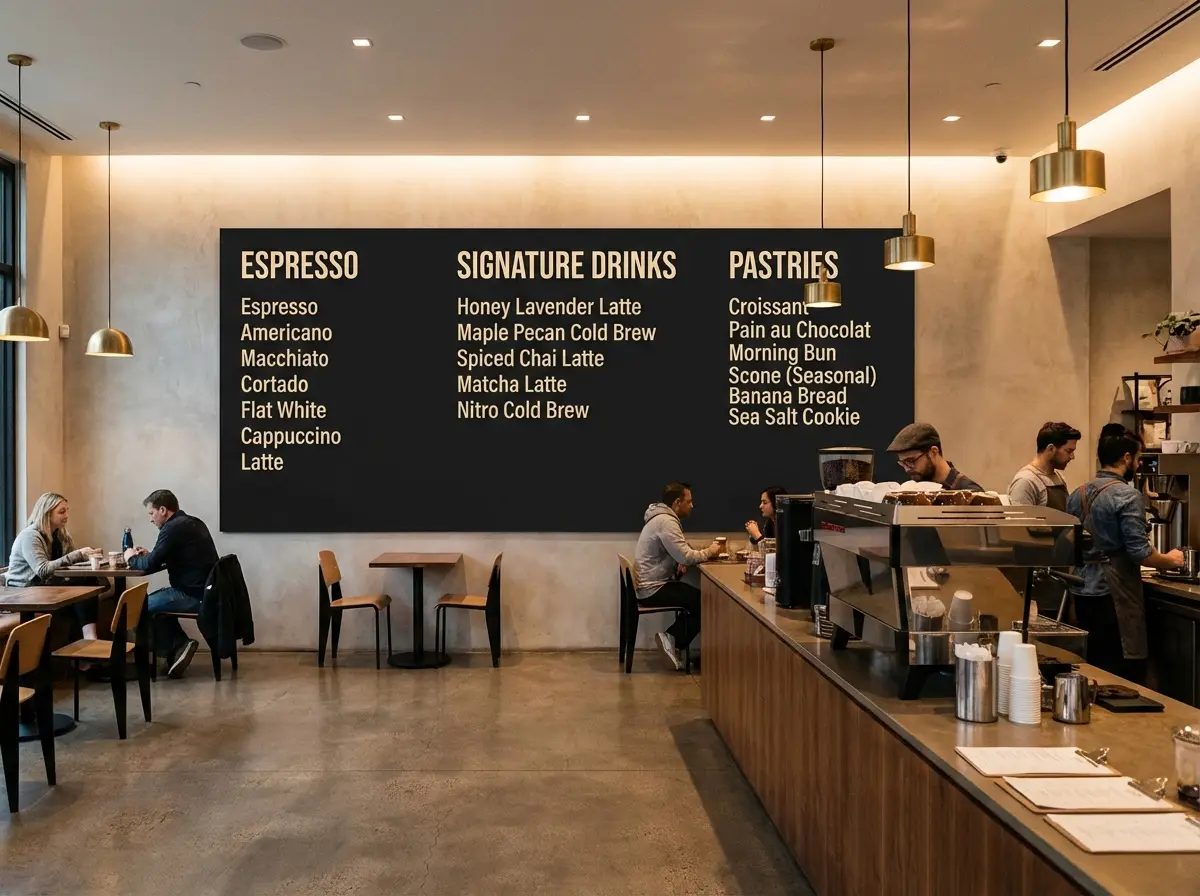
Text-focused layout

Meets or exceeds leading prompt Alignment Benchmark Standards

Ideal for Menu Boards and Poster Layouts Where Text Reads as Natural, Functional Copy

A readable cafe menu board with clear category headings and a premium in-store interior backdrop.

Readable Cafe Menu Board

Proven industry-standard Prompt best-practice workflow for optimized generation

[menu subject] + [exact headings] + [layout structure] + [interior style] + [readability note]

Explore Full prompt Documentation and Official Technical SpecificationsShow Full Comprehensive Breakdown

In-depth prompt Breakdown and Complete Overview

Make a premium cafe menu board installed in a sleek, modern coffee bar. Use large, easy-to-read category headings: "Espresso", "Signature Drinks", and "Pastries". Under each heading, add two short menu items with straightforward pricing. Keep a matte black board base with warm cream-colored text, clean, generous spacing, and a layout that feels like an authentic hospitality brand rather than playful chalk art. Use soft indoor overhead lighting and a realistic, cozy cafe interior around the menu board.

Core Functional Elements That Allow This Prompt To Produce Standout, High-quality Final Outputs

This prompt focuses on short, clear text, establishes the visual hierarchy, and clearly communicates to the model that readability matters more than decorative typography.

Targeted Final Generated Project Outcome

A practical menu concept ideal for hospitality brands, cafe mockups, or in-store retail visual prep.

Curated Pro Tips for Creative Industry Professionals

  • Use short phrases for your text to keep the layout realistic and functional.
  • Separate the menu board’s design and the surrounding cafe environment into two distinct elements for sharper results.
Product promotion

Meets or exceeds leading prompt Alignment Benchmark Standards

Ideal for Luxury Product Boards With a Hero Render, Callouts, and Short Structured Notes

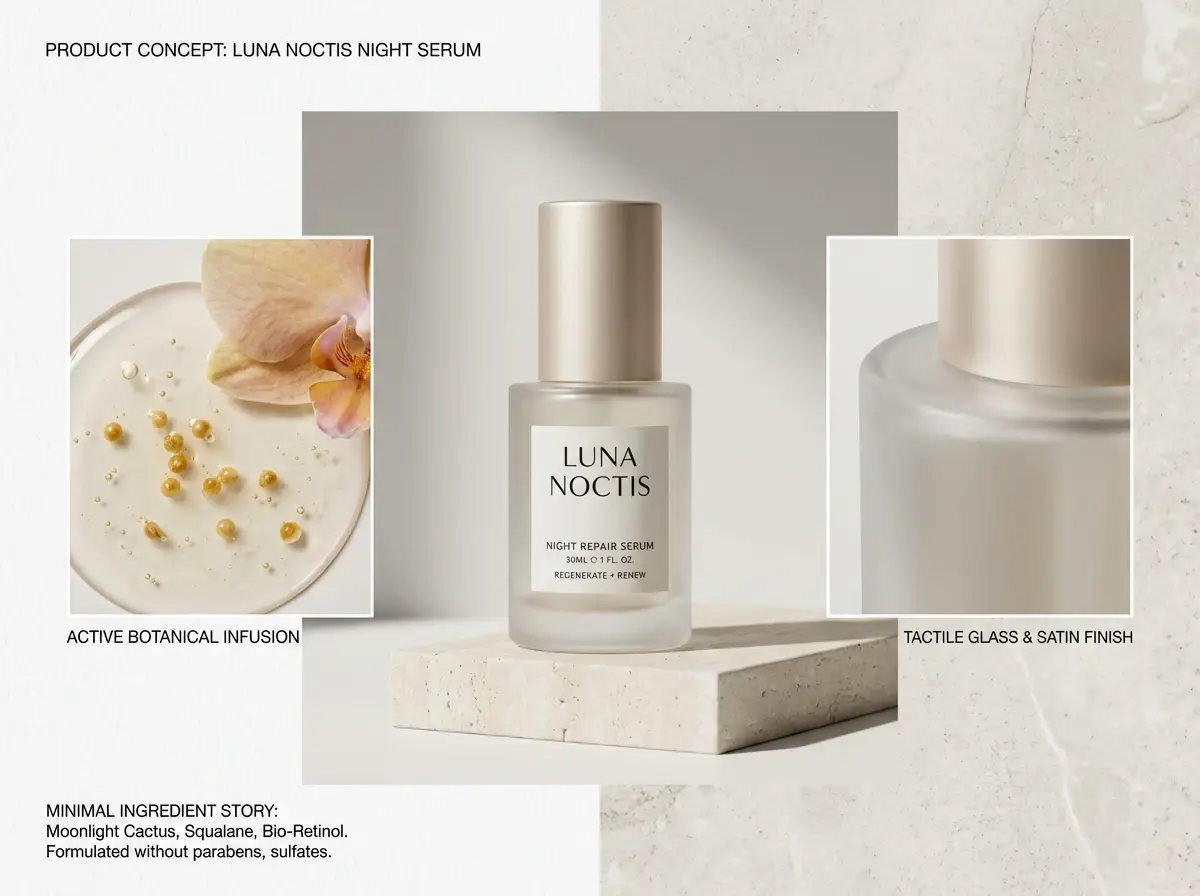
A skincare product concept board with a central hero bottle, close-up detail crops, and labeled design callouts.

Skincare Product Concept Board

Proven industry-standard Prompt best-practice workflow for optimized generation

[product] + [board sections] + [callout labels] + [brand mood] + [studio presentation]

Explore Full prompt Documentation and Official Technical SpecificationsShow Full Comprehensive Breakdown

In-depth prompt Breakdown and Complete Overview

Create a skincare product concept board for a hydrating night serum. Include one large central hero bottle, two smaller close-up detail crops, and short, clear callout labels reading "glass bottle", "soft satin cap", and "minimal ingredient story". Use a crisp white and pale stone background, understated editorial typography, luxury skincare studio lighting, and a clean art-direction board layout perfect for internal design reviews.

Core Functional Elements That Allow This Prompt To Produce Standout, High-quality Final Outputs

Nano Banana Pro produces sharper results when the prompt sets a clear board structure, rather than asking for a single standalone beauty shot with added labels.

Targeted Final Generated Project Outcome

An organized product board perfect for brand reviews, launch presentations, or internal team visual alignment.

Curated Pro Tips for Creative Industry Professionals

  • Explicitly name the board’s sections to ensure the composition feels intentional and well-planned.
  • Stick to 2 to 4 short, clear labels instead of a long paragraph of text.
Multi-reference adjustment

Meets or exceeds leading prompt Alignment Benchmark Standards

Ideal for multi-reference Boards Where Product Pieces, Color Palette, and Layout Need to Draw From Multiple Reference Images

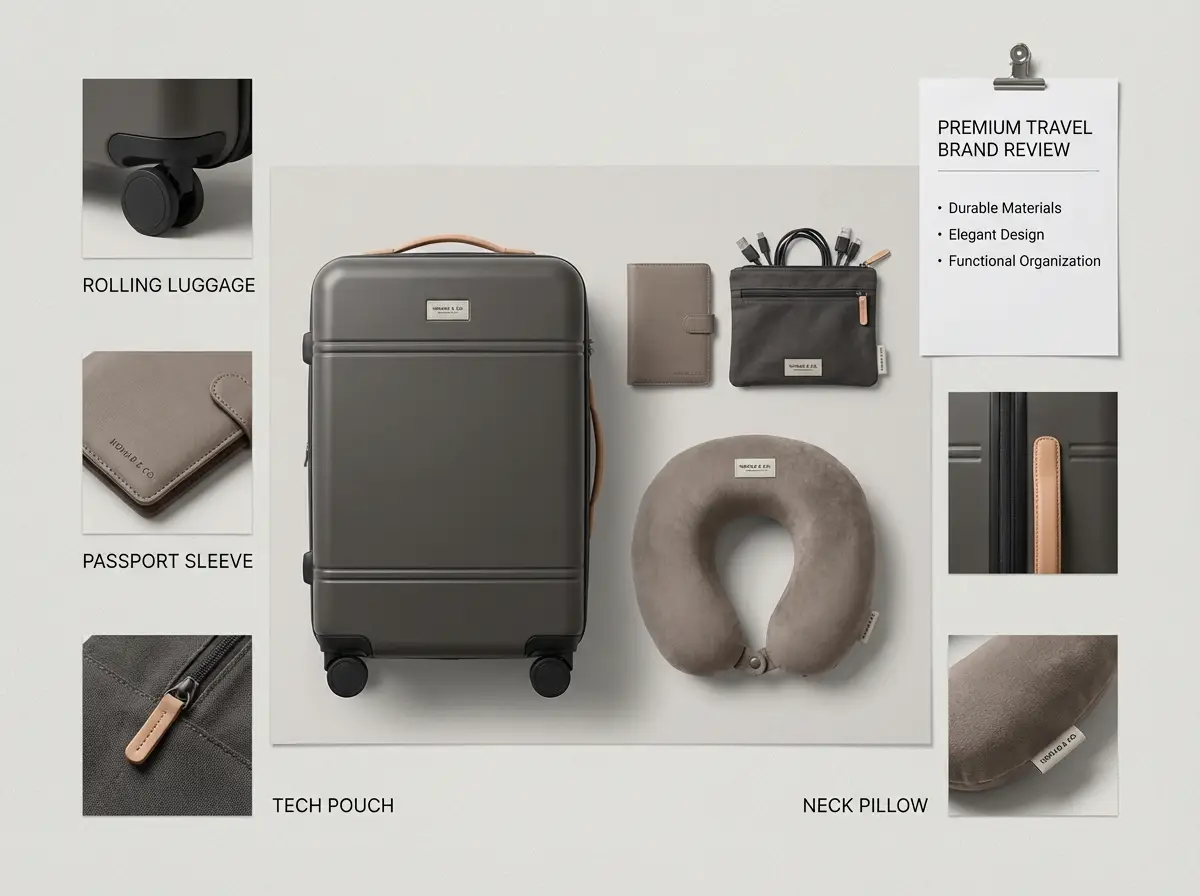
A travel kit design board combining luggage, accessories, and coordinated color direction drawn from multiple reference images.

Multi-Reference Travel Kit Design

Proven industry-standard Prompt best-practice workflow for optimized generation

[hero kit] + [reference roles] + [what should stay consistent] + [layout mood] + [output format]

Explore Full prompt Documentation and Official Technical SpecificationsShow Full Comprehensive Breakdown

In-depth prompt Breakdown and Complete Overview

Create a luxury travel essentials design board using multiple reference images. Use one reference to define the luggage silhouette, a second to set the pouch material, and a third to lock in the neutral taupe and charcoal color palette. Arrange the kit as a clean flat-lay board with a carry-on bag, passport sleeve, charging pouch, and neck pillow. Keep cohesive, minimal, realistic styling, add short item labels, and design a layout that feels like a premium travel brand review sheet.

Core Functional Elements That Allow This Prompt To Produce Standout, High-quality Final Outputs

The prompt explicitly assigns a specific objective to each reference image and tells the model how to combine all elements into one unified board.

Targeted Final Generated Project Outcome

A multi-reference design board that combines multiple product design choices into one refined final visual.

Curated Pro Tips for Creative Industry Professionals

  • Explicitly state what each reference image controls, rather than uploading multiple images without explaining their purpose.
  • Request one unified board instead of multiple disconnected scenes for a cohesive final result.
When to Choose Nano Banana Pro

Choose Nano Banana Pro When Detailed Specifications and Refined Finishes Matter More Than Raw Generation Speed

Nano Banana Pro is the ideal choice for complex requests, images that need readable text or labeled structure, and projects where the final output should feel fully polished before exiting the generation tool.

Choose Nano Banana Pro When Your Brief Is Detailed and Your Output Needs to Meet Strict Standards

Use this model when your prompt reads like a formal creative brief, including exact text requirements, specific product details, multiple reference images, and a layout that must stay consistent from initial draft to final deliverable.

Choose a Different Model When Speed, Grounding, or Open Deployment Are Your Main Priorities

Go with Nano Banana Flash for faster, budget-friendly iteration, Nano Banana 2 when web grounding is the core of your task, and Z-Image when open model weights or local deployment are key factors for your selection.

Community Insights

Video Walkthroughs & Independent Creator Reviews for Nano Banana Pro

These videos walk creators through using Nano Banana Pro for packaging edits, prompt best practices, and structured image workflows. They highlight the model’s strengths covered on this page without repeating the prompt examples above.

Curated Gallery of AI Video Generation Showcase Pieces

FAQs

FAQ

Helpful information about HappyHorse 2

What is Nano Banana Pro?

Nano Banana Pro is a top-tier hosted image model in Google’s product suite, designed for intentional generative creation and precise edits. It’s ideal for projects where your prompt requires hyper-detailed work, layout consistency is mandatory, and you need to reference multiple images for a single generation job.

What is Nano Banana Pro best for?

Nano Banana Pro excels at product mood boards, packaging redesigns, poster layouts with authentic text, educational visual explainers, and branded marketing assets that require tighter structure and a refined final deliverable.

Does Nano Banana Pro support image input here?

Without a doubt. This model accepts up to eight reference images per single request, perfect for multi-image edits, product mood boards, and projects where color palette, layout, and core subject identity must align closely with your initial creative brief.

Which resolutions and aspect ratios does Nano Banana Pro support here?

Nano Banana Pro provides 1K, 2K, and 4K output resolutions on this platform. You’ll have access to 1:1, 2:3, 3:2, 3:4, 4:3, 4:5, 5:4, 9:16, 16:9, 21:9 aspect ratios, plus automatic sizing presets for quick setup.

How do I write better Nano Banana Pro prompts?

To get the strongest possible results, structure your prompt like a formal creative brief. First, define your core subject, map out your ideal composition, note any exact text that must appear in the final image, and clearly state what each reference image should contribute to the project. Nano Banana Pro produces sharper outputs when your request is clear, specific, and free of generic, overused language.

When should I use Nano Banana Pro instead of Nano Banana Flash or Nano Banana 2?

Choose Nano Banana Pro when high output fidelity, crisp readable text, and a refined final finish matter more than raw generation speed. Pick Nano Banana Flash if fast iteration and budget-friendly edits are your main priorities. Go with Nano Banana 2 when web grounding or modern multi-reference workflows are the core of your creative pipeline.

Can Nano Banana Pro generate readable text in images?

Absolutely. Nano Banana Pro is a top pick for images that require menus, poster headlines, product labels, callouts, or other short, easy-to-read text that blends seamlessly into the final composition rather than looking like generic background texture.

Can I use Nano Banana Pro images commercially?

For professional production work, treat Nano Banana Pro’s generated outputs the same as any other hosted model result: review the final asset for legal compliance, brand alignment, and platform policy rules before publishing. Whether your commercial use case is valid depends on your specific needs and the applicable platform terms of service for this tool.

Still have questions? Our support team is ready to help.

Comparable Models

Compare Nano Banana Pro to Other Image Models on Our Site

If Nano Banana Pro isn’t the right fit for your workflow, compare it to these model pages to evaluate tradeoffs around speed, grounding, hosted editing style, or open deployment options.

Nano Banana Flash AI Image Generator

Test Nano Banana Flash if you want faster iteration, quicker editing cycles, and a more budget-friendly hosted creation workflow.

Discover Our Curated Collection of Associated AI Models

Nano Banana 2 AI Image Generator

Evaluate your options against Nano Banana 2 if optional web grounding and modern multi-image workflows matter more to you than maximum refinement.

Discover Our Curated Collection of Associated AI Models

GPT-4o AI Image Generator

Try GPT-4o if readable text and diagram-style layouts are important, but you prefer OpenAI’s hosted editing workflow.

Discover Our Curated Collection of Associated AI Models

Z-Image AI Image Generator

Compare against Z-Image if open model weights, local deployment, or post-creation customization are key factors for your model selection.

Discover Our Curated Collection of Associated AI Models

Try Nano Banana Pro Today

Open the creation tool, start with a detailed prompt, and upload only the reference images that will directly guide your final output.

Launch Nano Banana Pro Creator Tool
Resources
  • Create
  • Pricing
  • Image to Prompt
  • Batch Image to Prompt
Company & Legal
  • About
  • Contact
  • Privacy Policy
  • Terms of Service
  • Refund Policy
AI Image
  • Nano Banana Pro
  • Nano Banana 2
  • GPT-4o
  • Seedream 4.5
  • Seedream 4.0
  • Flux 2 Pro
  • Flux 2
  • Qwen Image 2
  • Z-Image
  • NanoBanana Flash
  • Qwen Image 3
HappyHorse 2

HappyHorse 2 – AI Video Generator Free with New User Credits

[email protected]

This website is an independent third-party service built around HappyHorse 2 workflows. We are not the official website for HappyHorse 2, and all product names, model names, and trademarks belong to their respective owners.

© 2026 HappyHorse 2. All rights reserved.

Privacy Policy