HappyHorse 2
  • Create
  • AI Image
    • Open Image WorkspaceCreate or edit images with all supported models
    • GPT Image 2NewOpenAI image generation and reference-guided editing
    • Nano Banana 2NewFast Google image generation with multi-reference editing
    • Nano Banana ProHigh-fidelity Google image generation and editing
    • Nano Banana FlashFast, efficient image generation and editing
    • Seedream 5.0NewHigh-detail creative image generation
    • Flux 2Flexible generation and reference-based editing
    • Qwen Image 2Versatile image generation with strong text rendering
    • Z-ImageFast open-weight image generation
    • Qwen Image 3NewStructured prompts, multilingual text, and rich visual detail
  • AI Video
    • Open Video WorkspaceCreate videos with all currently connected models
    • MiniMax H3NewExplore MiniMax H3 workflows, prompts, and video creation techniques
  • Tools
  • Pricing
English
  • English
  • 中文
  • 日本語
  • 한국어
  • Español
  • العربية
  • 繁體中文
HappyHorse 2

Nano Banana Flash Image Generator

is a lightning-fast cloud-native image model built for near-instant generation and hassle-free, low-effort edits. It excels when you need rapid turnaround times, support for up to 10 reference images, and a streamlined editing workflow for concept drafts, marketing assets, or last-minute visual tweaks.

Describe the image you want to generate

Generate 1 images · 4 credits total

Step-by-Step Walkthrough for Using Nano Banana Flash

Streamline Your Image Generation & Editing Workflow With Nano Banana Flash Today

Begin with a clear, targeted prompt, upload reference images as needed, and cycle through quick, precise tweaks until your concept is ready to share with your team or finalize for production.

01

Define Your Visual Task Clearly

Clearly lay out the visual task you’re working on: note what you want to create or adjust, which elements need to stay consistent, and the intended use of your final asset.

02

Upload Reference Images to Set Your Creative Direction

Use up to 10 reference images when you want Nano Banana Flash to combine product branding, layout, styling, or mood via a fast, simplified workflow.

03

Iterate With Quick, Targeted Adjustments

Request one or two targeted adjustments at a time, so you can quickly compare different versions and keep your editing workflow running smoothly.

Core Strengths of Nano Banana Flash

What Makes Nano Banana Flash Stand Out When Speed Is Non-Negotiable

Nano Banana Flash is the speedy option in this model lineup, ideal for when edits, mood boards, and social media assets need to be finished quickly without waiting for a more resource-intensive, fully polished render.

Designed for Fast Edit Turnaround

Nano Banana Flash excels when room refreshes, product swaps, or layout adjustments need to be completed quickly within a cloud-native editing tool.

This makes it ideal for rapid creative iteration and fast, on-demand review tweaks.
It performs best when you have a clear creative vision and prioritize speed over ultra-polished final outcomes.
Select it when your main goal is rapidly exploring multiple creative options.
Start Creating With Nano Banana Flash
Model reference image

Perfect for Storyboard-Style & Paneled Assets

Nano Banana Flash also excels for mood boards, storyboard panels, and rapid multi-part layouts when your image needs to share multiple creative ideas in a single frame.

This is ideal for product storyboards and product launch sequence concepts.
Its streamlined workflow lets you build multiple board versions in a single work session.
It’s perfectly suited for tasks where speed is a critical part of your project requirements.
Start Creating With Nano Banana Flash

Ideal for Light Multi-Image Creative Direction

Nano Banana Flash also performs well for projects where multiple reference inputs create a collage-style or mood-board image, all within a fast, low-effort workflow.

This is fantastic for sneaker design variations, travel product kits, and rapid comparison sheets.
It offers more structured creative direction than a single-image prompt, without switching to a slower, more resource-intensive model.
Choose it when you need creative direction fast, rather than a fully polished final result.
Start Creating With Nano Banana Flash
Model reference image

Perfect for Fast Social Launch Assets

Nano Banana Flash is a practical choice for bite-sized launch visuals, quick promotional content, and social-media-focused creative work when fast turnaround is a critical project requirement.

This makes it ideal for rapid ad variations and seasonal social media creative assets.
It delivers its best results when your image’s main objective is clear and straightforward.
Pick it when speed and output volume matter more than ultra-polished final details.
Start Creating With Nano Banana Flash
Top Use Cases

Perfect Use Cases for Nano Banana Flash

Nano Banana Flash shines when your project needs rapid concept development, quick edits, or multiple short cycles of visual iteration all within a single cloud-native image tool.

Quick Social & Campaign Drafts

Ideal for social media launch visuals, ad campaign concepts, and quick creative drafts when you want a fast first pass rather than a fully polished final asset right away.

Room, Product, and Scene Refresh Edits

Excellent for quick before-and-after style adjustments where the core structure of your scene or product is already finalized, and you want to update its appearance, styling, or minor details.

Multi-Image Blends & Mood Boards

Import multiple reference images to combine product design elements, textures, or brand identity into a fast, unified conceptual result.

Storyboards & Sequential Variations

Use Nano Banana Flash for storyboard panels, draft sequences, or rapid versioning when your main priority is speed and broad creative coverage over a single, perfectly polished final image.

Crafting Prompt: Best Practices & Real-World Examples

How to Write More Effective Nano Banana Flash prompts: Real-World Use Cases

These examples highlight tasks where Nano Banana Flash excels: fast edits, practical layout adjustments, and rapid concepting with multiple short prompt cycles of iteration.

Interior edit

Meets or exceeds leading prompt Alignment Benchmark Standards

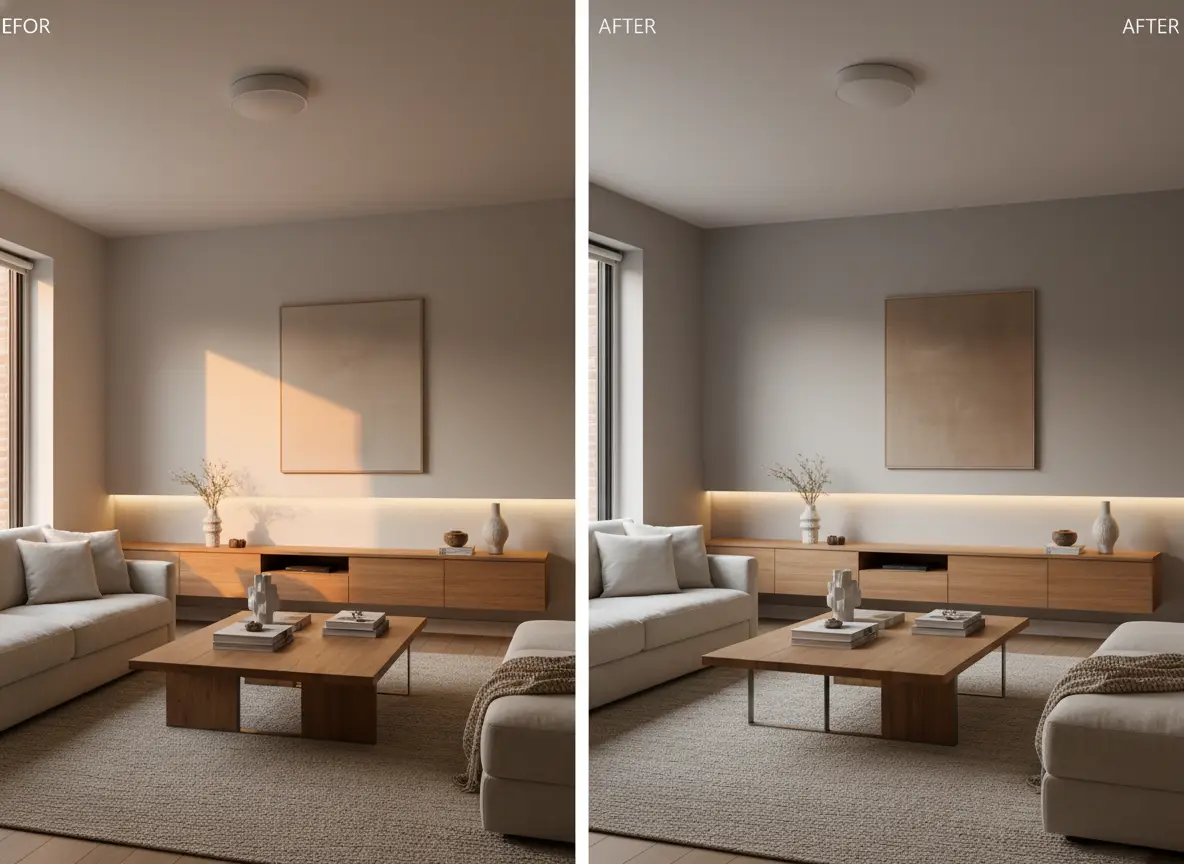
Perfect for quick room refreshes where the core layout stays consistent, but you want to rapidly update the space’s appearance.
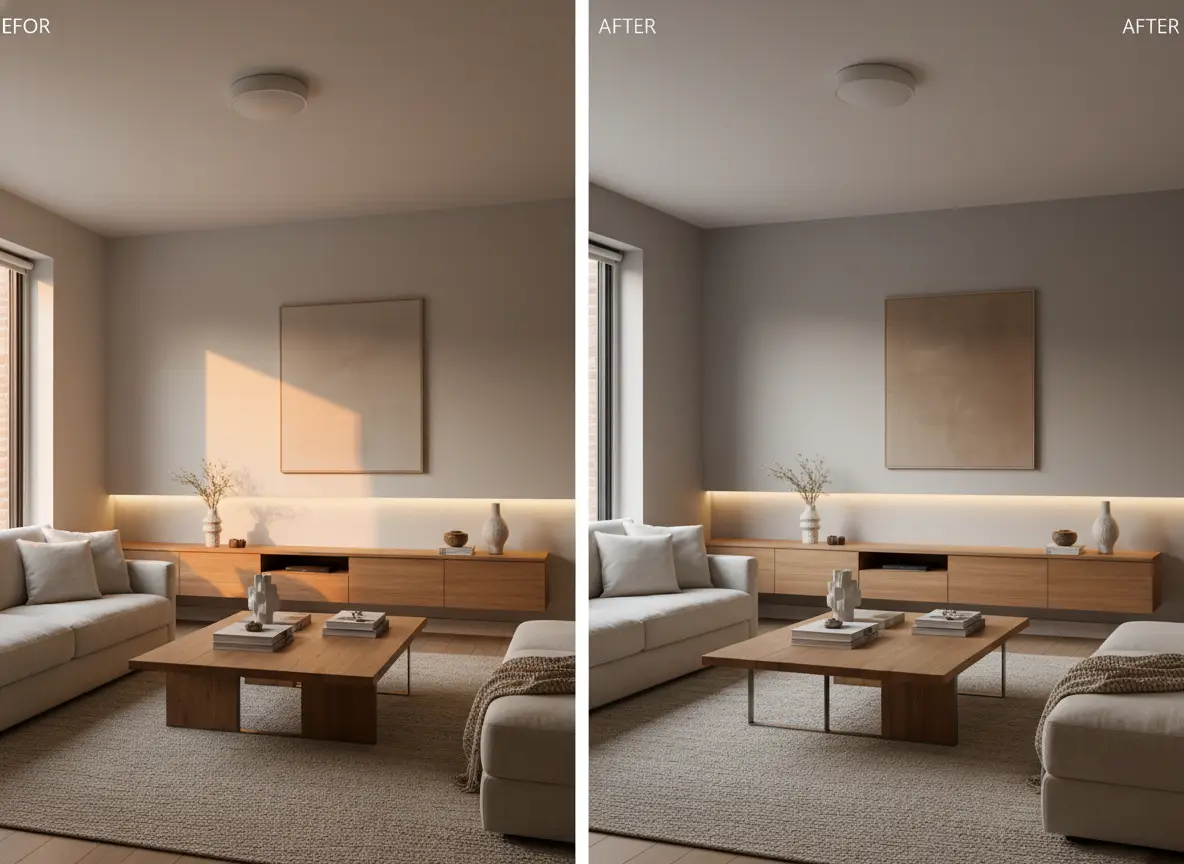
A rapid living-room refresh edit with warmer materials and a more streamlined styling approach.

Fast Living Room Refresh Edit

Proven industry-standard Prompt best-practice workflow for optimized generation

[what stays] + [what changes] + [new style direction] + [lighting mood] + [usage goal]

Explore Full prompt Documentation and Official Technical SpecificationsShow Full Comprehensive Breakdown

In-depth prompt Breakdown and Complete Overview

Keep the living room’s layout and camera angle exactly as seen in the supplied reference image. Refresh the space with warm oak accents, a plush linen sofa, soft indirect afternoon lighting, and a quieter, high-end home styling direction. Create a realistic interior refresh built for a design studio presentation, not a full-scale remodel.

Core Functional Elements That Allow This Prompt To Produce Standout, High-quality Final Outputs

This targeted, narrow edit request is ideal for Nano Banana Flash, since the adjustment list is clear and simple to iterate on across multiple rapid cycles.

Targeted Final Generated Project Outcome

A realistic before-and-after style refresh for interior design, staging, or campaign concept work.

Curated Pro Tips for Creative Industry Professionals

  • Start by listing which elements should stay consistent to keep the scene aligned with your reference image.
  • Limit your edit scope to a narrow enough range for a speedy model to follow clearly and precisely.
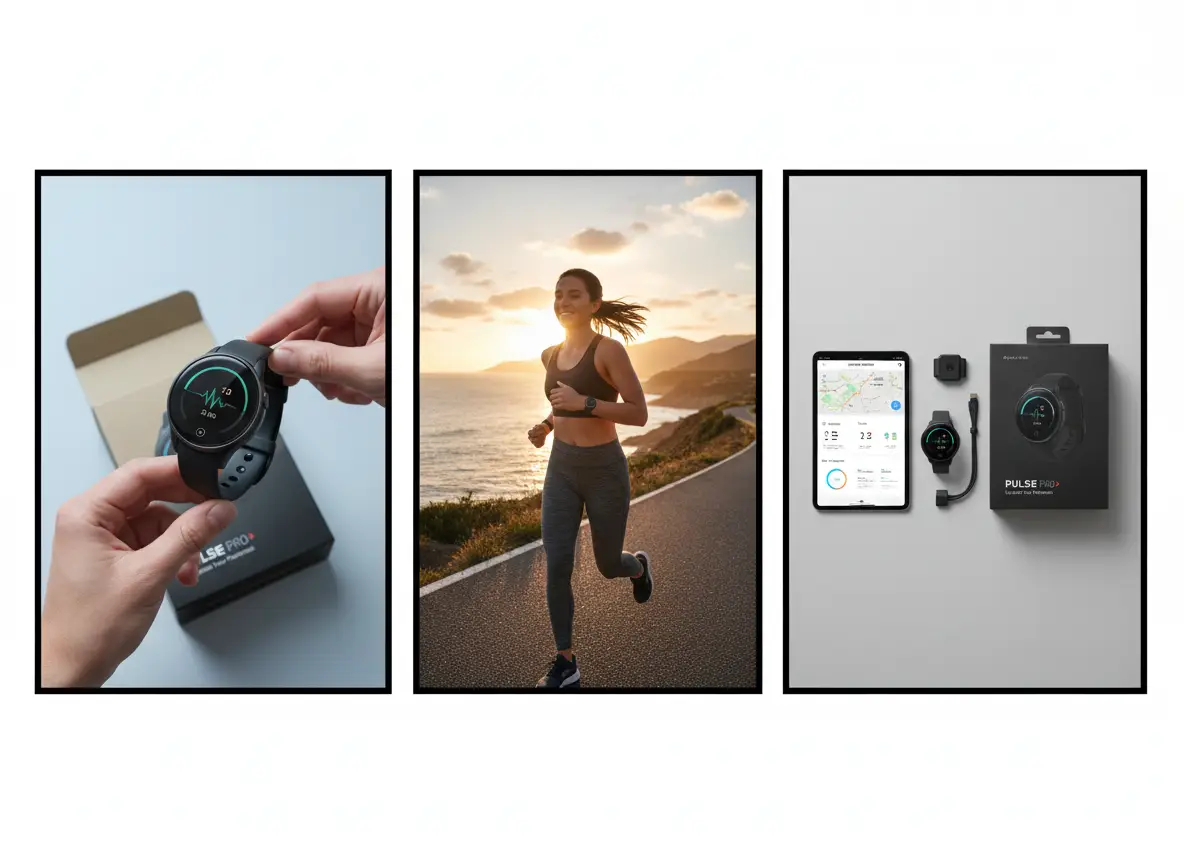
Storyboard

Meets or exceeds leading prompt Alignment Benchmark Standards

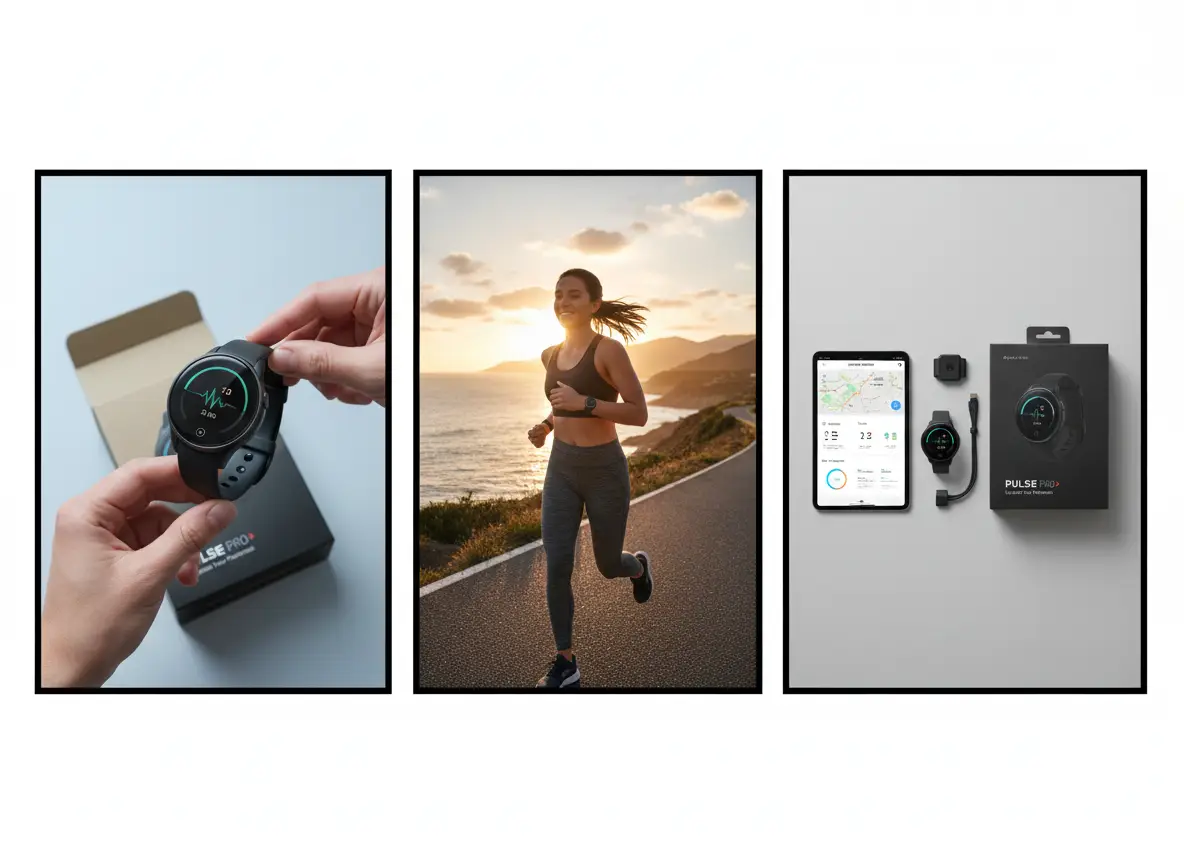
Excellent for rapid panel-based concepting when you want to visualize a simple sequence before moving to full production refinement.

A three-panel product storyboard for a wearable fitness tracker launch idea.

Three-Panel Product Storyboard

Proven industry-standard Prompt best-practice workflow for optimized generation

[subject] + [number of panels] + [what each panel shows] + [visual style] + [presentation note]

Explore Full prompt Documentation and Official Technical SpecificationsShow Full Comprehensive Breakdown

In-depth prompt Breakdown and Complete Overview

Build a three-panel storyboard for a wearable fitness tracker launch. Panel 1: Close-up product reveal on a clean, neutral backdrop. Panel 2: Athlete wearing the tracker outdoors at sunrise. Panel 3: Product sitting next to the companion app screen and packaging. Use a modern commercial aesthetic, clear panel separation, and a quick concept vibe instead of a fully polished ad campaign.

Core Functional Elements That Allow This Prompt To Produce Standout, High-quality Final Outputs

Nano Banana Flash is ideal for this use case, since it lets you create multiple frames or variations quickly without waiting for a more resource-heavy production-style render.

Targeted Final Generated Project Outcome

A rapid storyboard draft for campaign planning, internal alignment, or creative direction.

Curated Pro Tips for Creative Industry Professionals

  • Specify the exact number of panels you need for your sequence.
  • Outline a clear purpose for each panel to keep the storyboard flow easy to follow and understand.
Multi-image blend

Meets or exceeds leading prompt Alignment Benchmark Standards

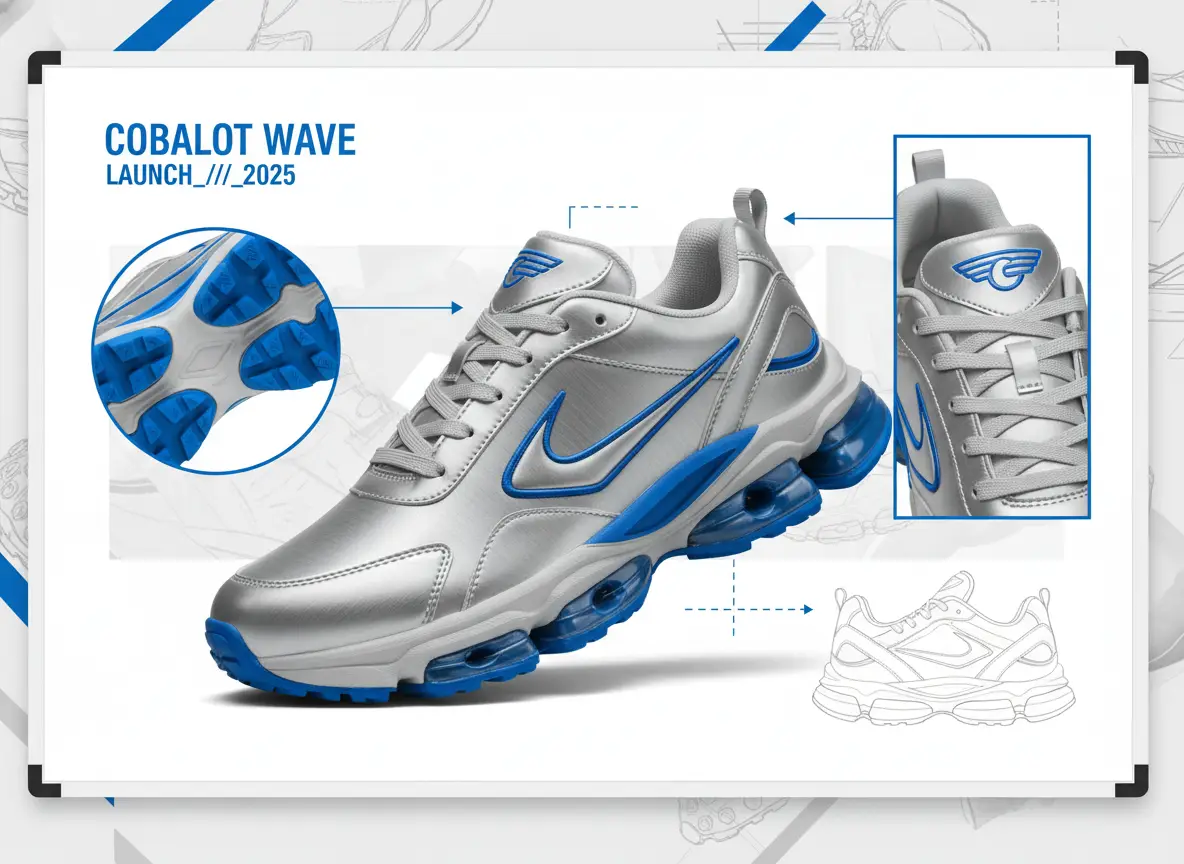
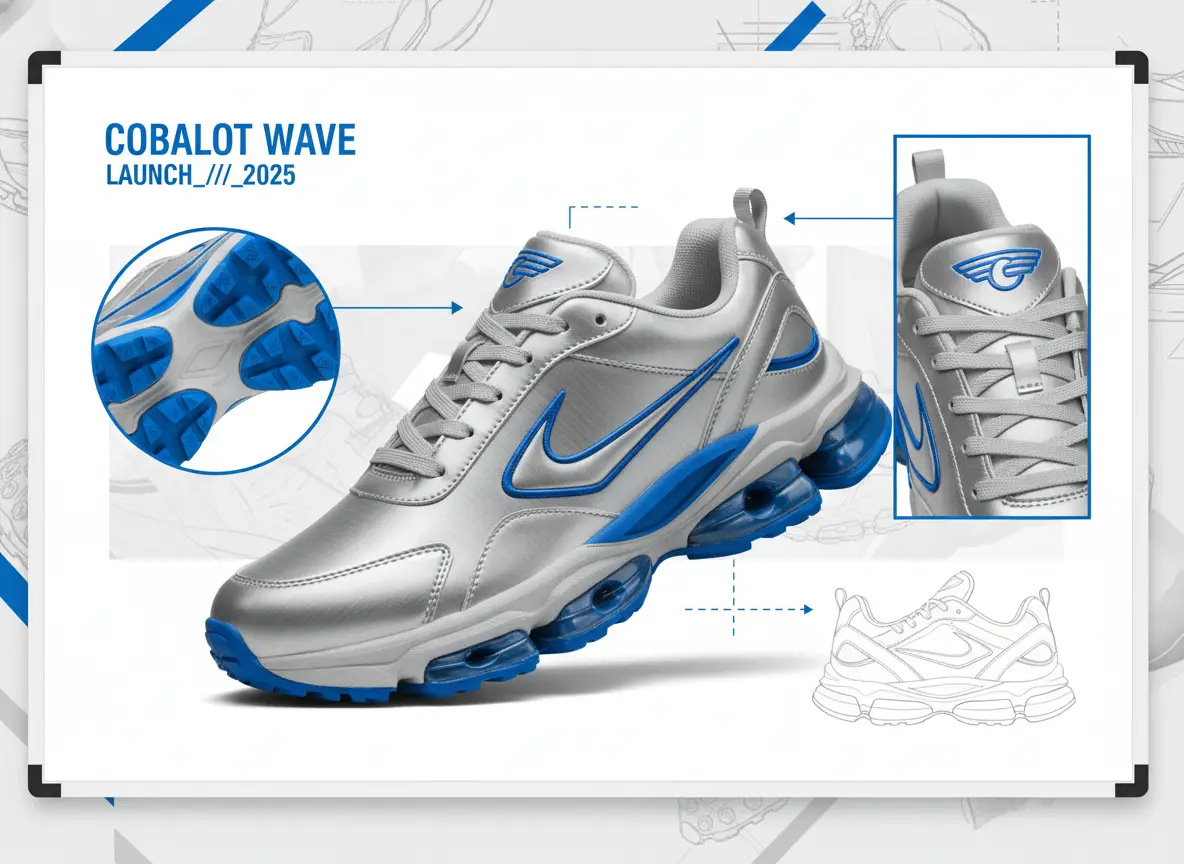
Perfect for fast mood-board style blends that combine material details, shoe silhouette, and campaign branding from multiple reference images.

A sneaker collage concept merging references for silhouette, materials, and campaign styling.

Multi-Image Sneaker Collage Concept

Proven industry-standard Prompt best-practice workflow for optimized generation

[hero object] + [reference roles] + [blend direction] + [layout] + [brand mood]

Explore Full prompt Documentation and Official Technical SpecificationsShow Full Comprehensive Breakdown

In-depth prompt Breakdown and Complete Overview

Build a sneaker concept collage using multiple reference images. Assign one reference to set the shoe’s silhouette, another for metallic silver material details, a third for bright cobalt accent touches, and a fourth to establish the campaign mood. Deliver the final result as a quick concept board with one hero sneaker, two supporting detail angles, and bold sportswear launch energy on a clean, neutral backdrop.

Core Functional Elements That Allow This Prompt To Produce Standout, High-quality Final Outputs

By giving each reference a clear, defined role, prompt can merge the inputs smoothly without creating visual clutter or disconnected results.

Targeted Final Generated Project Outcome

A fast blend-style concept board that helps a creative team compare directions before picking a final path.

Curated Pro Tips for Creative Industry Professionals

  • Explicitly note what each reference image controls for the model.
  • Ask for one main hero object alongside a small set of supporting views, instead of an overcrowded collage.
Social draft

Meets or exceeds leading prompt Alignment Benchmark Standards

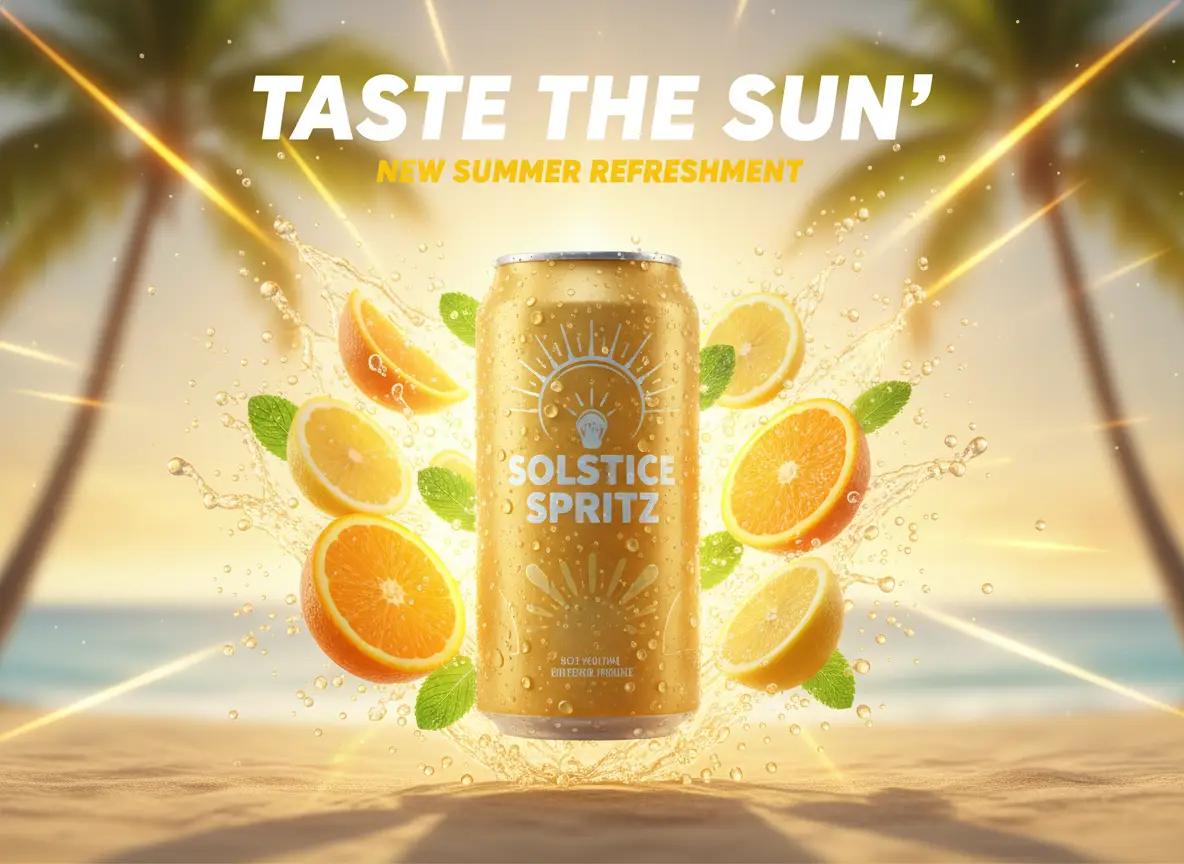
Ideal for social media launch visuals when speed is a higher priority than polishing every small detail in the final image.

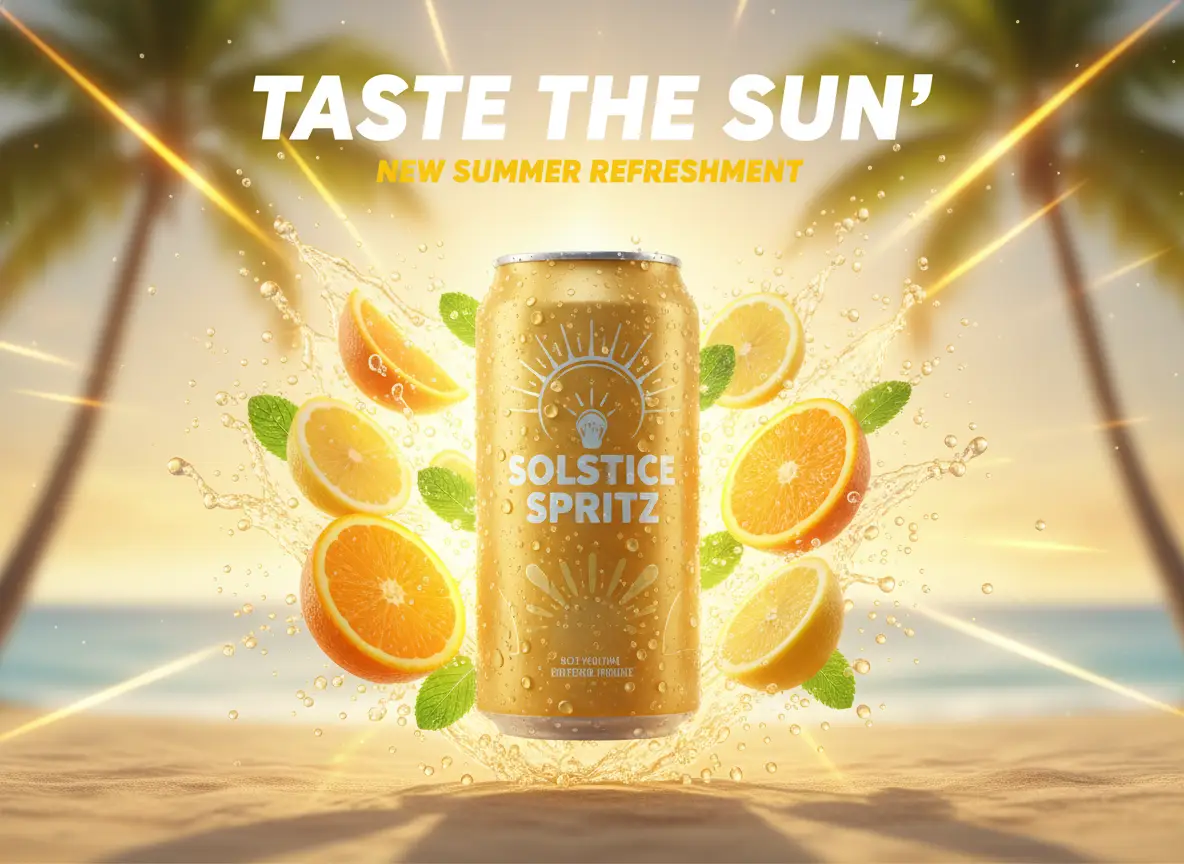
A quick social launch visual for a sparkling citrus beverage campaign with bold colors and product focus.

Fast Social Launch Visual

Proven industry-standard Prompt best-practice workflow for optimized generation

[campaign subject] + [hero composition] + [headline mood] + [platform usage] + [color / lighting]

Explore Full prompt Documentation and Official Technical SpecificationsShow Full Comprehensive Breakdown

In-depth prompt Breakdown and Complete Overview

Build a quick social media launch visual for a sparkling citrus beverage. Highlight one cold can covered in condensation, a bright splash of citrus slices, a clean centered layout, and space for a short headline at the top. Use warm summer sunlight, bold yellow and orange accent colors, and a visual style that feels made for an Instagram announcement draft.

Core Functional Elements That Allow This Prompt To Produce Standout, High-quality Final Outputs

This concise, social-media-focused prompt is short, direct, and easy to iterate on, which lines up perfectly with Nano Banana Flash’s core speed benefit.

Targeted Final Generated Project Outcome

A fast social-first campaign draft that can be reviewed or iterated on rapidly.

Curated Pro Tips for Creative Industry Professionals

  • Note the target platform or placement to make sure the crop feels intentional and well-suited.
  • Keep your headline instructions simple if text isn’t the main focus of your visual.
When to Choose Nano Banana Flash

Choose Nano Banana Flash When Rapid Iteration Matters More Than Maximum Polishing

Nano Banana Flash is the ideal choice when you want to rapidly move through creative ideas, fast edits, or short visual iteration cycles without turning every request into a resource-heavy production render.

Pick Nano Banana Flash When Your Project Needs Speed & Multiple Rapid Cycles

Choose Nano Banana Flash when your project needs speed and multiple rapid iteration cycles. Use it for draft-focused workflows, fast edits, storyboards, and marketing concepting where the main value comes from rapid creative iteration and broad visual coverage.

Opt for a Different Model When Polished Fidelity, Grounding, or Open Deployment Are Higher Priorities

Swap to a different model when polished fidelity, web grounding, or open-source deployment are more important. Pick Nano Banana Pro for more polished, structured final outputs, Nano Banana 2 when optional web grounding is essential, and Z-Image when open model weights or local deployment are part of your project needs.

Community Insights

Content Creator Video Guides & Independent Reviews of Nano Banana Flash

These videos share independent creator perspectives on the fast Nano Banana workflow and how it’s used for rapid cloud-native image creation and editing projects.

Curated Gallery of AI Video Generation Showcase Pieces

FAQs

FAQ

Helpful information about HappyHorse 2

What is Nano Banana Flash?

Nano Banana Flash is the speedy, cloud-hosted image model within Google’s model catalog, built for quick generation and editing when speed, rapid iteration, and responsive natural language adjustments matter more than ultra-polished final outputs.

What is Nano Banana Flash best for?

Nano Banana Flash shines at quick ad drafts, fast room refreshes, multi-image collages, storyboard panels, and image promptu product or social media edits when you want multiple iteration cycles without waiting for a more resource-intensive model to complete its render.

Does Nano Banana Flash support image input here?

100%. On this platform, Nano Banana Flash supports up to 10 reference images, perfect for quick mood boards, style-blending requests, and streamlined editing workflows that use multiple source inputs.

Which aspect ratios does Nano Banana Flash support here?

Nano Banana Flash is compatible with 1:1, 9:16, 16:9, 3:4, 4:3, 3:2, 2:3, plus auto mode right on this page. No dedicated resolution toggle is available for this model through this interface.

How do I write better Nano Banana Flash prompts?

Craft clear, straightforward prompts for the best results. Clearly note which elements should stay consistent, which need adjusting, and the intended purpose of your final asset. Nano Banana Flash performs its best when your prompt is specific, easy to iterate on, and free of overcrowded style keyword clutter.

When should I use Nano Banana Flash instead of Nano Banana Pro or Nano Banana 2?

Select Nano Banana Flash if rapid iteration and a streamlined, low-effort cloud workflow are your top priorities. Go with Nano Banana Pro when polished fidelity and crisp structural detail are your highest priorities. Choose Nano Banana 2 when web grounding access and real-time, up-to-date data pipelines are critical for your project.

Is Nano Banana Flash good for editing existing images?

Without a doubt. It excels at quick edit passes, room or product refreshes, layout adjustments, and multi-image blends when your main goal is rapidly exploring creative options.

Can I use Nano Banana Flash images commercially?

For commercial production projects, treat outputs from Nano Banana Flash the same way you would results from any other cloud-hosted image model. Commercial usability hinges on your specific use case, internal review policies, and the platform’s official terms of service.

Still have questions? Our support team is ready to help.

Related Image Models

Compare Nano Banana Flash to Other Image Models Right Now

If Nano Banana Flash isn’t the right fit for your project, compare it to these other model pages to access more polished outputs, better web grounding support, or a different prompt and deployment tradeoff.

Nano Banana Pro Image Generator

Choose Nano Banana Pro for projects that need a more polished final output and stronger structural integrity before the asset leaves the generator tool.

Discover Our Curated Collection of Associated AI Models

Nano Banana 2 Image Generator

Compare your needs to Nano Banana 2 if optional web grounding and real-time, current data pipelines matter more than raw speed.

Discover Our Curated Collection of Associated AI Models

Flux 2 Image Generator

Try Flux 2 if you want a unique visual aesthetic and an alternative cloud-native workflow for prompt-driven image generation.

Discover Our Curated Collection of Associated AI Models

GPT-4o Image Generator

Compare your project to GPT-4o when readable text and layout-focused cloud editing are your top priorities.

Discover Our Curated Collection of Associated AI Models

Try Nano Banana Flash Today

Open the generator tool, start with a clear, targeted prompt, and iterate quickly through fast edits, style blends, and marketing campaign drafts.

Launch Nano Banana Flash Generator
Resources
  • Create
  • Pricing
  • Image to Prompt
  • Batch Image to Prompt
Company & Legal
  • About
  • Contact
  • Privacy Policy
  • Terms of Service
  • Refund Policy
AI Image
  • Nano Banana Pro
  • Nano Banana 2
  • GPT-4o
  • Seedream 4.5
  • Seedream 4.0
  • Flux 2 Pro
  • Flux 2
  • Qwen Image 2
  • Z-Image
  • NanoBanana Flash
  • Qwen Image 3
HappyHorse 2

HappyHorse 2 – AI Video Generator Free with New User Credits

[email protected]

This website is an independent third-party service built around HappyHorse 2 workflows. We are not the official website for HappyHorse 2, and all product names, model names, and trademarks belong to their respective owners.

© 2026 HappyHorse 2. All rights reserved.

Privacy Policy